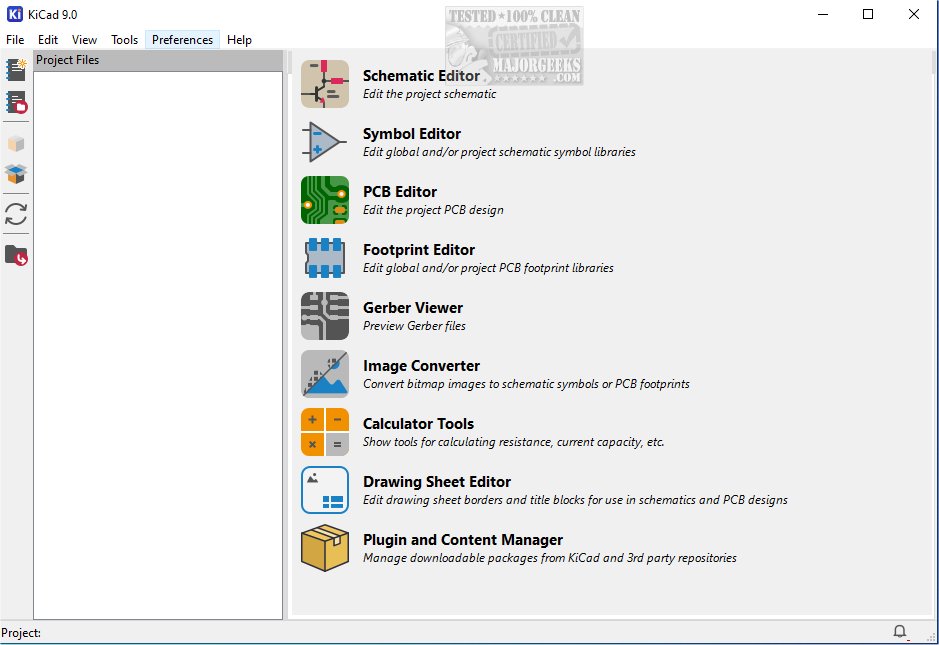
KiCad 10.0.6 has been released, marking an important update for this cross-platform, open-source suite tailored for electronics design automation. KiCad excels in managing both schematic capture and printed circuit board (PCB) layout, making it a versatile tool for various electronic design needs. It can output files like Gerber and IPC-2581, enabling a comprehensive workflow from initial concept to production.
What is KiCad?
KiCad is an integrated software suite that allows users to create and edit electrical schematics, which illustrate the connections and components in an electronic circuit. These schematics are crucial for both understanding the circuit's functionality and planning the layout for electronic projects. KiCad provides a robust set of tools for physically laying out PCBs, allowing users to place components—such as resistors, capacitors, and integrated circuits—on a virtual board. The software boasts advanced routing capabilities, enabling users to connect components with traces that mirror real-world electrical pathways.
Features and Utilities
The layout tools in KiCad are designed for flexibility, allowing adjustments for parameters like trace width and clearances, which are vital for the electrical performance and manufacturability of PCBs. Once a design is complete, KiCad can generate essential manufacturing files, including Gerber files and a Bill of Materials (BOM), to facilitate the production process.
Moreover, KiCad is enriched with utilities that enhance the circuit design experience. Key features include a PCB calculator for important design parameters, a built-in Gerber viewer for checking manufacturing files, and an integrated SPICE simulator for performing detailed circuit analysis. These utilities ensure designs are reliable and meet fabrication requirements before physical prototyping.
User Experience and Accessibility
KiCad's intuitive interface and extensive feature set make it a valuable resource for both hobbyists and professionals in the electronics field. The software's powerful capabilities allow for creativity and innovation in PCB design and electronic circuit development. Additionally, users can access a portable version available on MajorGeeks, further enhancing accessibility.
Conclusion
In summary, KiCad stands out as a powerful platform that caters to the diverse needs of users in the electronics design community. Its robust features, user-friendly interface, and comprehensive documentation make it a preferred choice for anyone involved in PCB design and electronic circuit development. For new users, it is recommended to explore the provided documentation to maximize the benefits of this versatile tool.
As KiCad continues to evolve with updates like version 10.0.6, users can expect ongoing improvements and features that will further streamline their design processes and enhance their overall experience in electronics design automation
What is KiCad?
KiCad is an integrated software suite that allows users to create and edit electrical schematics, which illustrate the connections and components in an electronic circuit. These schematics are crucial for both understanding the circuit's functionality and planning the layout for electronic projects. KiCad provides a robust set of tools for physically laying out PCBs, allowing users to place components—such as resistors, capacitors, and integrated circuits—on a virtual board. The software boasts advanced routing capabilities, enabling users to connect components with traces that mirror real-world electrical pathways.
Features and Utilities
The layout tools in KiCad are designed for flexibility, allowing adjustments for parameters like trace width and clearances, which are vital for the electrical performance and manufacturability of PCBs. Once a design is complete, KiCad can generate essential manufacturing files, including Gerber files and a Bill of Materials (BOM), to facilitate the production process.
Moreover, KiCad is enriched with utilities that enhance the circuit design experience. Key features include a PCB calculator for important design parameters, a built-in Gerber viewer for checking manufacturing files, and an integrated SPICE simulator for performing detailed circuit analysis. These utilities ensure designs are reliable and meet fabrication requirements before physical prototyping.
User Experience and Accessibility
KiCad's intuitive interface and extensive feature set make it a valuable resource for both hobbyists and professionals in the electronics field. The software's powerful capabilities allow for creativity and innovation in PCB design and electronic circuit development. Additionally, users can access a portable version available on MajorGeeks, further enhancing accessibility.
Conclusion
In summary, KiCad stands out as a powerful platform that caters to the diverse needs of users in the electronics design community. Its robust features, user-friendly interface, and comprehensive documentation make it a preferred choice for anyone involved in PCB design and electronic circuit development. For new users, it is recommended to explore the provided documentation to maximize the benefits of this versatile tool.
As KiCad continues to evolve with updates like version 10.0.6, users can expect ongoing improvements and features that will further streamline their design processes and enhance their overall experience in electronics design automation
KiCad 10.0.6 released
KiCad: A cross-platform, Open Source suite for electronics design automation that effectively manages schematic capture and PCB (printed circuit board) layout. MajorGeeks also has the portable version.