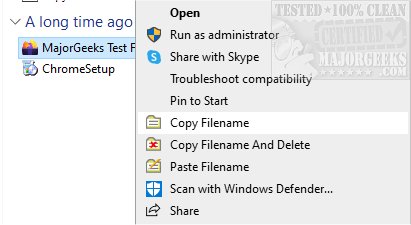
CopyFilenames is a powerful utility designed to streamline the process of copying file names and deleting files directly from the right-click context menu in Windows File Explorer. The latest version, 4.6, introduces several features aimed at saving time and reducing errors when managing files.
With CopyFilenames, users can seamlessly add various commands to the context menu, allowing for quick access to file names. This tool is particularly useful for individuals who need to reference files within documents or applications, as it simplifies the process of copying file paths. By holding the SHIFT key while selecting the Copy Filenames command, users can copy the full path of a file, which can then be easily pasted into any application that requires a file path. Additionally, users can include file size and last-modified date by holding down the CTRL key while selecting the command, which opens an options panel.
This utility is especially beneficial for developers, technical authors, and systems administrators, as it facilitates the addition of new files to databases or the updating of existing files, ensuring smooth downloads without issues.
Key Features of CopyFilenames:
- Copy one or multiple file or folder names as text to the clipboard.
- Options to include file size and date/time.
- Ability to copy full paths and customize path formatting (e.g., double backslashes or forward slashes).
- Options to quote filenames and separate multiple entries with newline, space, tab, or comma.
- A command to rename files using text from the clipboard (Paste Filename).
- A feature that allows users to copy and delete a file in one operation.
In addition to its core functionalities, CopyFilenames complements Windows' clipboard capabilities, providing users with advanced options for managing file paths and names efficiently.
Related Topics:
- Enabling or Disabling Clipboard History in Windows 10 & 11
- Copying the Path of a File or Folder to the Clipboard
- Clearing Clipboard History with Shortcuts
- Disabling Clipboard History in Windows 10 & 11
Overall, CopyFilenames 4.6 is a must-have tool for anyone looking to enhance their file management experience in Windows. With its intuitive features and context menu integration, it stands out as a reliable solution for effective file handling
With CopyFilenames, users can seamlessly add various commands to the context menu, allowing for quick access to file names. This tool is particularly useful for individuals who need to reference files within documents or applications, as it simplifies the process of copying file paths. By holding the SHIFT key while selecting the Copy Filenames command, users can copy the full path of a file, which can then be easily pasted into any application that requires a file path. Additionally, users can include file size and last-modified date by holding down the CTRL key while selecting the command, which opens an options panel.
This utility is especially beneficial for developers, technical authors, and systems administrators, as it facilitates the addition of new files to databases or the updating of existing files, ensuring smooth downloads without issues.
Key Features of CopyFilenames:
- Copy one or multiple file or folder names as text to the clipboard.
- Options to include file size and date/time.
- Ability to copy full paths and customize path formatting (e.g., double backslashes or forward slashes).
- Options to quote filenames and separate multiple entries with newline, space, tab, or comma.
- A command to rename files using text from the clipboard (Paste Filename).
- A feature that allows users to copy and delete a file in one operation.
In addition to its core functionalities, CopyFilenames complements Windows' clipboard capabilities, providing users with advanced options for managing file paths and names efficiently.
Related Topics:
- Enabling or Disabling Clipboard History in Windows 10 & 11
- Copying the Path of a File or Folder to the Clipboard
- Clearing Clipboard History with Shortcuts
- Disabling Clipboard History in Windows 10 & 11
Overall, CopyFilenames 4.6 is a must-have tool for anyone looking to enhance their file management experience in Windows. With its intuitive features and context menu integration, it stands out as a reliable solution for effective file handling
CopyFilenames 4.6 released
CopyFilenames allows efficient file name copying and deleting directly from the right-click context menu.