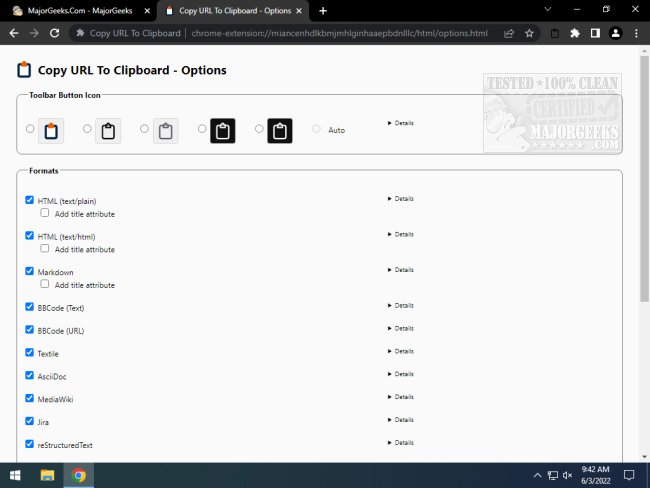
The Copy URL To Clipboard extension for Chrome and Firefox version 15.1.4 has been released, offering users enhanced functionality for copying and editing URLs. This versatile tool allows you to copy URLs from documents or links in various formats, including HTML, Markdown, BBCode, Textile, AsciiDoc, MediaWiki, Jira, reStructuredText, LaTeX, Org Mode, and plain text. Users can easily execute the copy operation from any open tab using the right-click context menu, a dedicated tool button, or keyboard shortcuts.
When you right-click on a webpage, you can select the desired format for the copied URL. If any text is highlighted prior to right-clicking, this text will be used as the link's content. This feature makes it simple for users to gather and edit URLs from their current browsing sessions and paste them into other applications as needed.
Furthermore, this extension is particularly useful for professionals who frequently work with different markup languages, making it easier to format links appropriately for documentation, web development, or content creation.
To enhance its utility, users may also explore additional related guides, such as how to customize context menus in Windows 10 and 11, which could complement their experience with the Copy URL To Clipboard extension. Overall, this tool streamlines the process of managing URLs, saving time and effort for users
When you right-click on a webpage, you can select the desired format for the copied URL. If any text is highlighted prior to right-clicking, this text will be used as the link's content. This feature makes it simple for users to gather and edit URLs from their current browsing sessions and paste them into other applications as needed.
Furthermore, this extension is particularly useful for professionals who frequently work with different markup languages, making it easier to format links appropriately for documentation, web development, or content creation.
To enhance its utility, users may also explore additional related guides, such as how to customize context menus in Windows 10 and 11, which could complement their experience with the Copy URL To Clipboard extension. Overall, this tool streamlines the process of managing URLs, saving time and effort for users
Copy URL To Clipboard for Chrome and Firefox 15.1.4 released
Copy URL To Clipboard for Chrome and Firefox allows you to copy and edit URLs.
Copy URL To Clipboard for Chrome and Firefox 15.1.4 released @ MajorGeeks