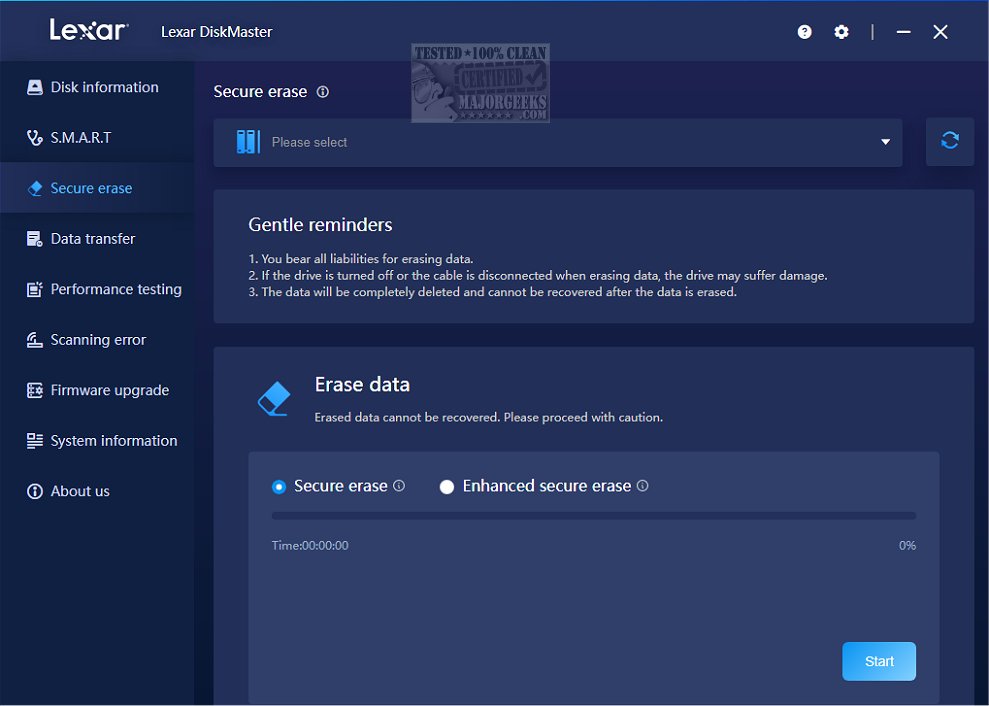
Lexar has launched the latest version of its advanced disk management tool, Lexar DiskMaster 2.0.0, aimed at optimizing the performance and ensuring the integrity of storage drives. This software is specifically designed to monitor and enhance the health of Lexar storage devices, including solid-state drives (SSDs) and USB flash drives, primarily for Windows users.
Key Features and Functionality
1. User-Friendly and Feature-Rich: Lexar DiskMaster boasts an intuitive interface that caters to both novice and experienced users. It includes essential features such as disk cleanup, defragmentation, and health monitoring, enabling effective disk space management and improved system speed.
2. Drive Health Check: A standout feature of Lexar DiskMaster is its ability to conduct comprehensive drive health checks. This functionality offers detailed diagnostics to identify any potential issues that could impact performance or data integrity.
3. Performance Optimization: The software includes a suite of optimization tools designed to enhance the speed and efficiency of storage devices. These processes help to ensure that drives operate at their best, ultimately extending their lifespan and boosting overall system performance.
4. Data Security: With robust security measures, Lexar DiskMaster helps protect users’ valuable data from various threats. This aspect is crucial for ensuring that information remains safe and confidential.
A Comprehensive Management Solution
Lexar DiskMaster serves as an all-in-one solution for managing Lexar drives on Windows systems. It encompasses essential tools for monitoring, optimizing, and securing data to guarantee the optimal functionality and durability of storage devices. Users can leverage the power of Lexar DiskMaster to maintain their drives’ health, maximize performance, enhance data security, and prolong device lifespan.
Future Prospects and Extended Use Cases
Looking ahead, the capabilities of Lexar DiskMaster could be expanded to support additional features such as cloud integration for backup solutions, cross-platform compatibility for Mac users, and enhanced data recovery options. As the demand for robust disk management tools continues to grow, Lexar DiskMaster could evolve into an even more indispensable tool for IT professionals and everyday users alike.
In conclusion, Lexar DiskMaster 2.0.0 stands out as a vital resource for anyone looking to optimize their storage management. With its comprehensive feature set, it not only helps in maintaining the health of devices but also plays a crucial role in safeguarding data against potential threats.
Related Topics for Further Reading:
- Everything You Need to Know About SSD TRIM
- How to Check If Your Hard Drive Is SSD or HDD
- How to Restore Your SSD Performance by Secure Erasing It
- How to Enable or Disable TRIM Support for SSDs
- How to Check Your Hard Disk Health Using WMI
Key Features and Functionality
1. User-Friendly and Feature-Rich: Lexar DiskMaster boasts an intuitive interface that caters to both novice and experienced users. It includes essential features such as disk cleanup, defragmentation, and health monitoring, enabling effective disk space management and improved system speed.
2. Drive Health Check: A standout feature of Lexar DiskMaster is its ability to conduct comprehensive drive health checks. This functionality offers detailed diagnostics to identify any potential issues that could impact performance or data integrity.
3. Performance Optimization: The software includes a suite of optimization tools designed to enhance the speed and efficiency of storage devices. These processes help to ensure that drives operate at their best, ultimately extending their lifespan and boosting overall system performance.
4. Data Security: With robust security measures, Lexar DiskMaster helps protect users’ valuable data from various threats. This aspect is crucial for ensuring that information remains safe and confidential.
A Comprehensive Management Solution
Lexar DiskMaster serves as an all-in-one solution for managing Lexar drives on Windows systems. It encompasses essential tools for monitoring, optimizing, and securing data to guarantee the optimal functionality and durability of storage devices. Users can leverage the power of Lexar DiskMaster to maintain their drives’ health, maximize performance, enhance data security, and prolong device lifespan.
Future Prospects and Extended Use Cases
Looking ahead, the capabilities of Lexar DiskMaster could be expanded to support additional features such as cloud integration for backup solutions, cross-platform compatibility for Mac users, and enhanced data recovery options. As the demand for robust disk management tools continues to grow, Lexar DiskMaster could evolve into an even more indispensable tool for IT professionals and everyday users alike.
In conclusion, Lexar DiskMaster 2.0.0 stands out as a vital resource for anyone looking to optimize their storage management. With its comprehensive feature set, it not only helps in maintaining the health of devices but also plays a crucial role in safeguarding data against potential threats.
Related Topics for Further Reading:
- Everything You Need to Know About SSD TRIM
- How to Check If Your Hard Drive Is SSD or HDD
- How to Restore Your SSD Performance by Secure Erasing It
- How to Enable or Disable TRIM Support for SSDs
- How to Check Your Hard Disk Health Using WMI
Lexar DiskMaster 2.0.0 released
Lexar DiskMaster is an advanced disk management tool designed to help users optimize performance and protect the integrity of their storage drives.