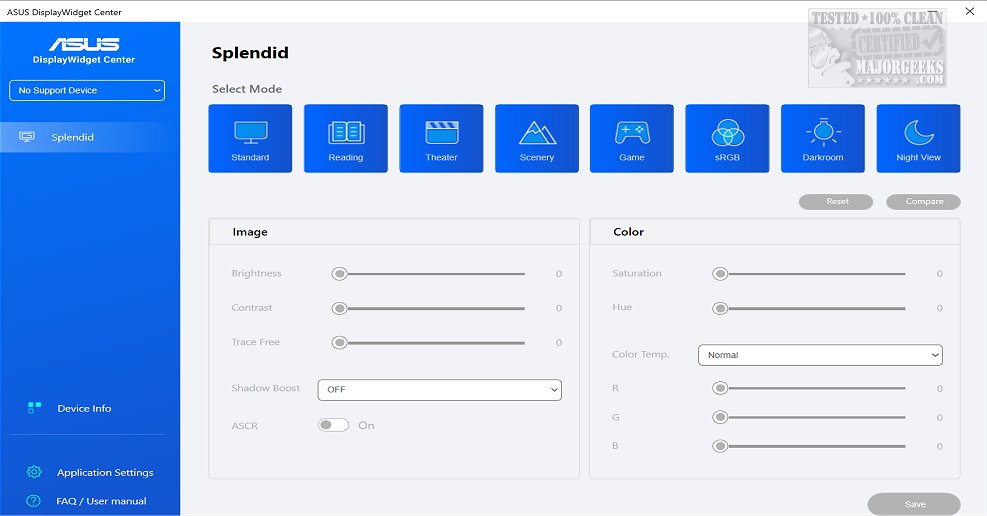
ASUS has released version 1.5.3.4 of the DisplayWidget Center, a dedicated monitor management application designed specifically for ASUS monitors. This software provides users with a comprehensive suite of tools to optimize and personalize their display settings, including adjustments for brightness, contrast, and color temperature. Such features are particularly advantageous for designers, gamers, and anyone who spends long hours in front of their monitors, as the user-friendly interface simplifies the adjustment process.
One of the standout features of the DisplayWidget Center is MultiScreen, which allows users to create customizable window layouts that enhance productivity by facilitating seamless connectivity and system control. The MultiFrame functionality further supports this by offering various templates to maximize screen usage, ensuring users can work efficiently.
Additionally, the software supports Picture-in-Picture (PIP) and Picture-by-Picture (PBP) modes, enabling users to view multiple input sources simultaneously and customize window arrangements according to their workflow needs. The KVM (Keyboard, Video, Mouse) feature enhances productivity by allowing control of two systems with a single monitor, keyboard, and mouse, although users should confirm their monitor's KVM compatibility before use.
To further enrich the user experience, the DisplayWidget Center includes an App Tweaker, which allows for customization of browser settings for cinema and gaming modes. Another notable feature is OLED Care, designed to protect OLED monitors by providing pixel cleaning processes, maintaining brightness uniformity, and offering reminders to prevent burn-in issues.
In summary, ASUS DisplayWidget Center version 1.5.3.4 empowers users with an array of features to tailor their display settings for an optimized viewing experience. With the ability to adjust settings effortlessly and utilize advanced features for multitasking and productivity, this application stands out as a vital tool for ASUS monitor users.
Looking ahead, future updates could potentially introduce even more advanced functionalities, such as AI-driven optimization settings that automatically adjust display parameters based on user behavior or integrated calibration tools for color accuracy. Moreover, expanding compatibility to include more monitor brands could broaden its user base and versatility, making it an indispensable tool for all computer users
One of the standout features of the DisplayWidget Center is MultiScreen, which allows users to create customizable window layouts that enhance productivity by facilitating seamless connectivity and system control. The MultiFrame functionality further supports this by offering various templates to maximize screen usage, ensuring users can work efficiently.
Additionally, the software supports Picture-in-Picture (PIP) and Picture-by-Picture (PBP) modes, enabling users to view multiple input sources simultaneously and customize window arrangements according to their workflow needs. The KVM (Keyboard, Video, Mouse) feature enhances productivity by allowing control of two systems with a single monitor, keyboard, and mouse, although users should confirm their monitor's KVM compatibility before use.
To further enrich the user experience, the DisplayWidget Center includes an App Tweaker, which allows for customization of browser settings for cinema and gaming modes. Another notable feature is OLED Care, designed to protect OLED monitors by providing pixel cleaning processes, maintaining brightness uniformity, and offering reminders to prevent burn-in issues.
In summary, ASUS DisplayWidget Center version 1.5.3.4 empowers users with an array of features to tailor their display settings for an optimized viewing experience. With the ability to adjust settings effortlessly and utilize advanced features for multitasking and productivity, this application stands out as a vital tool for ASUS monitor users.
Looking ahead, future updates could potentially introduce even more advanced functionalities, such as AI-driven optimization settings that automatically adjust display parameters based on user behavior or integrated calibration tools for color accuracy. Moreover, expanding compatibility to include more monitor brands could broaden its user base and versatility, making it an indispensable tool for all computer users
ASUS DisplayWidget Center 1.5.3.4 released
ASUS DisplayWidget Center offers a comprehensive monitor management solution that allows you to optimize, personalize, and fully utilize your display to suit your needs and preferences.