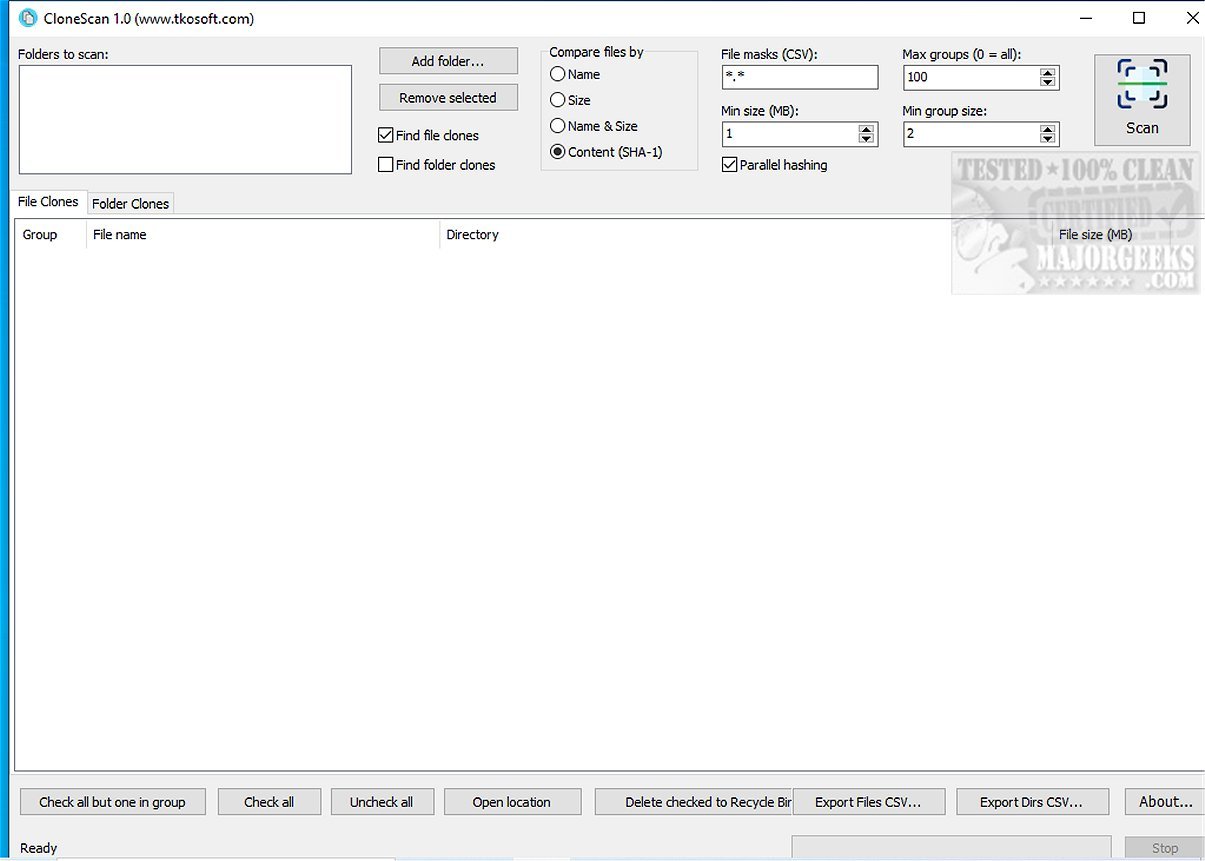
CloneScan is a free, user-friendly tool designed for Windows users to efficiently identify, evaluate, and securely remove duplicate files and folders from their computers. This utility is essential for maintaining an organized digital space, as it scans systems for duplicate content that can consume storage and create unnecessary clutter.
- User-Friendly Interface: The intuitive design allows users to effortlessly review detected duplicates, making it easy to decide which files and folders to keep or delete.
- Comprehensive Scanning: CloneScan not only finds duplicate files but also detects duplicate folders by analyzing their contents and generating signatures for each directory based on its files and subfolders. This feature is particularly helpful for identifying duplicated project folders, backups, and unnecessary archives.
- Fast and Efficient: During testing, CloneScan demonstrated quick scanning capabilities even with extensive criteria, providing organized results for easy review and removal.
- Customizable Scanning Options: Users can tailor their scans using file masks to target specific file types, allowing for more focused searches. Multiple masks can be applied, enhancing the scanning experience.
- Safe Deletion Process: Instead of permanently deleting files and folders, CloneScan moves them to the Windows Recycle Bin, ensuring users have the option to restore any mistakenly deleted items.
- Export Functionality: The software allows users to export scan results to CSV files for further analysis or reporting, making it a valuable tool for both personal and commercial use.
By utilizing CloneScan, users can significantly improve their system's storage efficiency and overall performance. The tool not only helps declutter digital environments but also enhances productivity by eliminating distractions caused by redundant files.
CloneScan 2.0 is an indispensable ally for anyone looking to streamline their digital workspace. Its powerful features, combined with a straightforward interface, make it easy to locate, assess, and safely remove duplicate files and folders. Best of all, it’s free, which means users can reclaim valuable storage space without incurring any costs. With CloneScan, it's time to bid farewell to file chaos and embrace a well-organized digital system.
For users seeking additional methods to manage storage and optimize their systems, consider exploring:
- How to Use Storage Sense for Automatic Junk File Deletion in Windows 10/11
- Strategies for Running Disk Cleanup Automatically with All Items Checked
- A Comparison of Drive Cleaners: CCleaner vs. Wise Disk Cleaner vs. PrivaZer
- Tips on Managing Libraries in Windows 10 & 11: Showing, Hiding, Adding, or Removing Folders.
With the right tools and practices, users can maintain a clean and efficient digital workspace
Key Features of CloneScan 2.0
- User-Friendly Interface: The intuitive design allows users to effortlessly review detected duplicates, making it easy to decide which files and folders to keep or delete.
- Comprehensive Scanning: CloneScan not only finds duplicate files but also detects duplicate folders by analyzing their contents and generating signatures for each directory based on its files and subfolders. This feature is particularly helpful for identifying duplicated project folders, backups, and unnecessary archives.
- Fast and Efficient: During testing, CloneScan demonstrated quick scanning capabilities even with extensive criteria, providing organized results for easy review and removal.
- Customizable Scanning Options: Users can tailor their scans using file masks to target specific file types, allowing for more focused searches. Multiple masks can be applied, enhancing the scanning experience.
- Safe Deletion Process: Instead of permanently deleting files and folders, CloneScan moves them to the Windows Recycle Bin, ensuring users have the option to restore any mistakenly deleted items.
- Export Functionality: The software allows users to export scan results to CSV files for further analysis or reporting, making it a valuable tool for both personal and commercial use.
The Benefits of Using CloneScan
By utilizing CloneScan, users can significantly improve their system's storage efficiency and overall performance. The tool not only helps declutter digital environments but also enhances productivity by eliminating distractions caused by redundant files.
Conclusion
CloneScan 2.0 is an indispensable ally for anyone looking to streamline their digital workspace. Its powerful features, combined with a straightforward interface, make it easy to locate, assess, and safely remove duplicate files and folders. Best of all, it’s free, which means users can reclaim valuable storage space without incurring any costs. With CloneScan, it's time to bid farewell to file chaos and embrace a well-organized digital system.
Related Tools and Tips
For users seeking additional methods to manage storage and optimize their systems, consider exploring:
- How to Use Storage Sense for Automatic Junk File Deletion in Windows 10/11
- Strategies for Running Disk Cleanup Automatically with All Items Checked
- A Comparison of Drive Cleaners: CCleaner vs. Wise Disk Cleaner vs. PrivaZer
- Tips on Managing Libraries in Windows 10 & 11: Showing, Hiding, Adding, or Removing Folders.
With the right tools and practices, users can maintain a clean and efficient digital workspace
CloneScan 2.0 released
CloneScan is a user-friendly Windows tool that helps you identify, evaluate, and securely remove duplicate files and folders on your computer. This free utility simplifies organizing your digital space by scanning your system for duplicate content, which can waste storage and create clutter.