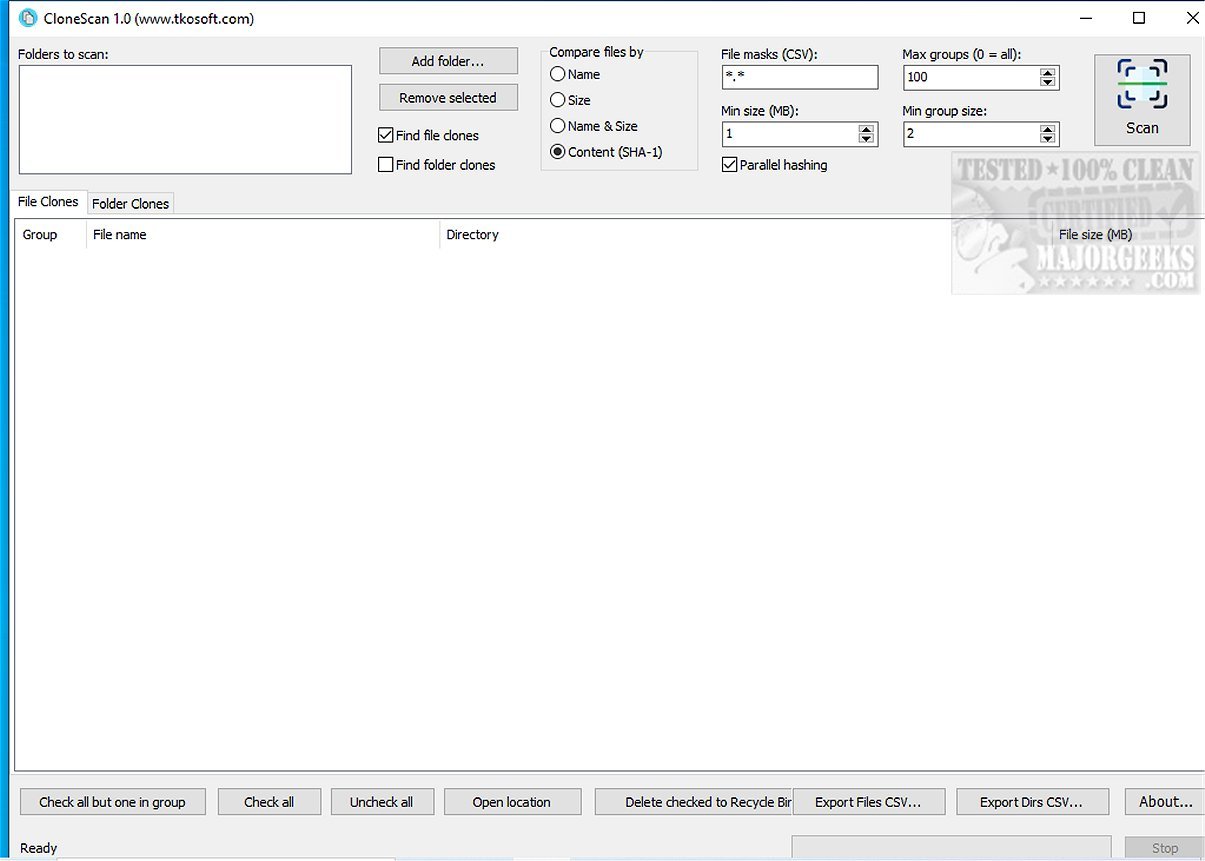
CloneScan is a new, user-friendly tool designed for Windows users to help identify, evaluate, and securely remove duplicate files and folders from their computers. This free utility addresses the common issue of duplicate content, which not only wastes storage space but also contributes to digital clutter. By efficiently scanning your system, CloneScan simplifies the organization of your digital files.
- Intuitive Interface: CloneScan offers a straightforward interface that allows users to easily review identified duplicates, making it simple to decide which files to keep or delete.
- Comprehensive Scanning: The tool can detect duplicate files based on various criteria, including names, sizes, or even SHA-1 content hashes. Additionally, it can identify duplicate folders and copied directory structures.
- Targeted Scans: Users can customize their scanning process with file mask filtering, which allows for focused searches based on specific file types or patterns.
- Efficient Performance: Utilizing parallel SHA-1 hashing, CloneScan ensures faster scanning without compromising accuracy. Results are organized and displayed in a way that highlights total wasted space due to duplicates.
- Safe Deletion: Rather than permanently deleting files, CloneScan moves them to the Windows Recycle Bin, allowing users to retrieve items if needed.
- Export Capabilities: Users can export scan results to CSV files for further analysis or record-keeping, applicable for both duplicate files and folders.
During testing, CloneScan demonstrated quick scanning capabilities and provided organized results that made it easy to manage duplicates. The easy-to-navigate interface added to the overall positive experience, making the decluttering process efficient.
CloneScan is an invaluable tool for anyone looking to declutter their digital space. This free, intuitive software not only helps reclaim storage space but also streamlines file organization, significantly enhancing system performance. With CloneScan, users can effectively tackle the chaos of duplicate files and folders, ensuring their digital environment is neat and efficient.
To further enhance CloneScan, future updates could consider the introduction of features such as:
- Cloud Storage Integration: Allow users to scan for duplicates across cloud storage services, ensuring a comprehensive cleanup of digital spaces.
- Scheduled Scans: Enable users to set up automatic scans at regular intervals, helping maintain a clutter-free system continuously.
- Advanced Reporting: Develop more in-depth reporting tools that provide insights into storage usage trends and suggest optimization strategies.
- Multi-Platform Support: Explore the possibility of a version for macOS or Linux users, expanding the utility's reach.
With its current capabilities and potential for future enhancements, CloneScan is well-positioned to become a go-to solution for digital organization
Key Features of CloneScan
- Intuitive Interface: CloneScan offers a straightforward interface that allows users to easily review identified duplicates, making it simple to decide which files to keep or delete.
- Comprehensive Scanning: The tool can detect duplicate files based on various criteria, including names, sizes, or even SHA-1 content hashes. Additionally, it can identify duplicate folders and copied directory structures.
- Targeted Scans: Users can customize their scanning process with file mask filtering, which allows for focused searches based on specific file types or patterns.
- Efficient Performance: Utilizing parallel SHA-1 hashing, CloneScan ensures faster scanning without compromising accuracy. Results are organized and displayed in a way that highlights total wasted space due to duplicates.
- Safe Deletion: Rather than permanently deleting files, CloneScan moves them to the Windows Recycle Bin, allowing users to retrieve items if needed.
- Export Capabilities: Users can export scan results to CSV files for further analysis or record-keeping, applicable for both duplicate files and folders.
User Experience
During testing, CloneScan demonstrated quick scanning capabilities and provided organized results that made it easy to manage duplicates. The easy-to-navigate interface added to the overall positive experience, making the decluttering process efficient.
Conclusion
CloneScan is an invaluable tool for anyone looking to declutter their digital space. This free, intuitive software not only helps reclaim storage space but also streamlines file organization, significantly enhancing system performance. With CloneScan, users can effectively tackle the chaos of duplicate files and folders, ensuring their digital environment is neat and efficient.
Extending the Functionality
To further enhance CloneScan, future updates could consider the introduction of features such as:
- Cloud Storage Integration: Allow users to scan for duplicates across cloud storage services, ensuring a comprehensive cleanup of digital spaces.
- Scheduled Scans: Enable users to set up automatic scans at regular intervals, helping maintain a clutter-free system continuously.
- Advanced Reporting: Develop more in-depth reporting tools that provide insights into storage usage trends and suggest optimization strategies.
- Multi-Platform Support: Explore the possibility of a version for macOS or Linux users, expanding the utility's reach.
With its current capabilities and potential for future enhancements, CloneScan is well-positioned to become a go-to solution for digital organization
CloneScan 1.0 released
CloneScan is a user-friendly Windows tool that helps you identify, evaluate, and securely remove duplicate files and folders on your computer. This free utility simplifies organizing your digital space by scanning your system for duplicate content, which can waste storage and create clutter.