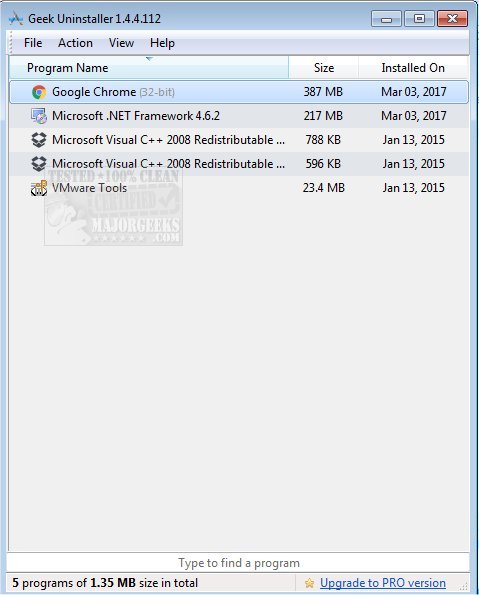
The latest version of Geek Uninstaller, 1.6.0.200, has been released, providing users with a powerful solution for uninstalling applications thoroughly while keeping their PCs in optimal condition. With its deep scanning capabilities, Geek Uninstaller not only removes programs but also eliminates leftover files and registry entries that can clutter your system. A video walkthrough is available to guide users through the process.
Why Geek Uninstaller Stands Out
Are you frustrated with applications that stubbornly refuse to be removed? Geek Uninstaller is designed to tackle this problem efficiently. Unlike the default Windows uninstaller, which often leaves behind residual data, Geek Uninstaller performs a comprehensive cleanup, ensuring that your system remains free of unnecessary clutter. Its portability, lightweight design, and no-cost model make it an appealing choice for users of all levels.
Key Features of Geek Uninstaller:
- Deep Clean Functionality: Beyond simply uninstalling programs, Geek Uninstaller conducts an extensive search for hidden files, folders, and leftover registry entries, keeping your system organized.
- Force Removal: This feature is crucial for stubborn applications that standard uninstallers cannot remove, ensuring complete deletion without leaving traces behind.
- Microsoft Store App Support: Geek Uninstaller simplifies the removal of Microsoft Store applications across Windows 8, 10, and 11, addressing a common limitation in native uninstallers.
- Portable and Fast: Users can download a small executable file that requires no installation, allowing it to be easily used on any Windows PC, regardless of whether it's a 32-bit or 64-bit system.
- Multilingual Support: With availability in over 40 languages, Geek Uninstaller caters to a diverse user base.
- Instant Search: The type-to-search feature helps users quickly locate applications, enhancing usability, especially for those with extensive software libraries.
- HTML Reports: Users can export a detailed HTML report of installed programs for personal records or to share with IT teams.
Who Benefits from Geek Uninstaller?
- Everyday Users: Maintain a smooth-running PC by removing unused applications and clearing out clutter.
- IT Professionals: A reliable tool for on-site troubleshooting, thanks to its portability and efficiency.
- Gamers and Performance Enthusiasts: Free up system resources by thoroughly uninstalling demanding software such as game launchers or mods.
Conclusion
Geek Uninstaller is a must-have utility for anyone seeking to optimize their system performance and keep their PCs clean. Its effectiveness, lightweight nature, and user-friendly interface make it suitable for a wide range of users, from novices to tech experts. Don't let stubborn applications slow you down—download Geek Uninstaller today for a free, portable solution that truly works.
Additional Resources:
For further assistance, consider exploring guides on how to uninstall programs effectively, including those not listed in the Control Panel, or how to manually remove program entries from the Apps & Features list in Windows
Why Geek Uninstaller Stands Out
Are you frustrated with applications that stubbornly refuse to be removed? Geek Uninstaller is designed to tackle this problem efficiently. Unlike the default Windows uninstaller, which often leaves behind residual data, Geek Uninstaller performs a comprehensive cleanup, ensuring that your system remains free of unnecessary clutter. Its portability, lightweight design, and no-cost model make it an appealing choice for users of all levels.
Key Features of Geek Uninstaller:
- Deep Clean Functionality: Beyond simply uninstalling programs, Geek Uninstaller conducts an extensive search for hidden files, folders, and leftover registry entries, keeping your system organized.
- Force Removal: This feature is crucial for stubborn applications that standard uninstallers cannot remove, ensuring complete deletion without leaving traces behind.
- Microsoft Store App Support: Geek Uninstaller simplifies the removal of Microsoft Store applications across Windows 8, 10, and 11, addressing a common limitation in native uninstallers.
- Portable and Fast: Users can download a small executable file that requires no installation, allowing it to be easily used on any Windows PC, regardless of whether it's a 32-bit or 64-bit system.
- Multilingual Support: With availability in over 40 languages, Geek Uninstaller caters to a diverse user base.
- Instant Search: The type-to-search feature helps users quickly locate applications, enhancing usability, especially for those with extensive software libraries.
- HTML Reports: Users can export a detailed HTML report of installed programs for personal records or to share with IT teams.
Who Benefits from Geek Uninstaller?
- Everyday Users: Maintain a smooth-running PC by removing unused applications and clearing out clutter.
- IT Professionals: A reliable tool for on-site troubleshooting, thanks to its portability and efficiency.
- Gamers and Performance Enthusiasts: Free up system resources by thoroughly uninstalling demanding software such as game launchers or mods.
Conclusion
Geek Uninstaller is a must-have utility for anyone seeking to optimize their system performance and keep their PCs clean. Its effectiveness, lightweight nature, and user-friendly interface make it suitable for a wide range of users, from novices to tech experts. Don't let stubborn applications slow you down—download Geek Uninstaller today for a free, portable solution that truly works.
Additional Resources:
For further assistance, consider exploring guides on how to uninstall programs effectively, including those not listed in the Control Panel, or how to manually remove program entries from the Apps & Features list in Windows
Geek Uninstaller 1.6.0.200 released
Geek Uninstaller performs deep and fast scanning after uninstall and removes all leftovers to keep your PC clean and in tip-top shape. Video walkthrough available.