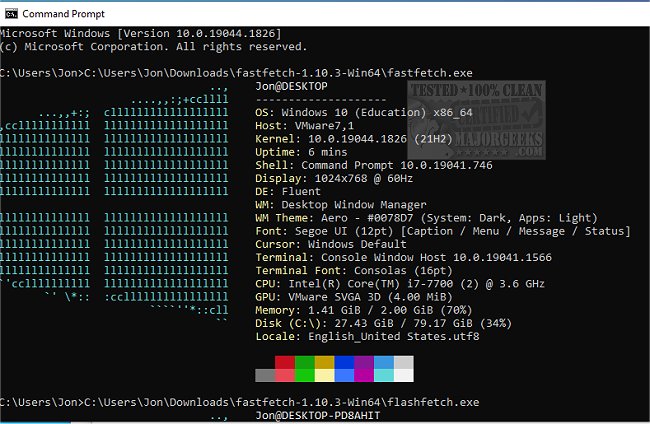
Fastfetch version 2.70.0 has been released, enhancing its functionality as an open-source, multi-platform application designed to quickly retrieve and visually present system information. Primarily developed in C, Fastfetch focuses on performance and customization, allowing users to tailor the output to their preferences.
The application features two executables: the main Fastfetch and a second version called Flashfetch. The latter is optimized at compile time to reduce overhead, and both executables can be configured using various flags, which can be made persistent by storing them in the $XDG_CONFIG_HOME/fastfetch/config.conf file. Users can access the list of available configuration options by running the command `fastfetch --help`.
Fastfetch continues to evolve, with regular updates introducing new features. It includes pre-made configuration files located in the presets directory, which users can load using the `--load-config` command. These presets also serve as useful examples for formatting arguments. Additionally, the application allows for extensive customization of logos, with detailed documentation available in the developer repository.
As computing needs grow, tools like Fastfetch are becoming increasingly valuable for users seeking efficient ways to identify and manage their system's hardware and software configurations. This makes Fastfetch a practical choice for both casual users and professionals who require detailed system insights.
In the future, users can expect ongoing enhancements, potentially including new features that will further improve performance on slower machines. As the demand for system information tools continues to rise, Fastfetch is positioned to remain a go-to resource in the open-source community
The application features two executables: the main Fastfetch and a second version called Flashfetch. The latter is optimized at compile time to reduce overhead, and both executables can be configured using various flags, which can be made persistent by storing them in the $XDG_CONFIG_HOME/fastfetch/config.conf file. Users can access the list of available configuration options by running the command `fastfetch --help`.
Fastfetch continues to evolve, with regular updates introducing new features. It includes pre-made configuration files located in the presets directory, which users can load using the `--load-config` command. These presets also serve as useful examples for formatting arguments. Additionally, the application allows for extensive customization of logos, with detailed documentation available in the developer repository.
As computing needs grow, tools like Fastfetch are becoming increasingly valuable for users seeking efficient ways to identify and manage their system's hardware and software configurations. This makes Fastfetch a practical choice for both casual users and professionals who require detailed system insights.
In the future, users can expect ongoing enhancements, potentially including new features that will further improve performance on slower machines. As the demand for system information tools continues to rise, Fastfetch is positioned to remain a go-to resource in the open-source community
Fastfetch 2.70.0 released
Fastfetch is an Open Source multi-platform app capable of quickly fetching and displaying system info.