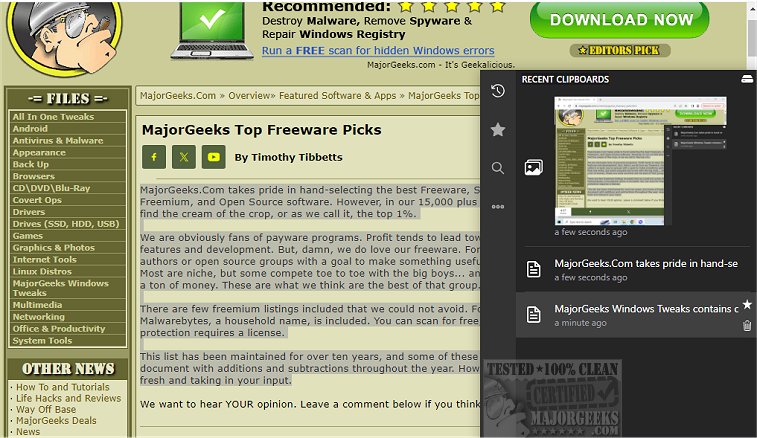
Clippy version 1.6.14 has been released, offering users a robust clipboard management solution that serves as an excellent alternative to the default Windows clipboard manager. Designed to meticulously track all copied text and images, Clippy enables users to effortlessly search and retrieve important information. The clipboard manager can be easily accessed via a simple hotkey, displaying itself near the system tray for quick convenience.
One of Clippy's standout features is its ability to record every copy event securely and locally, which ensures user privacy. Users can also mark significant entries as favorites or starred items for even quicker access. The application is highly customizable, allowing users to set their preferred hotkeys for accessing recent clipboard entries, starred items, and clipboard history. Additionally, Clippy supports backing up to cloud services and synchronizing clipboard history directly within the app.
In summary, Clippy is a user-friendly and feature-rich clipboard management tool that significantly enhances the clipboard experience for those who need efficient organization and access to their copied content.
Key Features of Clippy:
- Toggle display with ctrl+y or ctrl+d (configurable in settings)
- Type from clipboard using ctrl+b (even in restricted paste areas)
- Support for both text and images
- Customizable keybindings for all functions
- Ability to mark favorite clipboard entries
- Smart search functionality for links, colors, images, and hex codes
- Instant search capabilities
- Options to change database location and keyboard bindings
- Dark mode and light mode options
Similar topics include methods to copy file paths to the clipboard, clear clipboard history with shortcuts, and disable clipboard history in Windows 10 and 11.
As Clippy continues to evolve, future updates may include even more features, further enhancing its functionality and user experience, such as advanced organization tools, integration with other applications, or collaborative clipboard sharing features. This ongoing development reflects a commitment to meeting user needs and keeping up with technological advancements in clipboard management
One of Clippy's standout features is its ability to record every copy event securely and locally, which ensures user privacy. Users can also mark significant entries as favorites or starred items for even quicker access. The application is highly customizable, allowing users to set their preferred hotkeys for accessing recent clipboard entries, starred items, and clipboard history. Additionally, Clippy supports backing up to cloud services and synchronizing clipboard history directly within the app.
In summary, Clippy is a user-friendly and feature-rich clipboard management tool that significantly enhances the clipboard experience for those who need efficient organization and access to their copied content.
Key Features of Clippy:
- Toggle display with ctrl+y or ctrl+d (configurable in settings)
- Type from clipboard using ctrl+b (even in restricted paste areas)
- Support for both text and images
- Customizable keybindings for all functions
- Ability to mark favorite clipboard entries
- Smart search functionality for links, colors, images, and hex codes
- Instant search capabilities
- Options to change database location and keyboard bindings
- Dark mode and light mode options
Similar topics include methods to copy file paths to the clipboard, clear clipboard history with shortcuts, and disable clipboard history in Windows 10 and 11.
As Clippy continues to evolve, future updates may include even more features, further enhancing its functionality and user experience, such as advanced organization tools, integration with other applications, or collaborative clipboard sharing features. This ongoing development reflects a commitment to meeting user needs and keeping up with technological advancements in clipboard management
clippy 1.6.14 released
clippy provides a dedicated clipboard manager, a solid alternative to the default Windows manager.