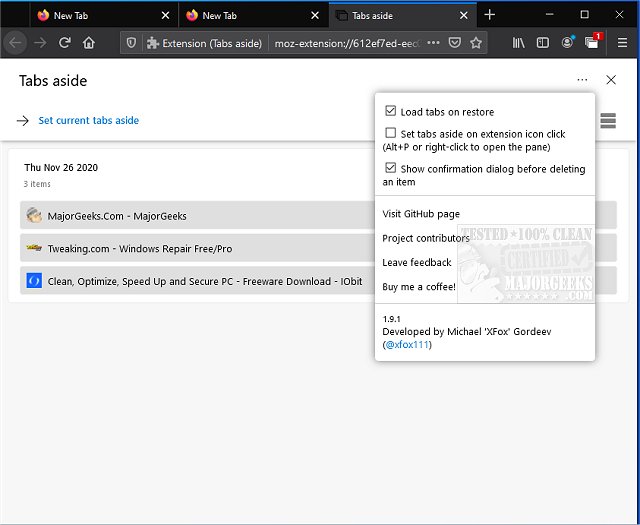
The Tabs Aside extension for Chrome, Firefox, and Edge has released version 3.3.1, providing users with a convenient way to save tabs for future reference. This tool is particularly useful for managing tabs that are frequently accessed but do not warrant being saved as bookmarks. It operates similarly to the now-defunct feature in Classic Microsoft Edge, allowing users to set tabs aside and revisit them later.
One key feature to remember is the method for reopening the Tabs Aside pane. If users enable the option to set tabs aside with a click on the extension icon, they will need to remember to use the keyboard shortcut Alt + P or right-click to access the interface again. During initial testing, some users forgot this step and found themselves unable to retrieve their saved tabs.
The latest version includes several enhancements:
- A familiar user interface inspired by the legacy Microsoft Edge, enhanced with improvements.
- An automatic dark mode for better visibility in low-light conditions.
- The ability to restore individual tabs from the saved collection without having to clear the entire set.
- Convenient hotkeys for quick access.
- The option to load restored tabs on demand for added flexibility.
Additionally, users may find the extension helpful for tasks like muting tabs in browsers and restoring accidentally closed tabs.
As web browsing continues to evolve, tools like Tabs Aside enhance user productivity by simplifying tab management, enabling a more organized and efficient online experience. Users are encouraged to explore its features and integrate it into their daily browsing habits to streamline their workflow
One key feature to remember is the method for reopening the Tabs Aside pane. If users enable the option to set tabs aside with a click on the extension icon, they will need to remember to use the keyboard shortcut Alt + P or right-click to access the interface again. During initial testing, some users forgot this step and found themselves unable to retrieve their saved tabs.
The latest version includes several enhancements:
- A familiar user interface inspired by the legacy Microsoft Edge, enhanced with improvements.
- An automatic dark mode for better visibility in low-light conditions.
- The ability to restore individual tabs from the saved collection without having to clear the entire set.
- Convenient hotkeys for quick access.
- The option to load restored tabs on demand for added flexibility.
Additionally, users may find the extension helpful for tasks like muting tabs in browsers and restoring accidentally closed tabs.
As web browsing continues to evolve, tools like Tabs Aside enhance user productivity by simplifying tab management, enabling a more organized and efficient online experience. Users are encouraged to explore its features and integrate it into their daily browsing habits to streamline their workflow
Tabs Aside for Chrome, Firefox, and Edge 3.3.1 released
Tabs Aside for Chrome, Firefox, and Edge allows you to save tabs for later use.
Tabs Aside for Chrome, Firefox, and Edge 3.3.1 released @ MajorGeeks