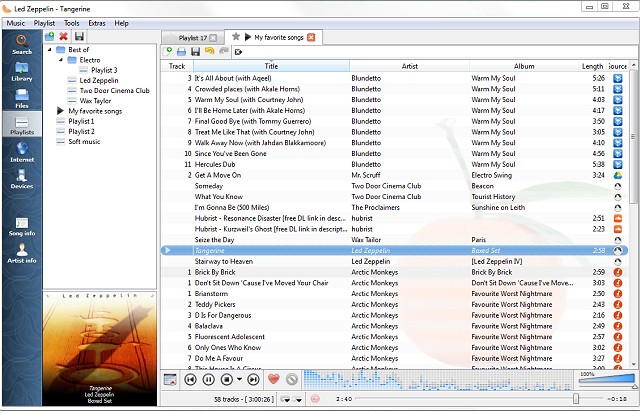
Clementine Music Player has released version 1.4.1-101, enhancing its reputation as a versatile, multiplatform music player that draws inspiration from Amarok 1.4. It is designed with a user-friendly interface that simplifies the process of searching for and playing music. The latest update introduces several new features, including support for podcasts with integration and synchronization capabilities with gpodder.net. Users can now access music from platforms like Soundcloud and jazzradio.com directly from the Internet tab in the sidebar, alongside songs stored in Google Drive. Additionally, Clementine now offers mood bars for tracks played from a local library.
Key features of Clementine Music Player include:
- Comprehensive local music library search and playback.
- Streaming from various internet radio services including Spotify, Grooveshark, and Last.fm.
- Access to Google Drive music uploads.
- Creation of smart and dynamic playlists.
- Support for multiple playlist formats (M3U, XSPF, PLS, ASX).
- Audio CD playback and CUE sheet support.
- Visualizations and metadata like lyrics, artist biographies, and photos.
- Music transcoding capabilities into various formats (MP3, Ogg Vorbis, FLAC, etc.).
- Tag editing and organization tools, including fetching missing tags from MusicBrainz.
- Podcast discovery and download options.
- Cross-platform compatibility with Windows, Mac OS X, and Linux.
- Native notifications for Linux and Mac OS X.
- Remote control features via Wii Remote, MPRIS, or command-line.
- Capability to copy music to iPod, iPhone, and other portable players.
- A queue manager for efficient playback control.
Overall, Clementine Music Player continues to evolve, offering users a robust set of features that cater to both local and online music needs, making it a powerful choice for music enthusiasts.
In future updates, users may look forward to even more integrations with popular music services, enhanced podcast functionalities, and improved user interface elements to make navigation and playback as seamless as possible. Additionally, expanding support for more audio formats and enhancing music discovery features would further solidify Clementine's position in the competitive landscape of music players
Key features of Clementine Music Player include:
- Comprehensive local music library search and playback.
- Streaming from various internet radio services including Spotify, Grooveshark, and Last.fm.
- Access to Google Drive music uploads.
- Creation of smart and dynamic playlists.
- Support for multiple playlist formats (M3U, XSPF, PLS, ASX).
- Audio CD playback and CUE sheet support.
- Visualizations and metadata like lyrics, artist biographies, and photos.
- Music transcoding capabilities into various formats (MP3, Ogg Vorbis, FLAC, etc.).
- Tag editing and organization tools, including fetching missing tags from MusicBrainz.
- Podcast discovery and download options.
- Cross-platform compatibility with Windows, Mac OS X, and Linux.
- Native notifications for Linux and Mac OS X.
- Remote control features via Wii Remote, MPRIS, or command-line.
- Capability to copy music to iPod, iPhone, and other portable players.
- A queue manager for efficient playback control.
Overall, Clementine Music Player continues to evolve, offering users a robust set of features that cater to both local and online music needs, making it a powerful choice for music enthusiasts.
In future updates, users may look forward to even more integrations with popular music services, enhanced podcast functionalities, and improved user interface elements to make navigation and playback as seamless as possible. Additionally, expanding support for more audio formats and enhancing music discovery features would further solidify Clementine's position in the competitive landscape of music players
Clementine Music Player 1.4.1-101 released
Clementine Music Player is a multiplatform music player inspired by Amarok 1.4. Its focus is on a fast and easy-to-use interface for searching and playing music.