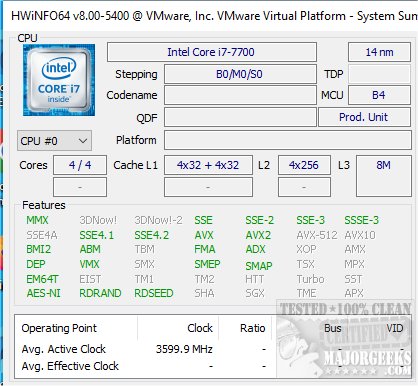
HWiNFO 8.52 has been released, offering users an extensive suite of system information tools that encompass detailed hardware analysis, real-time monitoring, and reporting capabilities for both Windows and DOS environments. The software is also available in a portable format for convenience.
Key features of HWiNFO include:
1. In-depth Hardware Information: Users can access a comprehensive overview of their system, exploring deep insights into various hardware components. HWiNFO is regularly updated to support the latest technologies and standards.
2. Real-Time System Monitoring: The tool provides accurate monitoring of all system components to track their current status and predict potential failures. The interface is customizable, allowing users to tailor their experience with various options.
3. Extensive Reporting: HWiNFO supports multiple report formats, status logging, and integration with other tools or add-ons, enhancing its functionality for advanced users.
Additionally, a video tutorial is available to help users navigate the software effectively.
For those looking for further assistance with their computer systems, HWiNFO also provides guidance on tasks such as identifying hardware components, finding serial numbers, checking CPU core counts, and evaluating RAM specifications.
As technology continues to evolve, tools like HWiNFO play an essential role in helping users maintain optimal performance and troubleshoot issues efficiently. Its consistent updates ensure that users have access to the most current information and features, making it a valuable resource for both casual users and IT professionals. As software demands grow, HWiNFO's capabilities are likely to expand, potentially incorporating more advanced diagnostic tools and features to meet users' needs
Key features of HWiNFO include:
1. In-depth Hardware Information: Users can access a comprehensive overview of their system, exploring deep insights into various hardware components. HWiNFO is regularly updated to support the latest technologies and standards.
2. Real-Time System Monitoring: The tool provides accurate monitoring of all system components to track their current status and predict potential failures. The interface is customizable, allowing users to tailor their experience with various options.
3. Extensive Reporting: HWiNFO supports multiple report formats, status logging, and integration with other tools or add-ons, enhancing its functionality for advanced users.
Additionally, a video tutorial is available to help users navigate the software effectively.
For those looking for further assistance with their computer systems, HWiNFO also provides guidance on tasks such as identifying hardware components, finding serial numbers, checking CPU core counts, and evaluating RAM specifications.
As technology continues to evolve, tools like HWiNFO play an essential role in helping users maintain optimal performance and troubleshoot issues efficiently. Its consistent updates ensure that users have access to the most current information and features, making it a valuable resource for both casual users and IT professionals. As software demands grow, HWiNFO's capabilities are likely to expand, potentially incorporating more advanced diagnostic tools and features to meet users' needs
HWiNFO 8.52 released
HWiNFO provides you with comprehensive system information details, including hardware analysis, monitoring, and Windows and DOS reporting. Also available as a portable app. Video tutorial available.