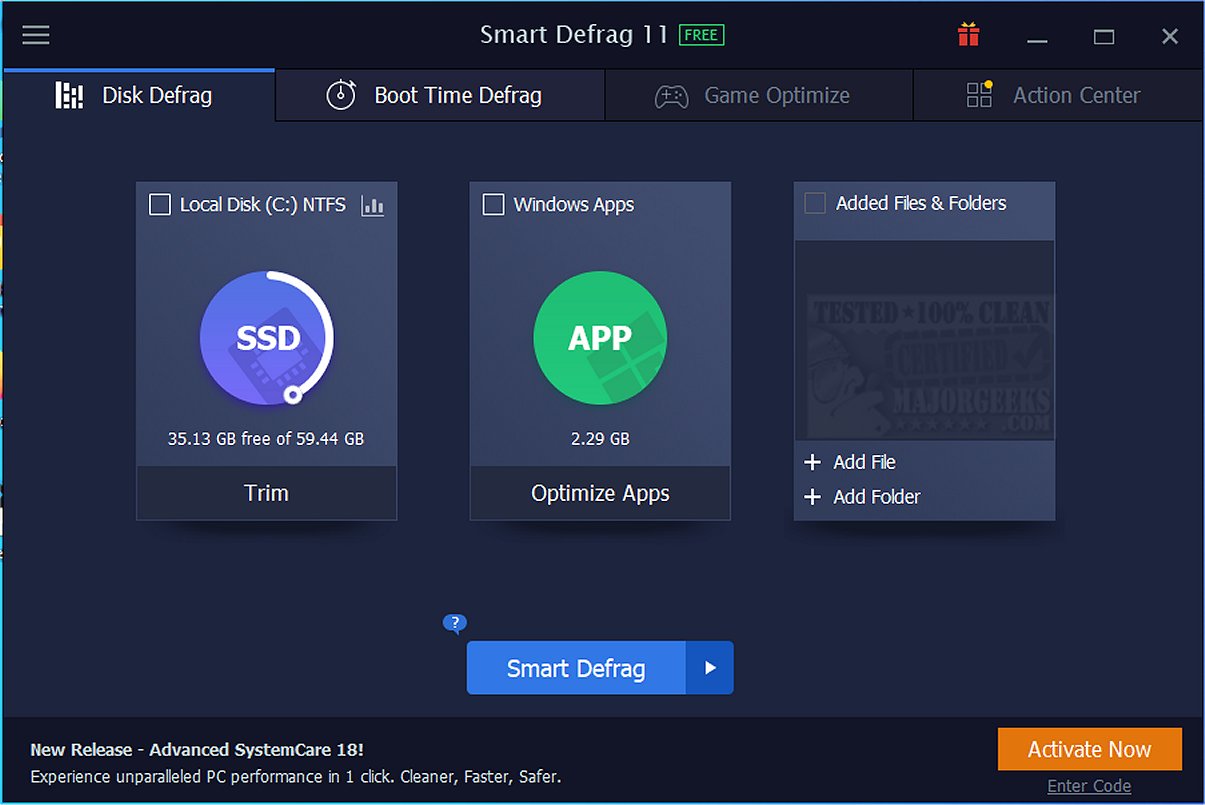
IObit has launched Smart Defrag 12.0.0.536, an advanced tool designed to defragment files, folders, and entire drives, ensuring optimal performance for your computer. Users can choose to run defragmentation on an as-needed basis or schedule it for regular maintenance. The software also includes SSD trimming capabilities that enhance the performance and longevity of solid-state drives.
Why Use Smart Defrag?
If your computer is experiencing slowdowns, long loading times for applications and games, or overall sluggish performance, Smart Defrag can rejuvenate your system. Unlike the basic Windows defragmentation tool, Smart Defrag acts as a comprehensive optimizer for both traditional HDDs and modern SSDs. It organizes fragmented files, boosts read/write speeds, and utilizes advanced TRIM technology to help extend the life of SSDs.
Key Features of Smart Defrag:
1. Ultra-Fast Defragging: The software employs an advanced engine to quickly reorganize fragmented files on HDDs and optimizes SSDs using precise TRIM operations, resulting in enhanced system stability and performance.
2. Gamers’ Optimization: Smart Defrag is tailored for gamers, minimizing loading times by organizing game files for faster access.
3. Boot Time Defrag: This feature targets files that Windows cannot move during regular operation, significantly decreasing boot times.
4. Real-Time Disk Health Monitoring: Users can monitor critical disk stats such as temperature and health, receiving alerts for potential issues before they escalate.
5. Intelligent Auto Features: Smart Defrag runs Auto Defrag in the background and allows for scheduled maintenance, ensuring your drives are always optimized without manual intervention.
Importance of SSD Optimization:
For SSD users, Smart Defrag's focus on TRIM is crucial. TRIM commands help manage unused data blocks efficiently, leading to:
- Extended Lifespan: By reducing unnecessary writes, TRIM helps preserve the endurance of SSDs.
- Consistent Speed: Regular TRIM operations keep the drive performing at its best by cleaning out obsolete data.
- Improved Reliability: Maintaining drive health reduces the risk of slowdowns or failures.
Who Should Use Smart Defrag?
Smart Defrag is designed for anyone with a hard drive, from hardcore gamers seeking peak performance to everyday users wanting a faster, more reliable computer. The intuitive interface allows even those with limited tech knowledge to navigate the software effectively, while advanced users can enjoy extensive customization options.
Conclusion:
Smart Defrag is a must-have for users serious about maximizing their system's performance. Its robust features, including SSD TRIM support and game optimization, render it superior to the basic defragmentation options available in Windows. Plus, with no ads or subscription fees—just a reliable tool to keep your PC running smoothly—it's an essential addition to any user's toolkit. A portable version is also available for those who prefer flexibility.
Download Smart Defrag Today: Current IObit users can access a direct download link for Smart Defrag to start optimizing their drives immediately.
Additional Resources:
- How to Check If Your Hard Drive is SSD or HDD
- Do You Need to Defragment an SSD? Understanding TRIM and NVME Optimization
- How to Add Optimize Drives to the Context Menu in Windows 10 & 11
- How to Check Your Hard Disk Health Using WMIC
- How to Monitor Drive Temperature in Windows 10 & 1
Why Use Smart Defrag?
If your computer is experiencing slowdowns, long loading times for applications and games, or overall sluggish performance, Smart Defrag can rejuvenate your system. Unlike the basic Windows defragmentation tool, Smart Defrag acts as a comprehensive optimizer for both traditional HDDs and modern SSDs. It organizes fragmented files, boosts read/write speeds, and utilizes advanced TRIM technology to help extend the life of SSDs.
Key Features of Smart Defrag:
1. Ultra-Fast Defragging: The software employs an advanced engine to quickly reorganize fragmented files on HDDs and optimizes SSDs using precise TRIM operations, resulting in enhanced system stability and performance.
2. Gamers’ Optimization: Smart Defrag is tailored for gamers, minimizing loading times by organizing game files for faster access.
3. Boot Time Defrag: This feature targets files that Windows cannot move during regular operation, significantly decreasing boot times.
4. Real-Time Disk Health Monitoring: Users can monitor critical disk stats such as temperature and health, receiving alerts for potential issues before they escalate.
5. Intelligent Auto Features: Smart Defrag runs Auto Defrag in the background and allows for scheduled maintenance, ensuring your drives are always optimized without manual intervention.
Importance of SSD Optimization:
For SSD users, Smart Defrag's focus on TRIM is crucial. TRIM commands help manage unused data blocks efficiently, leading to:
- Extended Lifespan: By reducing unnecessary writes, TRIM helps preserve the endurance of SSDs.
- Consistent Speed: Regular TRIM operations keep the drive performing at its best by cleaning out obsolete data.
- Improved Reliability: Maintaining drive health reduces the risk of slowdowns or failures.
Who Should Use Smart Defrag?
Smart Defrag is designed for anyone with a hard drive, from hardcore gamers seeking peak performance to everyday users wanting a faster, more reliable computer. The intuitive interface allows even those with limited tech knowledge to navigate the software effectively, while advanced users can enjoy extensive customization options.
Conclusion:
Smart Defrag is a must-have for users serious about maximizing their system's performance. Its robust features, including SSD TRIM support and game optimization, render it superior to the basic defragmentation options available in Windows. Plus, with no ads or subscription fees—just a reliable tool to keep your PC running smoothly—it's an essential addition to any user's toolkit. A portable version is also available for those who prefer flexibility.
Download Smart Defrag Today: Current IObit users can access a direct download link for Smart Defrag to start optimizing their drives immediately.
Additional Resources:
- How to Check If Your Hard Drive is SSD or HDD
- Do You Need to Defragment an SSD? Understanding TRIM and NVME Optimization
- How to Add Optimize Drives to the Context Menu in Windows 10 & 11
- How to Check Your Hard Disk Health Using WMIC
- How to Monitor Drive Temperature in Windows 10 & 1
Smart Defrag 12.0.0.536 released
Smart Defrag can defragment files, folders, and entire drives as needed or scheduled. It also features SSD trimming to prolong your SSD performance and life. Here is a direct link to download Smart Defrag for current IObit users. Portable version is also available.