The latest version of CareUEyes, 2.6.2.0, has been released, continuing its mission to promote eye health in the digital age. This application offers essential features such as a blue light filter, screen dimmer, and reminders for taking breaks, all aimed at reducing eye strain from prolonged screen use.
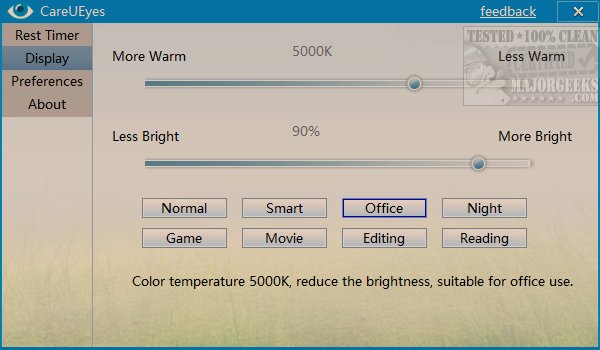
CareUEyes boasts an intuitive interface that makes it user-friendly. Upon launching the app, users are greeted with display settings that utilize sliders to adjust warmth and brightness levels. The app includes several predefined settings tailored for different activities, such as Normal, Smart, Office, Night, Game, Movie, Editing, and Reading, each accompanied by a brief explanation of its purpose. This thoughtful design helps users select the best mode for their current task.
Additionally, CareUEyes features a dedicated tab for managing rest intervals, allowing users to customize when their next break occurs and how long it lasts. During the countdown, users have the flexibility to initiate a break immediately, modify intervals, and more through a simple right-click option.
The application also offers various preferences, including the ability to start with Windows, use a tray icon, enable a mini floating interface, enforce breaks, and activate a "do not disturb" mode for full-screen activities.
While a break timer may seem straightforward, CareUEyes excels in delivering these functionalities efficiently, setting itself apart with its preset color modes that enhance user experience.
In summary, CareUEyes 2.6.2.0 is a comprehensive tool designed to alleviate eye strain, combining effective features with an easy-to-navigate interface. For those seeking to manage their screen time better and prioritize eye health, CareUEyes remains an excellent choice. As screen time continues to increase across various demographics, the importance of such tools will likely grow, potentially leading to further enhancements and new features in future updates
CareUEyes boasts an intuitive interface that makes it user-friendly. Upon launching the app, users are greeted with display settings that utilize sliders to adjust warmth and brightness levels. The app includes several predefined settings tailored for different activities, such as Normal, Smart, Office, Night, Game, Movie, Editing, and Reading, each accompanied by a brief explanation of its purpose. This thoughtful design helps users select the best mode for their current task.
Additionally, CareUEyes features a dedicated tab for managing rest intervals, allowing users to customize when their next break occurs and how long it lasts. During the countdown, users have the flexibility to initiate a break immediately, modify intervals, and more through a simple right-click option.
The application also offers various preferences, including the ability to start with Windows, use a tray icon, enable a mini floating interface, enforce breaks, and activate a "do not disturb" mode for full-screen activities.
While a break timer may seem straightforward, CareUEyes excels in delivering these functionalities efficiently, setting itself apart with its preset color modes that enhance user experience.
In summary, CareUEyes 2.6.2.0 is a comprehensive tool designed to alleviate eye strain, combining effective features with an easy-to-navigate interface. For those seeking to manage their screen time better and prioritize eye health, CareUEyes remains an excellent choice. As screen time continues to increase across various demographics, the importance of such tools will likely grow, potentially leading to further enhancements and new features in future updates
CareUEyes 2.6.2.0 released
CareUEyes is an app designed to give your eyes a break with a blue light filter, screen dimmer, and a break reminder.