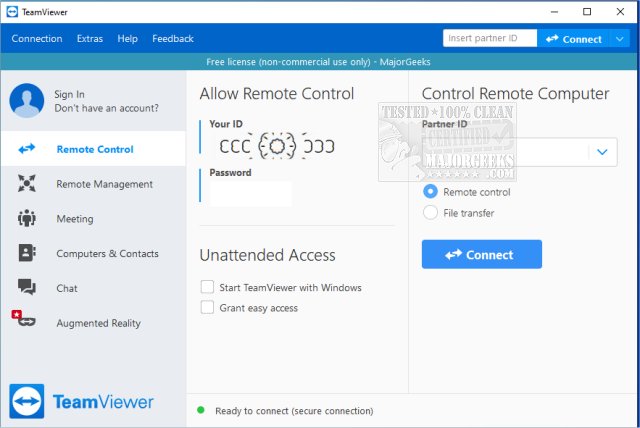
TeamViewer has released version 15.80.6 of its popular remote access software, which allows users to connect to and control remote computers effortlessly. This versatile program is especially user-friendly and can be utilized for free for non-commercial purposes. TeamViewer can be installed traditionally or run directly as a portable application without installation, making it accessible to a wide range of users.
Why Choose TeamViewer?
Anyone who has attempted to resolve a technical issue over the phone knows how challenging it can be. TeamViewer streamlines this process, enabling users to assist friends or family members by connecting to their computers from anywhere. It supports multiple operating systems, including Windows, macOS, Linux, Android, and iOS. The application generates a unique 9-digit ID and password for each session, enhancing security by requiring the user to provide the password each time, unless configured otherwise.
Key Features and Benefits:
- Two-Way Support: TeamViewer facilitates not only troubleshooting but also collaborative work. Users can share their desktop or demonstrate software in real-time, making it an excellent tool for presentations or project collaborations.
- Fast and Secure: All connections are safeguarded with end-to-end encryption using AES (256-bit). Users can expect quick performance with minimal lag, even on slower internet connections.
- Installation Options: Users have the flexibility to either install TeamViewer for enhanced features like unattended access or use the portable version for quick sessions without installation.
Pros and Cons
Pros:
- Free for personal use
- Portable version available, requiring no installation
- Supports file transfer, chat, and multi-monitor setups
- End-to-end encrypted connections
- Compatibility across all major platforms
Cons:
- Frequent commercial use may lead to license pop-ups and restrictions
- Certain features, such as remote printing, necessitate full installation
Geek Verdict
TeamViewer strikes an ideal balance between functionality and ease of use, making it a go-to solution for tech support and remote access needs. Its speed, security, and the option for portable use make it a valuable tool for both personal and professional applications. Many users, including tech support for family and friends, rely on TeamViewer daily due to its reliability and convenience.
Conclusion and Future Outlook
As remote work and online collaboration continue to rise, tools like TeamViewer will play an essential role in ensuring seamless communication and support. The ongoing enhancements in security and functionality suggest that TeamViewer will remain a preferred choice for users looking for robust remote access solutions. Future updates may further improve user experience, expand features, and enhance security measures to address evolving user needs
Why Choose TeamViewer?
Anyone who has attempted to resolve a technical issue over the phone knows how challenging it can be. TeamViewer streamlines this process, enabling users to assist friends or family members by connecting to their computers from anywhere. It supports multiple operating systems, including Windows, macOS, Linux, Android, and iOS. The application generates a unique 9-digit ID and password for each session, enhancing security by requiring the user to provide the password each time, unless configured otherwise.
Key Features and Benefits:
- Two-Way Support: TeamViewer facilitates not only troubleshooting but also collaborative work. Users can share their desktop or demonstrate software in real-time, making it an excellent tool for presentations or project collaborations.
- Fast and Secure: All connections are safeguarded with end-to-end encryption using AES (256-bit). Users can expect quick performance with minimal lag, even on slower internet connections.
- Installation Options: Users have the flexibility to either install TeamViewer for enhanced features like unattended access or use the portable version for quick sessions without installation.
Pros and Cons
Pros:
- Free for personal use
- Portable version available, requiring no installation
- Supports file transfer, chat, and multi-monitor setups
- End-to-end encrypted connections
- Compatibility across all major platforms
Cons:
- Frequent commercial use may lead to license pop-ups and restrictions
- Certain features, such as remote printing, necessitate full installation
Geek Verdict
TeamViewer strikes an ideal balance between functionality and ease of use, making it a go-to solution for tech support and remote access needs. Its speed, security, and the option for portable use make it a valuable tool for both personal and professional applications. Many users, including tech support for family and friends, rely on TeamViewer daily due to its reliability and convenience.
Conclusion and Future Outlook
As remote work and online collaboration continue to rise, tools like TeamViewer will play an essential role in ensuring seamless communication and support. The ongoing enhancements in security and functionality suggest that TeamViewer will remain a preferred choice for users looking for robust remote access solutions. Future updates may further improve user experience, expand features, and enhance security measures to address evolving user needs
TeamViewer 15.80.6 released
TeamViewer is a popular, easy-to-use free remote access program to access or let someone remotely access your computer. It can be installed or run as portable. Video tutorial available.