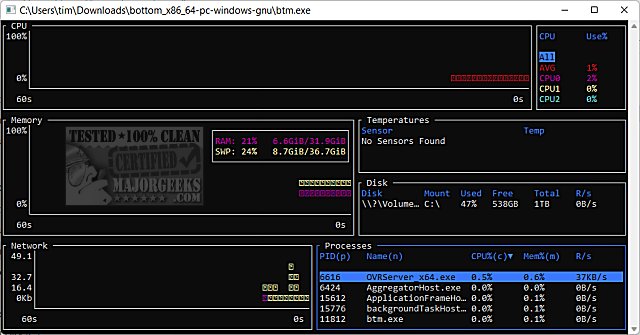
The recent release of bottom (btm) version 0.15.0 enhances its capabilities as a cross-platform monitoring application. This tool offers users a variety of graphical visualization widgets to monitor key system metrics, including:
- CPU Usage: Displays CPU usage over time, both as an average and per core, allowing for detailed performance analysis.
- RAM and Swap Usage: Tracks memory usage trends, providing insights into system resource allocation.
- Network I/O: Monitors network input and output over time, giving users a clear picture of data transfer rates.
Additionally, the new version supports features like zooming in and out on the displayed data, with the current time interval easily visible.
The app also includes widgets for:
- Disk Capacity and Usage: Helping users manage storage effectively.
- Temperature Sensors: Monitoring system temperatures to prevent overheating.
- Battery Usage: Providing details on battery performance for portable devices.
A notable feature is the process widget, which allows users to display, sort, and search through process information efficiently. This widget also supports functionalities such as sending kill signals to processes and viewing them in a tree mode for better organization.
In conjunction with these features, the app offers helpful resources such as guides on checking memory speed, identifying hard drives, and determining CPU cores and processor generations.
In summary, bottom (btm) 0.15.0 is a powerful tool for anyone looking to monitor their system's performance in real time, providing critical information in an easily digestible format. Future updates may further enhance its functionality or introduce new features, solidifying its place as a go-to application for system monitoring
- CPU Usage: Displays CPU usage over time, both as an average and per core, allowing for detailed performance analysis.
- RAM and Swap Usage: Tracks memory usage trends, providing insights into system resource allocation.
- Network I/O: Monitors network input and output over time, giving users a clear picture of data transfer rates.
Additionally, the new version supports features like zooming in and out on the displayed data, with the current time interval easily visible.
The app also includes widgets for:
- Disk Capacity and Usage: Helping users manage storage effectively.
- Temperature Sensors: Monitoring system temperatures to prevent overheating.
- Battery Usage: Providing details on battery performance for portable devices.
A notable feature is the process widget, which allows users to display, sort, and search through process information efficiently. This widget also supports functionalities such as sending kill signals to processes and viewing them in a tree mode for better organization.
In conjunction with these features, the app offers helpful resources such as guides on checking memory speed, identifying hard drives, and determining CPU cores and processor generations.
In summary, bottom (btm) 0.15.0 is a powerful tool for anyone looking to monitor their system's performance in real time, providing critical information in an easily digestible format. Future updates may further enhance its functionality or introduce new features, solidifying its place as a go-to application for system monitoring
bottom (btm) 0.15.0 released
bottom (btm) is a cross-platform monitoring app.