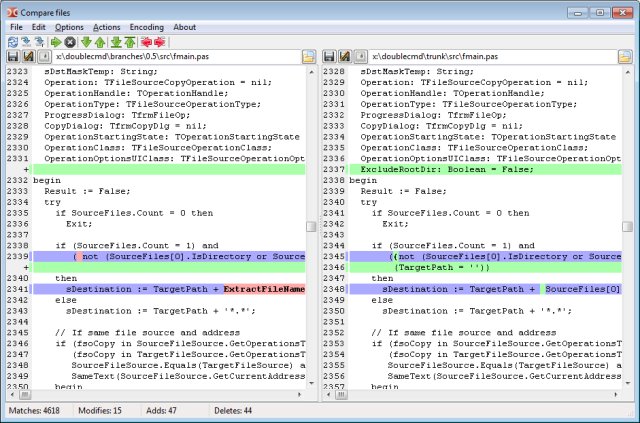
Double Commander has recently released version 1.2.10, enhancing its reputation as an open-source file manager designed for efficiency. This tool features a dual-panel layout that streamlines file management tasks, drawing inspiration from Total Commander while introducing unique functionalities.
As a free and open-source application compatible with Windows, macOS, and Linux, Double Commander allows users to work across multiple operating systems without the need for purchasing separate licenses. Its source code is accessible, inviting contributions from developers and ensuring transparency for users who wish to explore its inner workings.
The dual-pane interface simplifies tasks like copying, moving, and organizing files compared to traditional methods involving multiple windows. Users can easily manage their files by displaying a source folder in one panel and a destination folder in another. The tabbed interface further enhances usability, allowing for quick access to multiple locations, which is particularly beneficial for users who frequently download and organize various file types like PDFs, DOCXs, and ZIPs.
Beyond its dual panels, Double Commander boasts a range of advanced features. The multi-rename tool enables batch file renaming, while custom columns can be configured to display relevant information tailored to individual preferences. A powerful search tool allows users to delve into file contents, and many operations can be performed in the background, permitting uninterrupted browsing.
Double Commander treats archives like regular folders, facilitating easy access to their contents without the need for a separate archive manager. It supports various formats, including ZIP, 7Z, TAR, and RAR, enhancing its versatility. The built-in viewer can display text, binary, and hexadecimal data, while the internal text editor, equipped with syntax highlighting, is ideal for quick edits.
Customization is a key feature, with a configurable button bar that provides shortcuts to both internal commands and external applications. Additionally, the software supports numerous Total Commander plugin types to expand its capabilities, including those for archive management, file information, and remote file handling via FTP, FTPS, and SFTP.
For those who engage in regular file management tasks, Double Commander prioritizes practical functionality over a simplified interface. While it may have a steeper learning curve due to its plethora of options, the benefits of having all necessary tools at one's fingertips can significantly reduce repetitive actions.
In conclusion, Double Commander 1.2.10 offers a robust file management solution for users looking to enhance their organization and efficiency. Its blend of powerful features and user-friendly design makes it an invaluable tool for anyone who frequently handles files across different platforms. Whether you are a casual user or a more advanced individual, Double Commander provides the tools needed to streamline your file management experience
As a free and open-source application compatible with Windows, macOS, and Linux, Double Commander allows users to work across multiple operating systems without the need for purchasing separate licenses. Its source code is accessible, inviting contributions from developers and ensuring transparency for users who wish to explore its inner workings.
The dual-pane interface simplifies tasks like copying, moving, and organizing files compared to traditional methods involving multiple windows. Users can easily manage their files by displaying a source folder in one panel and a destination folder in another. The tabbed interface further enhances usability, allowing for quick access to multiple locations, which is particularly beneficial for users who frequently download and organize various file types like PDFs, DOCXs, and ZIPs.
Beyond its dual panels, Double Commander boasts a range of advanced features. The multi-rename tool enables batch file renaming, while custom columns can be configured to display relevant information tailored to individual preferences. A powerful search tool allows users to delve into file contents, and many operations can be performed in the background, permitting uninterrupted browsing.
Double Commander treats archives like regular folders, facilitating easy access to their contents without the need for a separate archive manager. It supports various formats, including ZIP, 7Z, TAR, and RAR, enhancing its versatility. The built-in viewer can display text, binary, and hexadecimal data, while the internal text editor, equipped with syntax highlighting, is ideal for quick edits.
Customization is a key feature, with a configurable button bar that provides shortcuts to both internal commands and external applications. Additionally, the software supports numerous Total Commander plugin types to expand its capabilities, including those for archive management, file information, and remote file handling via FTP, FTPS, and SFTP.
For those who engage in regular file management tasks, Double Commander prioritizes practical functionality over a simplified interface. While it may have a steeper learning curve due to its plethora of options, the benefits of having all necessary tools at one's fingertips can significantly reduce repetitive actions.
In conclusion, Double Commander 1.2.10 offers a robust file management solution for users looking to enhance their organization and efficiency. Its blend of powerful features and user-friendly design makes it an invaluable tool for anyone who frequently handles files across different platforms. Whether you are a casual user or a more advanced individual, Double Commander provides the tools needed to streamline your file management experience
Double Commander 1.2.10 released
Double Commander is an Open Source file manager with two panels side by side. The idea is based on Total Commander but with new and different features.