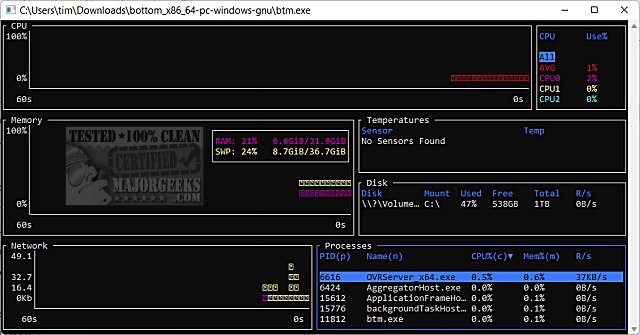
The latest version of bottom (btm), 0.14.0, has been released. This cross-platform monitoring application offers a comprehensive suite of graphical visualization widgets that provide real-time insights into various system metrics. Users can monitor CPU usage over time both at an average and per-core level, track RAM and swap usage, and observe network input/output (I/O) usage. The app also features zooming capabilities, allowing users to focus on specific time intervals.
In addition to these metrics, bottom (btm) includes widgets for monitoring disk capacity and usage, temperature sensors, and battery usage, enhancing its functionality as a holistic system monitoring tool. The process widget is particularly noteworthy, as it allows users to display, sort, and search for information about running processes. It also supports features like sending kill signals to processes and viewing them in a tree mode for better organization.
For users seeking further information on system performance, similar resources are available, such as guides on checking memory speed, identifying hard drive types, determining CPU core counts, and recognizing Intel processor generations, as well as finding motherboard details in Windows 10 and 11.
To extend this summary, it is worth noting that the continuous development of bottom (btm) signifies a growing interest in user-friendly system monitoring tools that cater to various operating systems. Future updates may include enhancements such as customizable dashboards, additional metrics, or even integration with other system management tools to provide users with a more seamless experience. The emphasis on cross-platform compatibility ensures that users across different environments can benefit from the insights provided by bottom (btm), making it an essential tool for both casual users and IT professionals alike
In addition to these metrics, bottom (btm) includes widgets for monitoring disk capacity and usage, temperature sensors, and battery usage, enhancing its functionality as a holistic system monitoring tool. The process widget is particularly noteworthy, as it allows users to display, sort, and search for information about running processes. It also supports features like sending kill signals to processes and viewing them in a tree mode for better organization.
For users seeking further information on system performance, similar resources are available, such as guides on checking memory speed, identifying hard drive types, determining CPU core counts, and recognizing Intel processor generations, as well as finding motherboard details in Windows 10 and 11.
To extend this summary, it is worth noting that the continuous development of bottom (btm) signifies a growing interest in user-friendly system monitoring tools that cater to various operating systems. Future updates may include enhancements such as customizable dashboards, additional metrics, or even integration with other system management tools to provide users with a more seamless experience. The emphasis on cross-platform compatibility ensures that users across different environments can benefit from the insights provided by bottom (btm), making it an essential tool for both casual users and IT professionals alike
bottom (btm) 0.14.0 released
bottom (btm) is a cross-platform monitoring app.