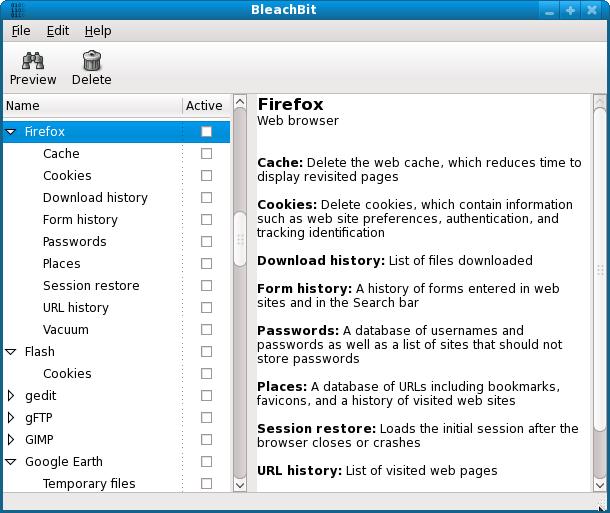
BleachBit 6.0.0 has been released, offering a robust solution for Windows and Linux users to effectively delete unnecessary files, enhance privacy, and eliminate digital clutter. This free, open-source system cleaner is designed to help users reclaim valuable disk space, remove unwanted files, and ensure optimal system performance.
BleachBit is particularly suited for those who prioritize privacy, as it not only clears cache, cookies, and internet history but also shreds sensitive data and wipes free disk space to prevent recovery. Its lightweight and streamlined interface allows for fast cleaning without unnecessary features that could slow down the system.
Key features include:
- Comprehensive System Cleaning: Capable of removing junk from hundreds of applications, including browsers and office suites.
- Privacy Assurance: Effectively shreds files and ensures deleted data is irretrievable.
- Cross-Platform Functionality: Operates seamlessly on both Windows and Linux.
- Community-Driven Development: As an open-source tool, BleachBit is free from ads and subscriptions, allowing users to benefit from transparent and collaborative development.
For users with limited storage, BleachBit can help recover gigabytes of space with minimal effort. Privacy-focused individuals will appreciate its capabilities to securely erase browsing history, chat logs, and sensitive documents, making it an essential tool for maintaining digital privacy. IT professionals and system administrators can also benefit from its command-line interface to automate cleaning tasks, further simplifying system maintenance.
In summary, BleachBit stands out as a powerful and efficient tool for deep cleaning and privacy enhancement. Its open-source nature, feature-rich capabilities, and lightweight design make it a valuable addition to any user's toolkit who seeks to keep their system clean, secure, and performing at its best. If you're looking to streamline your digital environment, consider trying BleachBit—its effectiveness will likely impress you.
BleachBit is particularly suited for those who prioritize privacy, as it not only clears cache, cookies, and internet history but also shreds sensitive data and wipes free disk space to prevent recovery. Its lightweight and streamlined interface allows for fast cleaning without unnecessary features that could slow down the system.
Key features include:
- Comprehensive System Cleaning: Capable of removing junk from hundreds of applications, including browsers and office suites.
- Privacy Assurance: Effectively shreds files and ensures deleted data is irretrievable.
- Cross-Platform Functionality: Operates seamlessly on both Windows and Linux.
- Community-Driven Development: As an open-source tool, BleachBit is free from ads and subscriptions, allowing users to benefit from transparent and collaborative development.
For users with limited storage, BleachBit can help recover gigabytes of space with minimal effort. Privacy-focused individuals will appreciate its capabilities to securely erase browsing history, chat logs, and sensitive documents, making it an essential tool for maintaining digital privacy. IT professionals and system administrators can also benefit from its command-line interface to automate cleaning tasks, further simplifying system maintenance.
In summary, BleachBit stands out as a powerful and efficient tool for deep cleaning and privacy enhancement. Its open-source nature, feature-rich capabilities, and lightweight design make it a valuable addition to any user's toolkit who seeks to keep their system clean, secure, and performing at its best. If you're looking to streamline your digital environment, consider trying BleachBit—its effectiveness will likely impress you.
Extensions:
As technology continues to evolve, system maintenance tools like BleachBit will need to adapt to new challenges in data privacy and storage management. Future updates could focus on integrating advanced features such as AI-driven cleaning suggestions, enhanced user interfaces for better accessibility, and more robust analytics for users to understand their file storage patterns. Additionally, as cyber threats become increasingly sophisticated, BleachBit may enhance its privacy features to combat emerging threats, ensuring users' data remains secure in an ever-changing digital landscapeBleachBit 6.0.0 released
BleachBit for Windows and Linux deletes unnecessary files to free valuable disk space, maintain privacy, and remove junk.