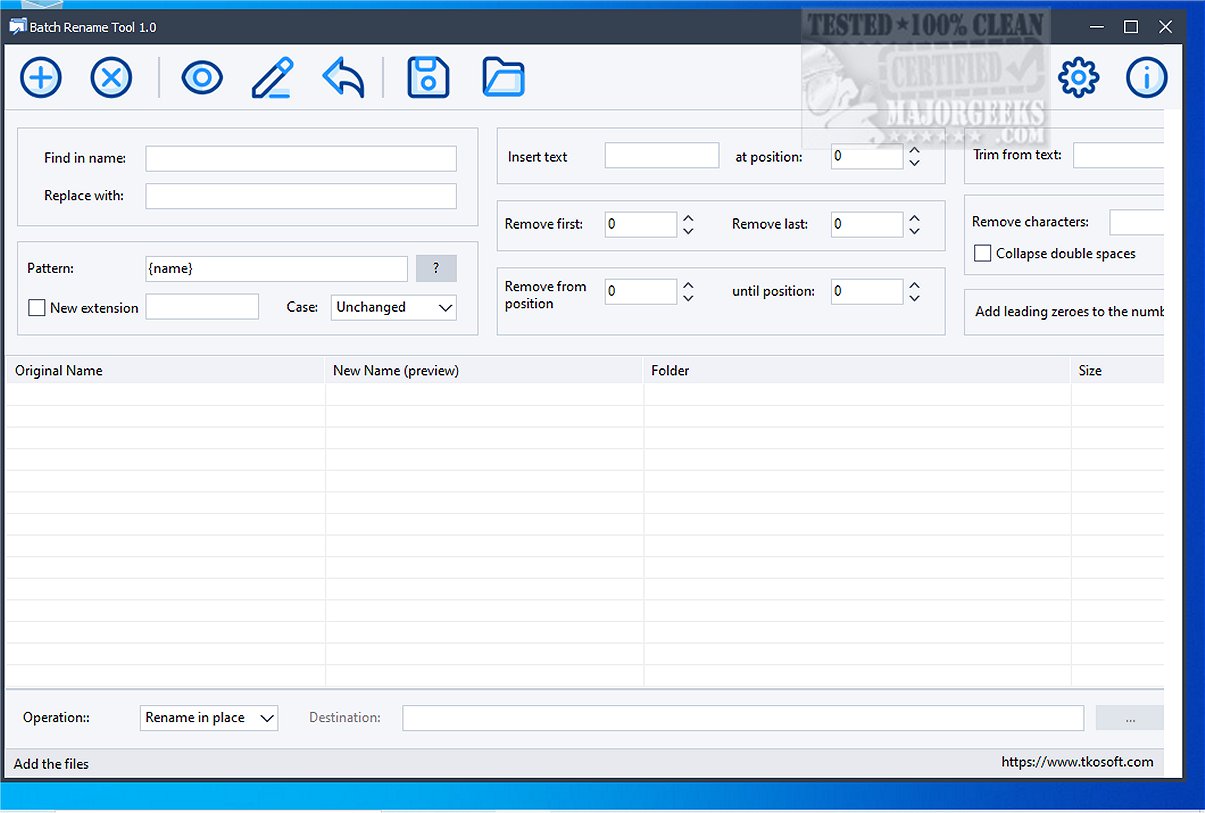
The Batch Rename Tool is a free utility designed to streamline the process of bulk file renaming. With its intuitive visual interface, users can rename multiple files at once, complete with an instant preview feature to ensure accuracy before finalizing changes.
Overview of Batch Rename Tool
This utility enables users to compile a list of files, preview their new names, and perform the renaming operation all in one go. The preview table provides essential details such as original filenames, new filenames, folder locations, and file sizes, allowing users to double-check their modifications.
The software is equipped with several practical features for common file renaming tasks. Users can easily find and replace text, insert custom strings at designated positions, and eliminate characters from either the start or end of filenames. Additional functionalities include deleting unwanted characters, trimming filenames at specific text markers, collapsing double spaces, and altering the case of filenames.
Key Features of Batch Rename Tool:
- Rename multiple files simultaneously
- Preview new filenames prior to applying changes
- Find and replace text within filenames
- Insert text at specified positions
- Remove characters from the beginning or end of filenames
- Remove text based on position range
- Delete selected characters
- Trim filenames from specific text
- Collapse double spaces
- Change filename case
- Utilize custom filename patterns with dynamic tokens
- Add leading zeros to numbers
- Change file extensions
- Rename files in their original location or to a designated folder
- Undo the last rename operation
Pattern-Based Renaming System
One standout aspect of the Batch Rename Tool is its flexible pattern-based renaming system. This feature allows users to generate new filenames by blending fixed text with dynamic tokens, which can include automatic counters, current date and time, creation or modification dates, folder names, file sizes, original extensions, and image dimensions.
Final Thoughts
The Batch Rename Tool is an extremely efficient solution for both everyday file organization and extensive projects. Its versatility makes it perfect for managing various tasks such as organizing photo collections, scanned documents, exported reports, numbered files, media libraries, backup folders, and project directories. Whether you're a casual user looking to tidy up your files or a professional managing large volumes of data, the Batch Rename Tool is equipped to meet your needs effectively.
Future Enhancements
Looking ahead, potential enhancements for the Batch Rename Tool could include the integration of cloud storage options for renaming files directly from services like Google Drive or Dropbox. Additionally, incorporating advanced automation features, such as script-based renaming for repetitive tasks, could further streamline the process for power users. A mobile version of the tool might also be beneficial, allowing users to manage file names on the go
Overview of Batch Rename Tool
This utility enables users to compile a list of files, preview their new names, and perform the renaming operation all in one go. The preview table provides essential details such as original filenames, new filenames, folder locations, and file sizes, allowing users to double-check their modifications.
The software is equipped with several practical features for common file renaming tasks. Users can easily find and replace text, insert custom strings at designated positions, and eliminate characters from either the start or end of filenames. Additional functionalities include deleting unwanted characters, trimming filenames at specific text markers, collapsing double spaces, and altering the case of filenames.
Key Features of Batch Rename Tool:
- Rename multiple files simultaneously
- Preview new filenames prior to applying changes
- Find and replace text within filenames
- Insert text at specified positions
- Remove characters from the beginning or end of filenames
- Remove text based on position range
- Delete selected characters
- Trim filenames from specific text
- Collapse double spaces
- Change filename case
- Utilize custom filename patterns with dynamic tokens
- Add leading zeros to numbers
- Change file extensions
- Rename files in their original location or to a designated folder
- Undo the last rename operation
Pattern-Based Renaming System
One standout aspect of the Batch Rename Tool is its flexible pattern-based renaming system. This feature allows users to generate new filenames by blending fixed text with dynamic tokens, which can include automatic counters, current date and time, creation or modification dates, folder names, file sizes, original extensions, and image dimensions.
Final Thoughts
The Batch Rename Tool is an extremely efficient solution for both everyday file organization and extensive projects. Its versatility makes it perfect for managing various tasks such as organizing photo collections, scanned documents, exported reports, numbered files, media libraries, backup folders, and project directories. Whether you're a casual user looking to tidy up your files or a professional managing large volumes of data, the Batch Rename Tool is equipped to meet your needs effectively.
Future Enhancements
Looking ahead, potential enhancements for the Batch Rename Tool could include the integration of cloud storage options for renaming files directly from services like Google Drive or Dropbox. Additionally, incorporating advanced automation features, such as script-based renaming for repetitive tasks, could further streamline the process for power users. A mobile version of the tool might also be beneficial, allowing users to manage file names on the go
Batch Rename Tool 2.2 released
Batch Rename Tool is a free utility designed to facilitate efficient and safe bulk file renaming. This tool allows users to rename multiple files simultaneously through a user-friendly visual interface, complete with an instant preview feature.