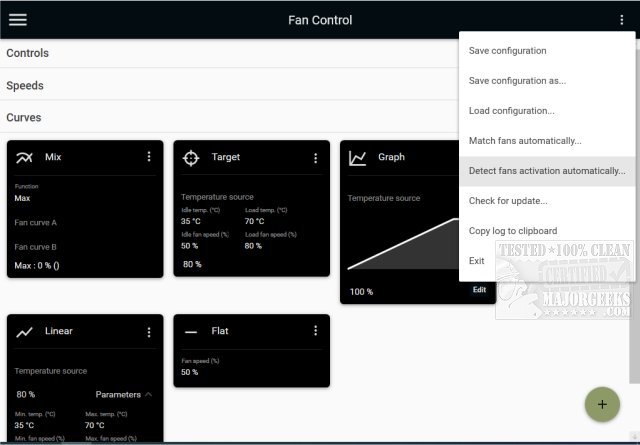
FanControl, now in its latest version (V285), is a powerful and highly customizable open-source utility designed for efficient GPU and CPU fan management. This portable application provides users with extensive control over their machine's cooling systems, ensuring that fans operate at optimal speeds for both performance and noise reduction.
Key Features of FanControl:
1. Custom Profiles: Users can save, edit, and load multiple fan control profiles tailored to their specific needs.
2. Multiple Temperature Sources: It supports various temperature readings, including CPU, GPU, motherboard, and hard drives, as well as custom sensor files.
3. Custom Fan Curves: Users can create and modify fan speed curves based on temperature changes, employing different types such as linear, graph, target, mix, sync, and flat curves.
4. Advanced Fine-Tuning: The utility offers detailed parameters for response adjustments, including steps, activation percentages, response time, and hysteresis.
5. Modern Dashboard UI: FanControl features an intuitive interface that enhances user experience, allowing easy configuration and monitoring.
6. Background Operation: It can run as a background application, complete with a customizable tray icon for quick access.
7. External Sensors: Users can create custom external temperature sensors using *.sensor files for even greater control.
Graph Fan Curve Editor: The tool also includes a graph editor that allows users to add, remove, and adjust points on their fan curves, providing a visual way to optimize fan responses.
Use Cases: Whether you're a gamer seeking to maintain cooler temperatures during high-demand sessions or a PC enthusiast wanting comprehensive control over system cooling, FanControl delivers a user-friendly and flexible solution.
Conclusion: FanControl V285 stands out as an essential utility for anyone looking to manage their PC's thermal performance effectively. Its blend of advanced features and user-friendly design makes it a must-have for both casual users and tech-savvy individuals alike.
Additional Resources: For those interested in further optimizing their systems, related topics include determining CPU core counts, identifying Intel processor generations, and best practices for safely operating computers under varying temperature conditions
Key Features of FanControl:
1. Custom Profiles: Users can save, edit, and load multiple fan control profiles tailored to their specific needs.
2. Multiple Temperature Sources: It supports various temperature readings, including CPU, GPU, motherboard, and hard drives, as well as custom sensor files.
3. Custom Fan Curves: Users can create and modify fan speed curves based on temperature changes, employing different types such as linear, graph, target, mix, sync, and flat curves.
4. Advanced Fine-Tuning: The utility offers detailed parameters for response adjustments, including steps, activation percentages, response time, and hysteresis.
5. Modern Dashboard UI: FanControl features an intuitive interface that enhances user experience, allowing easy configuration and monitoring.
6. Background Operation: It can run as a background application, complete with a customizable tray icon for quick access.
7. External Sensors: Users can create custom external temperature sensors using *.sensor files for even greater control.
Graph Fan Curve Editor: The tool also includes a graph editor that allows users to add, remove, and adjust points on their fan curves, providing a visual way to optimize fan responses.
Use Cases: Whether you're a gamer seeking to maintain cooler temperatures during high-demand sessions or a PC enthusiast wanting comprehensive control over system cooling, FanControl delivers a user-friendly and flexible solution.
Conclusion: FanControl V285 stands out as an essential utility for anyone looking to manage their PC's thermal performance effectively. Its blend of advanced features and user-friendly design makes it a must-have for both casual users and tech-savvy individuals alike.
Additional Resources: For those interested in further optimizing their systems, related topics include determining CPU core counts, identifying Intel processor generations, and best practices for safely operating computers under varying temperature conditions
FanControl V285 released
FanControl is a highly customizable portable Open Source GPU and CPU fan management utility.