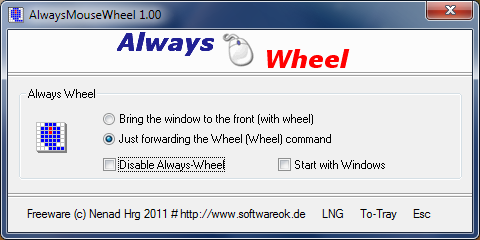
AlwaysMouseWheel version 6.66 has been released, enhancing user experience by allowing users to scroll through any window using the mouse wheel, regardless of whether that window is currently in the foreground. This functionality can significantly improve multitasking and workflow efficiency.
Key features of AlwaysMouseWheel include:
- Focus Shift: The ability to bring a specific window to the foreground with a scroll action.
- Background Scrolling: Users can send scroll commands to applications running in the background without needing to switch to them.
- Window Manipulation: By holding down the Alt key and using the left mouse button, users can drag windows around. Similarly, holding Alt and using the right mouse button allows for resizing windows.
- Volume Control: Users can adjust the volume directly by scrolling on the taskbar.
In addition to these features, there are related tips and tricks for enhancing mouse functionality, such as changing double-click actions to single-click for file access, enabling mouse pointer trails, adjusting pointer precision, and troubleshooting common mouse issues like lag or erratic movement.
Overall, AlwaysMouseWheel 6.66 not only simplifies scrolling across multiple applications but also provides additional tools for window management, making it a valuable utility for users looking to optimize their desktop experience. Future updates could focus on integrating more customizable features or enhancing compatibility with a broader range of applications
Key features of AlwaysMouseWheel include:
- Focus Shift: The ability to bring a specific window to the foreground with a scroll action.
- Background Scrolling: Users can send scroll commands to applications running in the background without needing to switch to them.
- Window Manipulation: By holding down the Alt key and using the left mouse button, users can drag windows around. Similarly, holding Alt and using the right mouse button allows for resizing windows.
- Volume Control: Users can adjust the volume directly by scrolling on the taskbar.
In addition to these features, there are related tips and tricks for enhancing mouse functionality, such as changing double-click actions to single-click for file access, enabling mouse pointer trails, adjusting pointer precision, and troubleshooting common mouse issues like lag or erratic movement.
Overall, AlwaysMouseWheel 6.66 not only simplifies scrolling across multiple applications but also provides additional tools for window management, making it a valuable utility for users looking to optimize their desktop experience. Future updates could focus on integrating more customizable features or enhancing compatibility with a broader range of applications
AlwaysMouseWheel 6.66 released
AlwaysMouseWheel allows you to use the mouse wheel for scrolling over any windows, even if that window is not in the foreground.