Background Muter 1.1.0 has been released as a portable application designed to automatically manage audio settings for applications based on their active status. When applications are running in the background, Background Muter automatically mutes them, and it restores their audio when they are brought to the foreground.
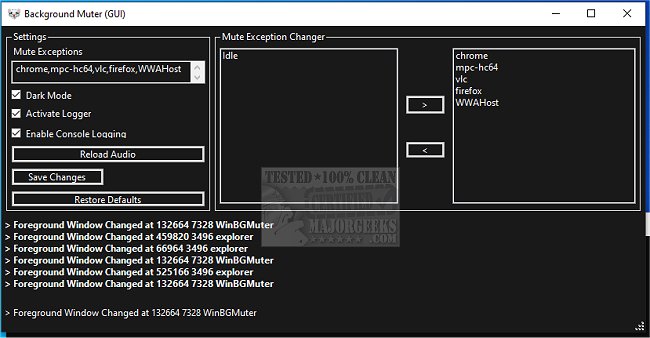
The application is user-friendly and requires no installation; it is ready to use immediately after unpacking, complete with default settings. For users who want more control, Background Muter provides options for customization. It includes a built-in logger and a console logger for monitoring app activity, ensuring users can track audio management effectively. The interface is designed to be simple and intuitive, displaying only necessary features.
Users can easily manage which applications are muted or unmuted through the "Mute Exception Changer" section. Here, they can create a list of exceptions for applications that should never be muted, enhancing their user experience. Adding or removing exceptions is straightforward; users can either type directly into a text box or use the interface to move applications between lists—one for detected processes with audio channels and another for exceptions.
To operate Background Muter, users need to have DotNet 6.0.x installed on their devices.
In addition to its primary functionality, Background Muter is similar to various other tools that help users manage audio settings in Windows 10 and 11, such as changing notification sounds, adjusting toggle key sounds, and muting tabs in web browsers like Google Chrome, Mozilla Firefox, and Microsoft Edge.
Overall, Background Muter simplifies audio management for multitaskers, allowing them to focus on their work without being distracted by unwanted sounds from background applications.
Extension: Future updates could potentially include features such as customizable sound profiles for different users or scenarios (e.g., gaming, work, leisure), integration with voice assistants for hands-free control, or improved AI capabilities to learn user preferences over time. Additionally, the development team could consider incorporating multi-platform support, allowing Background Muter to function seamlessly across different operating systems, thereby broadening its user base
The application is user-friendly and requires no installation; it is ready to use immediately after unpacking, complete with default settings. For users who want more control, Background Muter provides options for customization. It includes a built-in logger and a console logger for monitoring app activity, ensuring users can track audio management effectively. The interface is designed to be simple and intuitive, displaying only necessary features.
Users can easily manage which applications are muted or unmuted through the "Mute Exception Changer" section. Here, they can create a list of exceptions for applications that should never be muted, enhancing their user experience. Adding or removing exceptions is straightforward; users can either type directly into a text box or use the interface to move applications between lists—one for detected processes with audio channels and another for exceptions.
To operate Background Muter, users need to have DotNet 6.0.x installed on their devices.
In addition to its primary functionality, Background Muter is similar to various other tools that help users manage audio settings in Windows 10 and 11, such as changing notification sounds, adjusting toggle key sounds, and muting tabs in web browsers like Google Chrome, Mozilla Firefox, and Microsoft Edge.
Overall, Background Muter simplifies audio management for multitaskers, allowing them to focus on their work without being distracted by unwanted sounds from background applications.
Extension: Future updates could potentially include features such as customizable sound profiles for different users or scenarios (e.g., gaming, work, leisure), integration with voice assistants for hands-free control, or improved AI capabilities to learn user preferences over time. Additionally, the development team could consider incorporating multi-platform support, allowing Background Muter to function seamlessly across different operating systems, thereby broadening its user base
Background Muter 1.1.0 released
Background Muter is a portable app that will allow you to automatically mute apps in the background and unmute them when brought to the foreground.