AutoPowerOptionsOK version 6.44 has been released, offering a free and efficient solution for power management. This application is designed to enhance energy efficiency by allowing users to easily customize settings related to monitor shutdown, sleep timers, and switching between different energy plans based on predefined schedules.
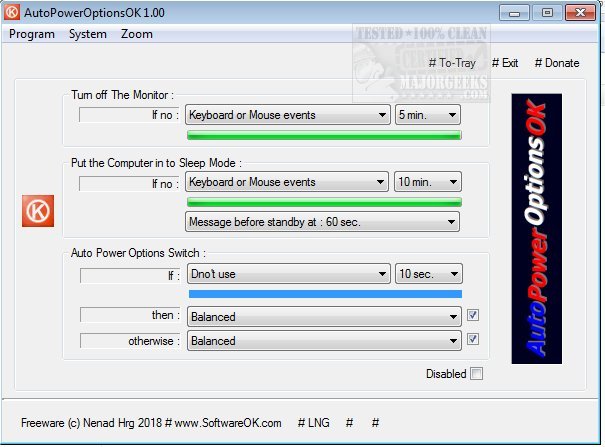
Upon launching the app, users encounter a straightforward interface showcasing available options such as turning off the monitor, initiating sleep mode, and switching power plans automatically if there is no keyboard or mouse activity for a specified period. This feature is particularly useful in helping users save energy by ensuring that their system shifts to an alternate power plan during inactivity.
Additionally, AutoPowerOptionsOK provides quick access to essential system information tools, including Task Manager, System Information, and MSConfig, making it a valuable resource not just for network administrators but also for everyday users looking to optimize their energy consumption.
In conclusion, AutoPowerOptionsOK is an intuitive application that streamlines power management, promotes energy savings, and enhances user convenience. It stands out as a beneficial tool for anyone looking to take control of their computer's power settings more effectively. Users can also explore related topics like sleep versus hibernation, adjusting power plan settings in Windows 10 and 11, and creating custom power plans to further tailor their energy management approach
Upon launching the app, users encounter a straightforward interface showcasing available options such as turning off the monitor, initiating sleep mode, and switching power plans automatically if there is no keyboard or mouse activity for a specified period. This feature is particularly useful in helping users save energy by ensuring that their system shifts to an alternate power plan during inactivity.
Additionally, AutoPowerOptionsOK provides quick access to essential system information tools, including Task Manager, System Information, and MSConfig, making it a valuable resource not just for network administrators but also for everyday users looking to optimize their energy consumption.
In conclusion, AutoPowerOptionsOK is an intuitive application that streamlines power management, promotes energy savings, and enhances user convenience. It stands out as a beneficial tool for anyone looking to take control of their computer's power settings more effectively. Users can also explore related topics like sleep versus hibernation, adjusting power plan settings in Windows 10 and 11, and creating custom power plans to further tailor their energy management approach
AutoPowerOptionsOK 6.44 released
AutoPowerOptionsOK is a free power management app that enables you to increase energy efficiency by providing quick access to customize monitor shutdown, the sleep timer, as well as toggling between energy plans at pre-determined times.