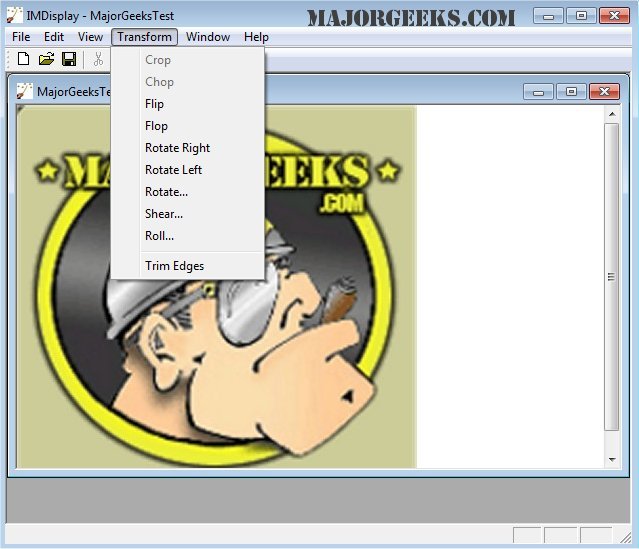
ImageMagick 7.1.2-22 has been released, enhancing the capabilities of this comprehensive and free graphics software suite. Suitable for users on Windows, Linux, and Mac platforms, ImageMagick allows for the creation, editing, composition, and conversion of images across more than 100 formats, including popular ones like GIF, JPEG, PNG, and TIFF.
The software provides a diverse range of functionalities, such as resizing, flipping, and rotating images, adjusting colors, applying special effects, and drawing shapes or text. Users can operate ImageMagick via the command line or integrate it into programs using their favorite programming languages.
Key features of ImageMagick include:
- Format Conversion: Easily switch between image formats.
- Transformations: Resize, crop, and manipulate images in various ways.
- Transparency Handling: Make parts of images invisible.
- Drawing Tools: Add text, shapes, and decorations.
- Special Effects: Apply blurring, sharpening, and other effects.
- Animation Creation: Generate GIF animations from a series of images.
- Image Identification: Analyze and describe image attributes.
- Compositing and Montage: Overlay images or create thumbnails on a canvas.
- Pixel Distortion Handling: Correct or induce distortions in images.
- Shape Morphology: Analyze and recognize patterns within images.
- Motion Picture Support: Manage common image formats in digital filmmaking.
- Image Calculation: Use mathematical expressions on images.
- Color Management: Ensure accurate color representation with profiles.
- High Dynamic Range Imaging: Represent a wide range of brightness.
- Encryption: Secure images through encoding.
- Large Image Support: Work with extremely large images effectively.
- Threading: Enhance performance through parallel processing.
- Distributed Processing: Utilize remote servers for pixel storage.
- OpenCL Support: Leverage multicore and heterogeneous processing for speed improvements.
Additionally, ImageMagick is accessible on iOS devices like the iPhone and iPad, allowing users to edit and manipulate images on the go.
To further assist users, the text also references related guides, such as restoring the Windows Photo Viewer, viewing images as slideshows, and managing context menus for image editing in Windows 10 and 11.
In summary, ImageMagick remains a powerful tool for both casual and professional users seeking a versatile solution for image processing and manipulation. Future updates may continue to expand its capabilities, enhance user experience, and introduce new features tailored to evolving digital imaging needs
The software provides a diverse range of functionalities, such as resizing, flipping, and rotating images, adjusting colors, applying special effects, and drawing shapes or text. Users can operate ImageMagick via the command line or integrate it into programs using their favorite programming languages.
Key features of ImageMagick include:
- Format Conversion: Easily switch between image formats.
- Transformations: Resize, crop, and manipulate images in various ways.
- Transparency Handling: Make parts of images invisible.
- Drawing Tools: Add text, shapes, and decorations.
- Special Effects: Apply blurring, sharpening, and other effects.
- Animation Creation: Generate GIF animations from a series of images.
- Image Identification: Analyze and describe image attributes.
- Compositing and Montage: Overlay images or create thumbnails on a canvas.
- Pixel Distortion Handling: Correct or induce distortions in images.
- Shape Morphology: Analyze and recognize patterns within images.
- Motion Picture Support: Manage common image formats in digital filmmaking.
- Image Calculation: Use mathematical expressions on images.
- Color Management: Ensure accurate color representation with profiles.
- High Dynamic Range Imaging: Represent a wide range of brightness.
- Encryption: Secure images through encoding.
- Large Image Support: Work with extremely large images effectively.
- Threading: Enhance performance through parallel processing.
- Distributed Processing: Utilize remote servers for pixel storage.
- OpenCL Support: Leverage multicore and heterogeneous processing for speed improvements.
Additionally, ImageMagick is accessible on iOS devices like the iPhone and iPad, allowing users to edit and manipulate images on the go.
To further assist users, the text also references related guides, such as restoring the Windows Photo Viewer, viewing images as slideshows, and managing context menus for image editing in Windows 10 and 11.
In summary, ImageMagick remains a powerful tool for both casual and professional users seeking a versatile solution for image processing and manipulation. Future updates may continue to expand its capabilities, enhance user experience, and introduce new features tailored to evolving digital imaging needs
ImageMagick 7.1.2-22 released
ImageMagick is an all-in-one freeware graphics software suite for creating, editing, composing, or converting images in Windows, Linux, and Mac.