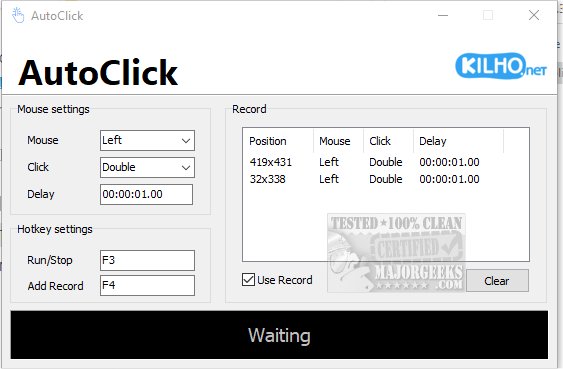
AutoClick 1.5.5 has been released as a user-friendly application that automates mouse clicks, streamlining repetitive clicking tasks. Its intuitive interface allows users to tailor clicking speeds and patterns, making it especially useful for gamers, data entry jobs, or any task requiring frequent mouse interactions. Users can establish precise time intervals and geographic coordinates for various clicking patterns, which is beneficial in scenarios like click-heavy games where rapid clicking is crucial for achieving success. Additionally, AutoClick can prevent a computer from entering idle mode during long tasks, ensuring uninterrupted workflow.
The process of using AutoClick is straightforward. Users begin by creating a click sequence, defining the specific series of clicks, timing, and order. Once the cursor is positioned over the target area on the screen, users select the desired mouse button and specify the type of click action—single, double, or mouse wheel. They can also set delays between actions for more controlled execution. After configuring these parameters, users activate the process with a designated hotkey, which adds the action to a list for future use. All recorded actions are displayed in an organized table, providing a clear overview of the sequences.
However, a limitation of AutoClick is the lack of a feature to save click profiles, which would enhance its usability. Overall, AutoClick is a reliable and straightforward auto-clicker suitable for users of all experience levels.
In extending this information, users might benefit from additional features in future updates, such as the ability to save and load click profiles for quicker access, enhanced customization options for click patterns, or integration with other productivity tools. Furthermore, incorporating a tutorial or help section within the app could assist new users in maximizing its potential. The addition of a community forum or support channel could also foster user engagement and provide a platform for sharing tips and tricks for effective use of the application
The process of using AutoClick is straightforward. Users begin by creating a click sequence, defining the specific series of clicks, timing, and order. Once the cursor is positioned over the target area on the screen, users select the desired mouse button and specify the type of click action—single, double, or mouse wheel. They can also set delays between actions for more controlled execution. After configuring these parameters, users activate the process with a designated hotkey, which adds the action to a list for future use. All recorded actions are displayed in an organized table, providing a clear overview of the sequences.
However, a limitation of AutoClick is the lack of a feature to save click profiles, which would enhance its usability. Overall, AutoClick is a reliable and straightforward auto-clicker suitable for users of all experience levels.
In extending this information, users might benefit from additional features in future updates, such as the ability to save and load click profiles for quicker access, enhanced customization options for click patterns, or integration with other productivity tools. Furthermore, incorporating a tutorial or help section within the app could assist new users in maximizing its potential. The addition of a community forum or support channel could also foster user engagement and provide a platform for sharing tips and tricks for effective use of the application
AutoClick 1.5.5 released
AutoClick is a straightforward app designed to automate mouse clicks, allowing you to perform repetitive clicking tasks effortlessly.