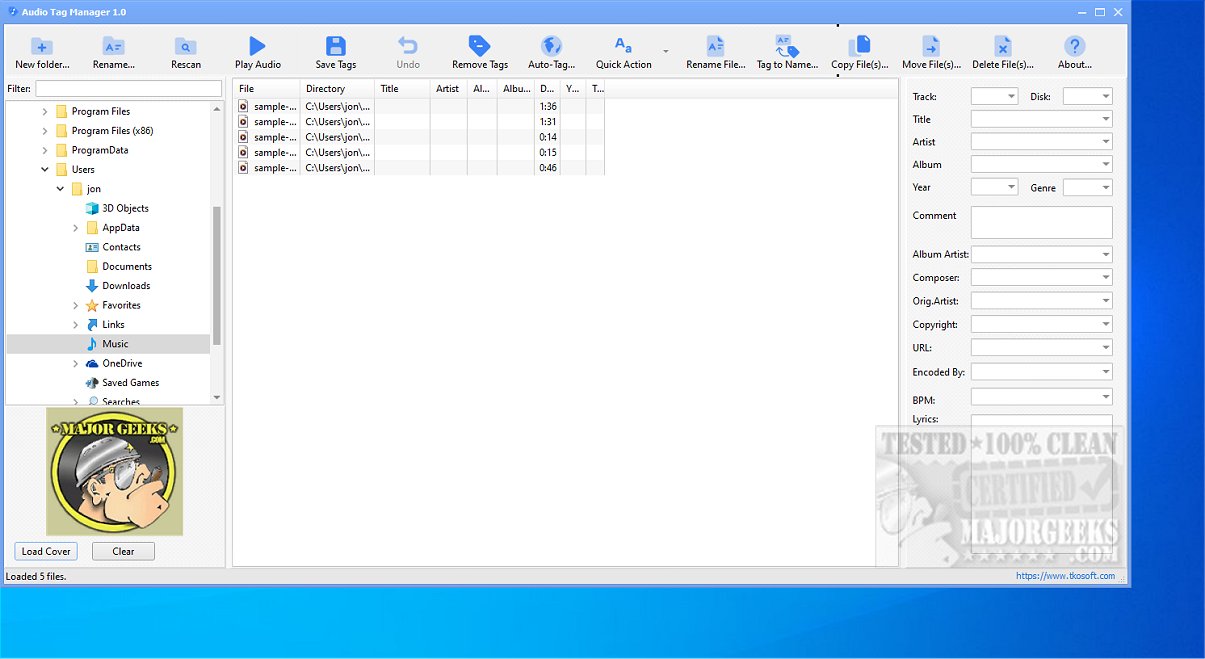
Audio Tag Manager is a free and efficient audio tag editor designed to help users edit, organize, clean, and rename their music files seamlessly. Supporting an array of audio formats, including MP3, FLAC, OGG, APE, M4A, WMA, and WAV, it serves as a robust solution for maintaining a well-structured music collection.
Core Features and Functionalities
Audio Tag Manager focuses on enhancing and managing essential music metadata. Users can edit a variety of metadata fields such as Title, Artist, Album, Album Artist, Year, Track Number, Genre, Composer, Comment, BPM, Copyright information, URL, Encoded By, and Lyrics. This flexibility allows for both individual file editing and mass updates across multiple files, streamlining the music library management process.
In addition to metadata editing, the software boasts advanced file renaming capabilities. Users can rename audio files based on tag-based patterns, utilizing details like artist names, song titles, album titles, and more. This feature is particularly useful for cleaning up files with inconsistent naming conventions, resulting in a more organized library.
Highlighted Feature: Auto-Tagging with MusicBrainz
One of the standout features of Audio Tag Manager is its Auto-Tag functionality, which connects users to the MusicBrainz online database. This allows for the automatic retrieval of accurate metadata for poorly tagged files. Users can search for matches and seamlessly apply essential details, such as song title and artist, ensuring that their audio files are correctly identified.
Additional Features
- Supports a Variety of Formats: Works with MP3, FLAC, OGG, APE, M4A, WMA, and WAV.
- Batch Editing: Allows for simultaneous editing of multiple audio files.
- Cover Art Management: Users can load, replace, or clear album artwork.
- Custom and Built-in Presets: Offers presets for common tag-cleaning tasks and allows users to create custom workflows.
- User-Friendly Interface: Designed to be intuitive, making it accessible for both novices and experienced users.
Conclusion: The Ideal Tool for Music Enthusiasts
In summary, Audio Tag Manager 2.4 is a powerful yet user-friendly tool perfect for anyone looking to optimize their music collection. Its combination of comprehensive tag editing, batch-renaming options, flexible presets, and powerful Auto-Tag functionality makes it an indispensable resource for maintaining an accurate and well-organized music library. Whether for personal use or professional needs, Audio Tag Manager simplifies the complexities of audio file management, ensuring that users can focus on enjoying their music.
Future Enhancements
As the software continues to evolve, potential future enhancements could include support for additional audio formats, improved integration with more online databases for metadata retrieval, and further refinements to the user interface to enhance accessibility for all users
Core Features and Functionalities
Audio Tag Manager focuses on enhancing and managing essential music metadata. Users can edit a variety of metadata fields such as Title, Artist, Album, Album Artist, Year, Track Number, Genre, Composer, Comment, BPM, Copyright information, URL, Encoded By, and Lyrics. This flexibility allows for both individual file editing and mass updates across multiple files, streamlining the music library management process.
In addition to metadata editing, the software boasts advanced file renaming capabilities. Users can rename audio files based on tag-based patterns, utilizing details like artist names, song titles, album titles, and more. This feature is particularly useful for cleaning up files with inconsistent naming conventions, resulting in a more organized library.
Highlighted Feature: Auto-Tagging with MusicBrainz
One of the standout features of Audio Tag Manager is its Auto-Tag functionality, which connects users to the MusicBrainz online database. This allows for the automatic retrieval of accurate metadata for poorly tagged files. Users can search for matches and seamlessly apply essential details, such as song title and artist, ensuring that their audio files are correctly identified.
Additional Features
- Supports a Variety of Formats: Works with MP3, FLAC, OGG, APE, M4A, WMA, and WAV.
- Batch Editing: Allows for simultaneous editing of multiple audio files.
- Cover Art Management: Users can load, replace, or clear album artwork.
- Custom and Built-in Presets: Offers presets for common tag-cleaning tasks and allows users to create custom workflows.
- User-Friendly Interface: Designed to be intuitive, making it accessible for both novices and experienced users.
Conclusion: The Ideal Tool for Music Enthusiasts
In summary, Audio Tag Manager 2.4 is a powerful yet user-friendly tool perfect for anyone looking to optimize their music collection. Its combination of comprehensive tag editing, batch-renaming options, flexible presets, and powerful Auto-Tag functionality makes it an indispensable resource for maintaining an accurate and well-organized music library. Whether for personal use or professional needs, Audio Tag Manager simplifies the complexities of audio file management, ensuring that users can focus on enjoying their music.
Future Enhancements
As the software continues to evolve, potential future enhancements could include support for additional audio formats, improved integration with more online databases for metadata retrieval, and further refinements to the user interface to enhance accessibility for all users
Audio Tag Manager 2.4 released
Audio Tag Manager is a free audio tag editor that lets you efficiently edit, organize, clean, and rename your music files. This versatile tool supports a variety of audio formats, including MP3, FLAC, OGG, APE, M4A, WMA, and WAV, making it a comprehensive solution for managing your music collection.