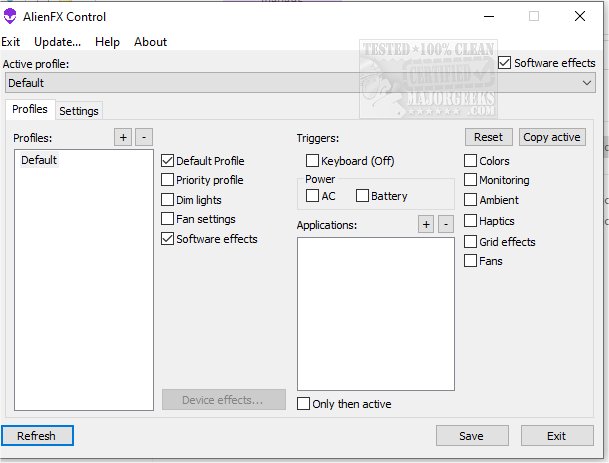
AlienFX Tools has recently released version 9.6.1.2, a robust software suite designed for Alienware users seeking greater control over their systems. This suite allows users to manage various aspects of their machines, including lighting, fan settings, and power configurations.
For those experiencing issues with noise or overheating, AlienFX Tools provides diagnostic capabilities. The AlienFan tool offers advanced fan configuration options, enabling users to customize fan parameters and power modes for optimal performance. Users can also manage operational profiles through the Control menu, facilitating effortless switching between different modes tailored for specific applications or triggers.
The suite includes the AlienFX Monitor, which gives users access to temperature data from various sensors, allowing for selective monitoring of hardware temperatures directly from the system tray. Notably, users no longer need the Alienware Command Center (AWCC), as AlienFX Tools offers lightweight alternatives for controlling system lights, fans, and power profiles.
Key components of the AlienFX Tools suite include:
- AlienFX Control: A compact 500 KB alternative to AWCC, providing control over lighting, fans, temperature monitoring, and power settings.
- AlienFX Monitor: A system monitoring tool that displays essential health parameters in the tray.
- AlienFX-CLI: A command-line interface for adjusting AlienFX light settings and checking status.
- LightFX: An emulator for the Dell LightFX library, compatible with all API functions for LightFX/AlienFX games.
- AlienFan GUI: A straightforward utility for fan and power control based on system temperature readings.
- AlienFan-CLI: A command-line tool for fan and lighting control, along with power settings adjustments.
- AlienFX-Config: A script for backing up, restoring, or deleting configuration settings from the registry.
For users new to the suite, the developer has provided a detailed beginner's guide to facilitate a smooth setup and usage experience.
In conclusion, AlienFX Tools 9.6.1.2 not only enhances system management for Alienware owners but also simplifies the overall user experience with a suite of efficient and user-friendly tools. The flexibility and control provided by these tools are invaluable for optimizing system performance and tailoring the gaming experience to individual preferences
For those experiencing issues with noise or overheating, AlienFX Tools provides diagnostic capabilities. The AlienFan tool offers advanced fan configuration options, enabling users to customize fan parameters and power modes for optimal performance. Users can also manage operational profiles through the Control menu, facilitating effortless switching between different modes tailored for specific applications or triggers.
The suite includes the AlienFX Monitor, which gives users access to temperature data from various sensors, allowing for selective monitoring of hardware temperatures directly from the system tray. Notably, users no longer need the Alienware Command Center (AWCC), as AlienFX Tools offers lightweight alternatives for controlling system lights, fans, and power profiles.
Key components of the AlienFX Tools suite include:
- AlienFX Control: A compact 500 KB alternative to AWCC, providing control over lighting, fans, temperature monitoring, and power settings.
- AlienFX Monitor: A system monitoring tool that displays essential health parameters in the tray.
- AlienFX-CLI: A command-line interface for adjusting AlienFX light settings and checking status.
- LightFX: An emulator for the Dell LightFX library, compatible with all API functions for LightFX/AlienFX games.
- AlienFan GUI: A straightforward utility for fan and power control based on system temperature readings.
- AlienFan-CLI: A command-line tool for fan and lighting control, along with power settings adjustments.
- AlienFX-Config: A script for backing up, restoring, or deleting configuration settings from the registry.
For users new to the suite, the developer has provided a detailed beginner's guide to facilitate a smooth setup and usage experience.
In conclusion, AlienFX Tools 9.6.1.2 not only enhances system management for Alienware owners but also simplifies the overall user experience with a suite of efficient and user-friendly tools. The flexibility and control provided by these tools are invaluable for optimizing system performance and tailoring the gaming experience to individual preferences
AlienFx Tools 9.6.1.2 released
AlienFX Tools is a comprehensive suite that aims to provide Alienware owners with enhanced control over their machines; it offers various features that enable you to easily manage your system's lights, fans, and power settings.