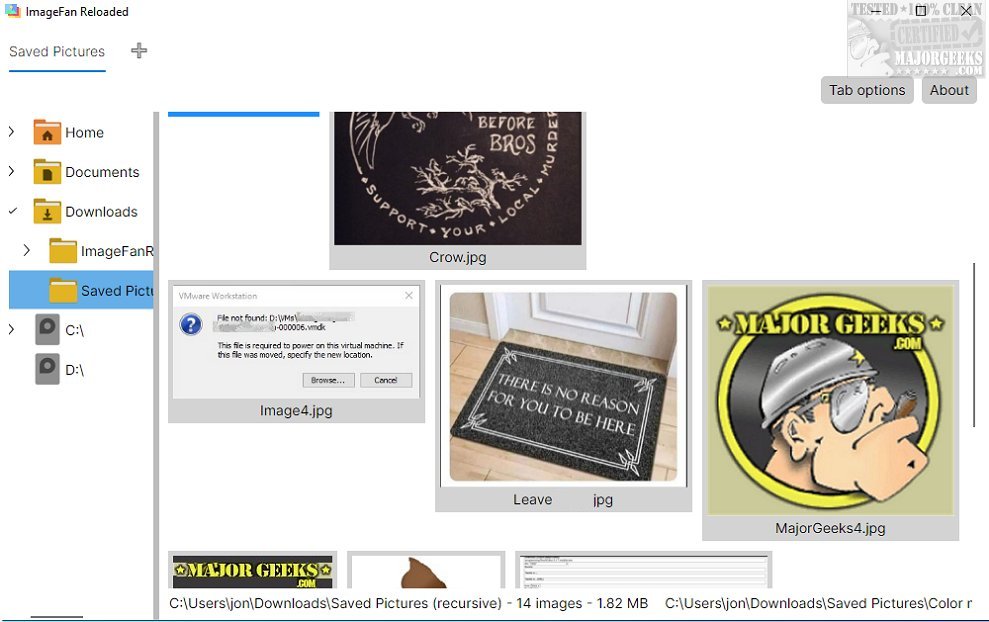
ImageFan Reloaded is a cross-platform image viewer designed with a focus on simplicity and user-friendliness. The latest version, released on July 5, 2026, maintains the software's core principles, offering a tab-based interface that enhances navigation through image files.
Key Features and Usability
This lightweight application is optimized for multi-core processors, allowing for quick image loading and seamless browsing. Users can easily navigate through directories and enjoy thumbnail previews that aid in swiftly identifying images without the hassle of traditional file management. ImageFan Reloaded's minimalist design strips away unnecessary features, centering on essential functions that enhance user experience. This design philosophy is ideal for those who prefer a straightforward interface, although it may not cater to users seeking advanced functionalities like image editing, batch processing, or extensive metadata support.
Tab Management for Enhanced Viewing
One of the standout features of ImageFan Reloaded is its tab management, which allows users to open multiple images simultaneously. This functionality facilitates efficient switching between images, making it easier to compare or review pictures side by side.
Target Audience and Limitations
While ImageFan Reloaded is a commendable option for users who value straightforwardness and ease of use, its lack of advanced features may leave some users wanting more. Those who require comprehensive tools for managing their image collections might find the software's capabilities somewhat limiting.
Conclusion and Recommendations
In summary, ImageFan Reloaded excels in providing a user-friendly platform for image viewing, appealing especially to individuals who appreciate a minimalist approach. However, users with more demanding needs may want to explore additional options that offer a broader range of image management features. As technology continues to evolve, future updates could enhance the software's capabilities while maintaining its core simplicity.
Related Articles:
- How to Restore Windows Photo Viewer on Windows 10 & 11
- How to Add and Remove Folders in Windows 10 & 11 Photos App
- How to Add or Remove 'Edit With Photos' Context Menu in Windows 10 & 11
- What is a HEIC File?
As ImageFan Reloaded progresses, it may benefit from considering user feedback to introduce features that bridge the gap between simplicity and functionality, potentially appealing to a wider audience
Key Features and Usability
This lightweight application is optimized for multi-core processors, allowing for quick image loading and seamless browsing. Users can easily navigate through directories and enjoy thumbnail previews that aid in swiftly identifying images without the hassle of traditional file management. ImageFan Reloaded's minimalist design strips away unnecessary features, centering on essential functions that enhance user experience. This design philosophy is ideal for those who prefer a straightforward interface, although it may not cater to users seeking advanced functionalities like image editing, batch processing, or extensive metadata support.
Tab Management for Enhanced Viewing
One of the standout features of ImageFan Reloaded is its tab management, which allows users to open multiple images simultaneously. This functionality facilitates efficient switching between images, making it easier to compare or review pictures side by side.
Target Audience and Limitations
While ImageFan Reloaded is a commendable option for users who value straightforwardness and ease of use, its lack of advanced features may leave some users wanting more. Those who require comprehensive tools for managing their image collections might find the software's capabilities somewhat limiting.
Conclusion and Recommendations
In summary, ImageFan Reloaded excels in providing a user-friendly platform for image viewing, appealing especially to individuals who appreciate a minimalist approach. However, users with more demanding needs may want to explore additional options that offer a broader range of image management features. As technology continues to evolve, future updates could enhance the software's capabilities while maintaining its core simplicity.
Related Articles:
- How to Restore Windows Photo Viewer on Windows 10 & 11
- How to Add and Remove Folders in Windows 10 & 11 Photos App
- How to Add or Remove 'Edit With Photos' Context Menu in Windows 10 & 11
- What is a HEIC File?
As ImageFan Reloaded progresses, it may benefit from considering user feedback to introduce features that bridge the gap between simplicity and functionality, potentially appealing to a wider audience
ImageFan Reloaded 1.2026.07.05 released
ImageFan Reloaded is a simple image viewer that operates across different platforms, featuring a user-friendly tab-based interface.