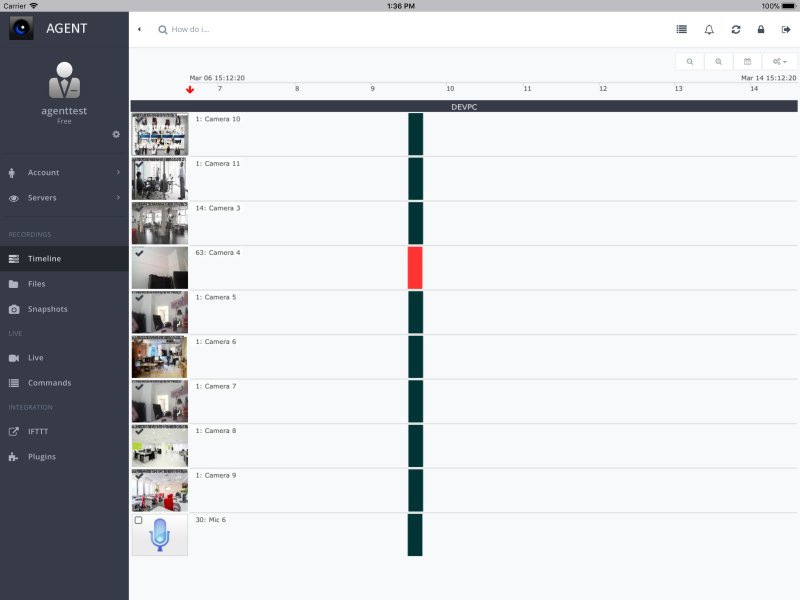
Agent DVR version 7.4.2.0 has been released, offering a comprehensive, cross-platform DVR solution for PCs. This software detects movement and sound, enabling users to record and stream from various video sources, including USB and IP cameras, as well as desktop feeds. Unlike cloud-based services, Agent DVR is a self-hosted surveillance system that gives users complete control over their footage and storage without incurring subscription fees or privacy issues.
Agent DVR is free for personal use and allows local recordings, with optional paid upgrades for AI-enhanced features. It supports a wide range of cameras, including USB webcams, ONVIF cameras, and Raspberry Pi cameras. Although an internet connection is not required for local monitoring, it is necessary for remote viewing and cloud storage. Remote access is user-friendly, requiring no port forwarding, allowing you to view your cameras from any browser. Recordings can be stored locally on a PC or NAS, or on cloud services like Google Drive or OneDrive.
The software's AI-powered motion detection significantly reduces false alerts by differentiating between people, vehicles, and animals. It also integrates seamlessly with smart home systems such as Home Assistant, MQTT, and IFTTT. Agent DVR is compatible with multiple operating systems, including Windows, macOS, Linux, Docker, and Raspberry Pi. While basic setup is straightforward, advanced users may need some networking knowledge to maximize the software's capabilities.
Agent DVR is ideal for various applications, including DIY home security systems, business monitoring, pet or baby surveillance, wildlife watching, and temporary setups for events. It eliminates the need for constant monitoring by sending alerts when motion is detected, making remote oversight simple and efficient.
To get started, users must download and install Agent DVR on their preferred operating system, connect their cameras, and configure settings for motion detection and recording schedules. Footage can be stored locally or sent to cloud services, offering flexibility in data management.
Key features include AI-powered motion detection, flexible recording options (continuous, motion-triggered, or scheduled), and alert notifications via email, SMS, or push notifications. While performance varies based on system specifications, most basic setups can handle one or two cameras with ease. Higher demands, like multiple HD streams with AI detection, require more robust hardware.
Pros of Agent DVR include its free personal use policy, support for multiple camera types, effective AI motion detection, remote access without port forwarding, and flexible storage options. However, there are some cons: initial setup can be complex for beginners, optimal AI performance requires a powerful CPU, and there is no standalone mobile app, necessitating configuration through a PC.
In conclusion, Agent DVR stands out as a powerful, privacy-oriented surveillance solution that empowers users to manage their security needs without relying on cloud services. While some technical setup is involved, its flexibility, control, and lack of ongoing costs make it an excellent choice for anyone seeking a customizable and effective security system
Agent DVR is free for personal use and allows local recordings, with optional paid upgrades for AI-enhanced features. It supports a wide range of cameras, including USB webcams, ONVIF cameras, and Raspberry Pi cameras. Although an internet connection is not required for local monitoring, it is necessary for remote viewing and cloud storage. Remote access is user-friendly, requiring no port forwarding, allowing you to view your cameras from any browser. Recordings can be stored locally on a PC or NAS, or on cloud services like Google Drive or OneDrive.
The software's AI-powered motion detection significantly reduces false alerts by differentiating between people, vehicles, and animals. It also integrates seamlessly with smart home systems such as Home Assistant, MQTT, and IFTTT. Agent DVR is compatible with multiple operating systems, including Windows, macOS, Linux, Docker, and Raspberry Pi. While basic setup is straightforward, advanced users may need some networking knowledge to maximize the software's capabilities.
Agent DVR is ideal for various applications, including DIY home security systems, business monitoring, pet or baby surveillance, wildlife watching, and temporary setups for events. It eliminates the need for constant monitoring by sending alerts when motion is detected, making remote oversight simple and efficient.
To get started, users must download and install Agent DVR on their preferred operating system, connect their cameras, and configure settings for motion detection and recording schedules. Footage can be stored locally or sent to cloud services, offering flexibility in data management.
Key features include AI-powered motion detection, flexible recording options (continuous, motion-triggered, or scheduled), and alert notifications via email, SMS, or push notifications. While performance varies based on system specifications, most basic setups can handle one or two cameras with ease. Higher demands, like multiple HD streams with AI detection, require more robust hardware.
Pros of Agent DVR include its free personal use policy, support for multiple camera types, effective AI motion detection, remote access without port forwarding, and flexible storage options. However, there are some cons: initial setup can be complex for beginners, optimal AI performance requires a powerful CPU, and there is no standalone mobile app, necessitating configuration through a PC.
In conclusion, Agent DVR stands out as a powerful, privacy-oriented surveillance solution that empowers users to manage their security needs without relying on cloud services. While some technical setup is involved, its flexibility, control, and lack of ongoing costs make it an excellent choice for anyone seeking a customizable and effective security system
Agent DVR 7.4.2.0 released
Agent DVR is a full DVR service-based solution for PCs (fully cross-platform). It detects movement and sound, records and streams from multiple video sources, including USB, IP cameras, Desktop, etc.