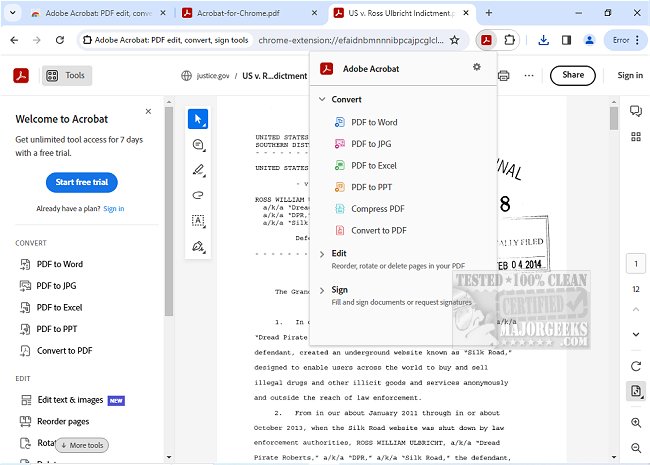
Adobe has released version 26.6.3.0 of Adobe Acrobat for Chrome, an extension that brings a comprehensive suite of PDF tools directly into the browser. This extension allows users to easily view, fill out, comment on, sign, convert, and compress PDF documents without leaving Chrome.
Adobe Acrobat is already well-known for its robust capabilities in handling PDFs, and with this integration, users can enhance their productivity while browsing. The extension provides free features such as the ability to add comments, sticky notes, text, and highlights to PDFs. For those who require more advanced functionalities, premium tools are available, including options to export and import PDFs, create new PDFs, merge multiple PDF documents, organize pages, and reduce file size.
To get started with Adobe Acrobat for Chrome, users simply need to install the extension, pin it for easy access, and then open any PDF document in their browser. From there, they can select the specific Acrobat tool they wish to use. The extension also facilitates downloading and printing PDFs with just a click, and offers cloud storage options for easy access to files from anywhere.
Moreover, users can make use of the PDF editor features to write on documents or add drawings. For filling out forms, Adobe Acrobat for Chrome allows users to complete PDF forms seamlessly and e-sign documents using their signature or initials. This integration not only simplifies PDF management but also streamlines workflows, making it easier to handle documents efficiently.
In summary, Adobe Acrobat for Chrome offers a user-friendly way to manage PDF tasks, providing both free and premium features to enhance the PDF experience in the browser. This latest update continues to position Adobe as a leader in PDF solutions, catering to the needs of both casual users and professionals alike.
As an extension of these capabilities, future updates could potentially include features such as enhanced collaboration tools, improved integration with other document formats, and advanced security options for sensitive documents, further solidifying Adobe Acrobat's position in the digital document space
Adobe Acrobat is already well-known for its robust capabilities in handling PDFs, and with this integration, users can enhance their productivity while browsing. The extension provides free features such as the ability to add comments, sticky notes, text, and highlights to PDFs. For those who require more advanced functionalities, premium tools are available, including options to export and import PDFs, create new PDFs, merge multiple PDF documents, organize pages, and reduce file size.
To get started with Adobe Acrobat for Chrome, users simply need to install the extension, pin it for easy access, and then open any PDF document in their browser. From there, they can select the specific Acrobat tool they wish to use. The extension also facilitates downloading and printing PDFs with just a click, and offers cloud storage options for easy access to files from anywhere.
Moreover, users can make use of the PDF editor features to write on documents or add drawings. For filling out forms, Adobe Acrobat for Chrome allows users to complete PDF forms seamlessly and e-sign documents using their signature or initials. This integration not only simplifies PDF management but also streamlines workflows, making it easier to handle documents efficiently.
In summary, Adobe Acrobat for Chrome offers a user-friendly way to manage PDF tasks, providing both free and premium features to enhance the PDF experience in the browser. This latest update continues to position Adobe as a leader in PDF solutions, catering to the needs of both casual users and professionals alike.
As an extension of these capabilities, future updates could potentially include features such as enhanced collaboration tools, improved integration with other document formats, and advanced security options for sensitive documents, further solidifying Adobe Acrobat's position in the digital document space
Adobe Acrobat for Chrome 26.6.3.0 released
Access Adobe Acrobat PDF tools in Chrome; view, fill, comment, sign, convert, and compress tools available.