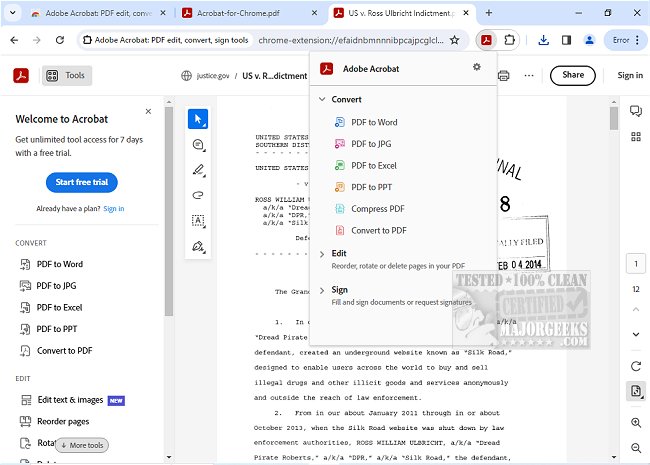
Adobe has released version 26.5.2.0 of Adobe Acrobat for Chrome, enhancing users' ability to manage PDFs directly within their browser. This powerful extension allows users to view, fill, comment on, sign, convert, and compress PDF documents seamlessly while using Google Chrome.
Adobe Acrobat is known for its robust PDF capabilities, making it an essential tool for anyone dealing with PDF files. The Chrome extension provides an enriched PDF viewing experience, enabling users to add comments such as sticky notes, text, and highlights for free. For those seeking advanced functionalities, additional tools are available to export and import PDFs, create new documents, merge multiple PDFs, organize pages, and reduce file sizes.
Using Adobe Acrobat for Chrome is user-friendly; simply install the extension, pin it for easy access, open any PDF, and select the desired tool. This integration not only optimizes PDF viewing but also simplifies common tasks like downloading, printing, and signing documents. Users can store their files online for quick retrieval from any location, providing flexibility in accessing important documents.
Moreover, the extension allows for interactive engagement with PDF content, including adding notes, drawings, and text directly onto documents. Users can also benefit from the Acrobat Reader's form-filling capabilities on their desktop, making it easy to complete forms and e-sign documents with a signature or initials.
In summary, Adobe Acrobat for Chrome streamlines PDF management, offering both basic and advanced features that enhance productivity and collaboration. As the digital workspace continues to evolve, tools like Adobe Acrobat for Chrome play a crucial role in optimizing workflows and improving user experience with PDFs.
Future updates may focus on further integration with cloud services, enhanced collaboration features, and additional editing capabilities, ensuring that users have the most efficient tools at their disposal for managing PDF documents
Adobe Acrobat is known for its robust PDF capabilities, making it an essential tool for anyone dealing with PDF files. The Chrome extension provides an enriched PDF viewing experience, enabling users to add comments such as sticky notes, text, and highlights for free. For those seeking advanced functionalities, additional tools are available to export and import PDFs, create new documents, merge multiple PDFs, organize pages, and reduce file sizes.
Using Adobe Acrobat for Chrome is user-friendly; simply install the extension, pin it for easy access, open any PDF, and select the desired tool. This integration not only optimizes PDF viewing but also simplifies common tasks like downloading, printing, and signing documents. Users can store their files online for quick retrieval from any location, providing flexibility in accessing important documents.
Moreover, the extension allows for interactive engagement with PDF content, including adding notes, drawings, and text directly onto documents. Users can also benefit from the Acrobat Reader's form-filling capabilities on their desktop, making it easy to complete forms and e-sign documents with a signature or initials.
In summary, Adobe Acrobat for Chrome streamlines PDF management, offering both basic and advanced features that enhance productivity and collaboration. As the digital workspace continues to evolve, tools like Adobe Acrobat for Chrome play a crucial role in optimizing workflows and improving user experience with PDFs.
Future updates may focus on further integration with cloud services, enhanced collaboration features, and additional editing capabilities, ensuring that users have the most efficient tools at their disposal for managing PDF documents
Adobe Acrobat for Chrome 26.5.2.0 released
Access Adobe Acrobat PDF tools in Chrome; view, fill, comment, sign, convert, and compress tools available.