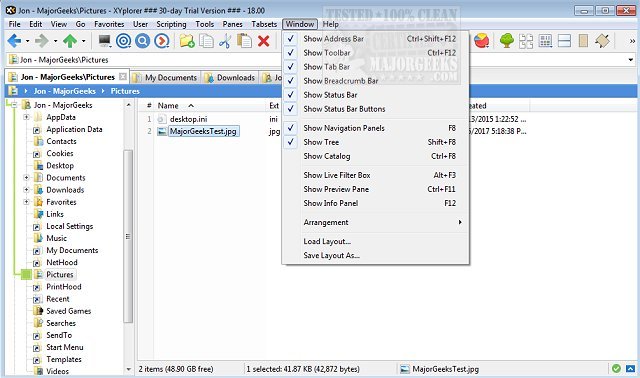
XYplorer has released two versions, 28.40.0300 and 27.20.1600, enhancing its reputation as a powerful tabbed file manager for Windows. Unlike the standard Windows File Explorer, XYplorer offers advanced features that provide users with greater control over file management. It includes tools for dual-pane browsing, comprehensive file searches, batch renaming, duplicate file detection, ZIP file support, file previews, and automation capabilities, all in a fast and customizable interface that can be utilized portably.
What XYplorer Offers:
XYplorer is designed to simplify and enhance everyday file management tasks, addressing the limitations of Windows File Explorer especially when handling extensive file collections. For users managing large volumes of files, such as photos or documents across multiple drives, XYplorer's tabbed interface and dual panes allow for seamless navigation. Users can easily keep folders open in tabs, work side by side with different locations, search through large datasets, and perform batch operations without the hassle of switching between multiple Explorer windows.
Advantages Over Windows File Explorer:
While Windows File Explorer may suffice for basic tasks, users who frequently organize, move, or search for files quickly find its limitations. XYplorer's functionalities—such as maintaining an organized view of files from multiple drives and the ability to preview before moving—make it a superior option for heavy file managers. The added feature of queued file operations is particularly beneficial when dealing with large transfers, reducing the chaos often associated with simultaneous file operations.
Customization and Usability:
XYplorer is highly customizable, catering to both casual users and power users. However, its extensive range of options can appear overwhelming initially. Thankfully, essential features like tabs, dual panes, and batch renaming can be utilized with minimal learning required. Advanced customization and automation features can be explored at the user's pace, making it accessible for those who might not initially need all the capabilities.
Target Audience and Conclusion:
Casual users who only occasionally move files may not find XYplorer necessary. However, for dedicated file managers who frequently encounter the restrictions of Windows File Explorer, XYplorer presents compelling reasons to switch or at least keep it as a supplementary tool. The software is particularly appealing to technicians and users who work across multiple Windows systems due to its portability.
In summary, XYplorer stands out as an efficient, flexible, and powerful file management solution for Windows users, especially those dealing with large quantities of files or in need of advanced organizational tools. Its combination of usability and customization makes it a worthy alternative to traditional file explorers
What XYplorer Offers:
XYplorer is designed to simplify and enhance everyday file management tasks, addressing the limitations of Windows File Explorer especially when handling extensive file collections. For users managing large volumes of files, such as photos or documents across multiple drives, XYplorer's tabbed interface and dual panes allow for seamless navigation. Users can easily keep folders open in tabs, work side by side with different locations, search through large datasets, and perform batch operations without the hassle of switching between multiple Explorer windows.
Advantages Over Windows File Explorer:
While Windows File Explorer may suffice for basic tasks, users who frequently organize, move, or search for files quickly find its limitations. XYplorer's functionalities—such as maintaining an organized view of files from multiple drives and the ability to preview before moving—make it a superior option for heavy file managers. The added feature of queued file operations is particularly beneficial when dealing with large transfers, reducing the chaos often associated with simultaneous file operations.
Customization and Usability:
XYplorer is highly customizable, catering to both casual users and power users. However, its extensive range of options can appear overwhelming initially. Thankfully, essential features like tabs, dual panes, and batch renaming can be utilized with minimal learning required. Advanced customization and automation features can be explored at the user's pace, making it accessible for those who might not initially need all the capabilities.
Target Audience and Conclusion:
Casual users who only occasionally move files may not find XYplorer necessary. However, for dedicated file managers who frequently encounter the restrictions of Windows File Explorer, XYplorer presents compelling reasons to switch or at least keep it as a supplementary tool. The software is particularly appealing to technicians and users who work across multiple Windows systems due to its portability.
In summary, XYplorer stands out as an efficient, flexible, and powerful file management solution for Windows users, especially those dealing with large quantities of files or in need of advanced organizational tools. Its combination of usability and customization makes it a worthy alternative to traditional file explorers
XYplorer 28.40.0300 / 27.20.1600 released
XYplorer is a tabbed file manager for Windows featuring powerful file search, zip support, duplicate file finder and much more.