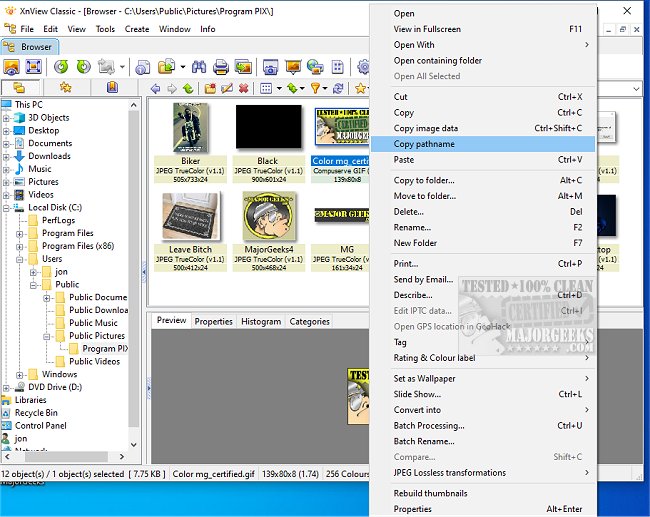
XnView Standard 2.52.6 has recently been released, enhancing its capabilities as a user-friendly tool for viewing, processing, and converting image files. The software supports over 500 image formats, including popular ones like GIF, BMP, JPG, PNG, and multi-page TIFF, while also accommodating various video formats and specialized formats such as Amiga IFF.
The interface of XnView Standard resembles that of Windows Explorer, allowing users to navigate their directories effortlessly and view images in thumbnail format for quick selection. One of the standout features is that it can be executed without installation, making it ideal for creating portable photo albums on CDs. Additionally, it is free for personal use.
Beyond basic image viewing, XnView Standard offers advanced functionalities like webpage creation, contact prints, batch conversions, slide shows, screen capturing, and Twain support for scanners and digital cameras. The software also includes numerous filters and effects for image processing and allows seamless integration with professional graphics programs like Adobe Photoshop through drag-and-drop or clipboard functionalities.
XnView’s built-in file operations, including copying, moving, and directory management, further solidify its position as a versatile tool for graphic handling.
In summary, XnView Standard is a comprehensive image management solution that caters to both casual users and professionals, combining ease of use with a robust set of features designed to enhance productivity and creativity in image processing.
Extension: The latest version may include optimizations for newer operating systems, enhanced user interface elements for a smoother experience, and improved performance metrics for faster image loading and processing. Future updates could potentially introduce even more formats for compatibility, cloud integration for easier sharing and storage, and AI-driven tools to automate basic editing tasks, catering to a growing demand for efficiency in digital image management
The interface of XnView Standard resembles that of Windows Explorer, allowing users to navigate their directories effortlessly and view images in thumbnail format for quick selection. One of the standout features is that it can be executed without installation, making it ideal for creating portable photo albums on CDs. Additionally, it is free for personal use.
Beyond basic image viewing, XnView Standard offers advanced functionalities like webpage creation, contact prints, batch conversions, slide shows, screen capturing, and Twain support for scanners and digital cameras. The software also includes numerous filters and effects for image processing and allows seamless integration with professional graphics programs like Adobe Photoshop through drag-and-drop or clipboard functionalities.
XnView’s built-in file operations, including copying, moving, and directory management, further solidify its position as a versatile tool for graphic handling.
In summary, XnView Standard is a comprehensive image management solution that caters to both casual users and professionals, combining ease of use with a robust set of features designed to enhance productivity and creativity in image processing.
Extension: The latest version may include optimizations for newer operating systems, enhanced user interface elements for a smoother experience, and improved performance metrics for faster image loading and processing. Future updates could potentially introduce even more formats for compatibility, cloud integration for easier sharing and storage, and AI-driven tools to automate basic editing tasks, catering to a growing demand for efficiency in digital image management
XnView Standard 2.52.6 released
XnView Standard is designed to quickly and easily view, process, and convert your image files. All languages and a few add-ons are included.