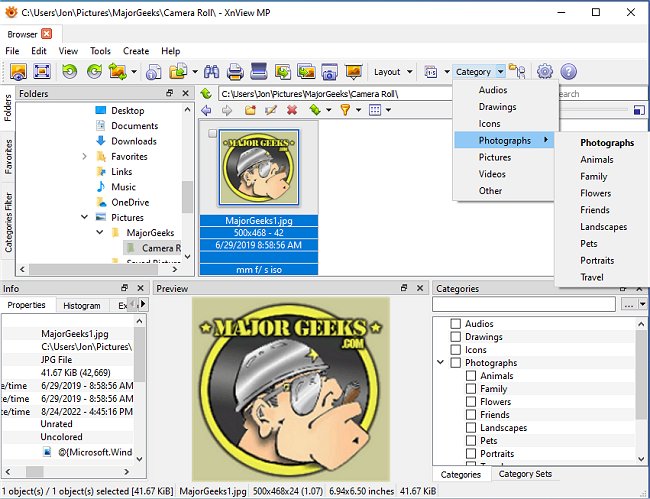
XnView MP version 1.11.7 has been released, offering a robust cross-platform image viewer capable of viewing, converting, organizing, and editing various graphic and video files. It is available for free for personal, educational, and non-profit use, making it an attractive option for many users who appreciate its extensive features, often comparable to those found in paid image viewers.
Supporting over 400 image file formats, XnView MP excels where other image organizers like ACDSee may fall short. It can read numerous audio and video formats and write to 50 different image file formats. Additionally, it supports ICC profiles in JPEG, PNG, and TIFF files, enhancing color management capabilities. Users can view IPTC, Exif, and XMP metadata, although the ability to batch edit IPTC metadata is currently missing, which has been a request from the user community. Another limitation is the inability to sort thumbnails in a user-defined order.
XnView MP also provides powerful search functions, allowing users to find files with identical names or similar graphics, and offers histogram displays for images. With just a few clicks, users can create scripts for batch conversion, manipulation, and renaming of images. The software includes various editing tools for color adjustments, sizing, and applying filters, as well as lossless manipulation of JPEG files.
Advanced slideshow creation is supported, and users can upload images to FTP sites or ImageShack, as well as burn images to CDs or DVDs (with Nero Burning ROM required for the full version).
In summary, XnView MP 1.11.7 stands out as a versatile and powerful tool for anyone needing to manage and edit images and videos, while its free availability for non-commercial use makes it accessible for a wide audience. Future updates could potentially address current limitations, such as batch IPTC editing and improved thumbnail sorting, further enhancing its appeal
Supporting over 400 image file formats, XnView MP excels where other image organizers like ACDSee may fall short. It can read numerous audio and video formats and write to 50 different image file formats. Additionally, it supports ICC profiles in JPEG, PNG, and TIFF files, enhancing color management capabilities. Users can view IPTC, Exif, and XMP metadata, although the ability to batch edit IPTC metadata is currently missing, which has been a request from the user community. Another limitation is the inability to sort thumbnails in a user-defined order.
XnView MP also provides powerful search functions, allowing users to find files with identical names or similar graphics, and offers histogram displays for images. With just a few clicks, users can create scripts for batch conversion, manipulation, and renaming of images. The software includes various editing tools for color adjustments, sizing, and applying filters, as well as lossless manipulation of JPEG files.
Advanced slideshow creation is supported, and users can upload images to FTP sites or ImageShack, as well as burn images to CDs or DVDs (with Nero Burning ROM required for the full version).
In summary, XnView MP 1.11.7 stands out as a versatile and powerful tool for anyone needing to manage and edit images and videos, while its free availability for non-commercial use makes it accessible for a wide audience. Future updates could potentially address current limitations, such as batch IPTC editing and improved thumbnail sorting, further enhancing its appeal
XnView MP 1.11.7 released
XnView MP is a cross-platform image viewer used to view, convert, organize, and edit graphical & video files.