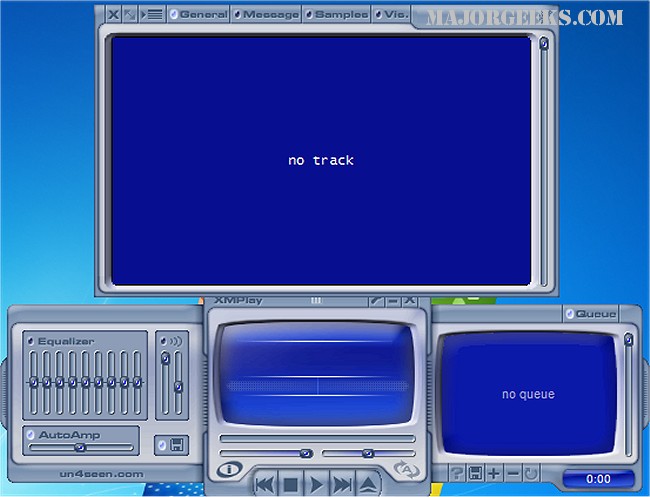
XMPlay version 4.1.0.14 Beta and the final version 4.1 have been released, showcasing this versatile audio player that accommodates a wide array of audio formats, including OGG, MP3, MP2, MP1, WMA, WAV, AIFF, CDA, MO3, and various module formats like IT, XM, S3M, MTM, MOD, and UMX. Additionally, it supports popular playlist formats such as PLS, M3U, ASX, WAX, and CUE, along with ZIP archives. For users looking to expand format compatibility, XMPlay allows the incorporation of Winamp plugins.
Originally launched in 1998 with support solely for the XM format—which inspired its name—XMPlay has evolved significantly, retaining all essential audio player features. Users appreciate its streamlined, organized user interface, which includes multiple visualizations and requires no installation—simply unzip the files to get started.
Key features of XMPlay include 32/24-bit and multi-channel output for high-quality audio playback, gapless playback for seamless listening, crossfading, interpolation, and volume/pan ramping. The player also provides Digital Signal Processing (DSP) capabilities, automatic gain control, and a nine-band equalizer. Users can stream supported file types from servers like Shoutcast and Icecast, as well as scan FTP directories and HTML pages for playable files.
Additional XMPlay functionalities include:
- Track Information: Displays comprehensive file and format details, including instrument/sample texts and allows for webpage opening directly from the track information.
- Title Formatting: Customizable track titles and the ability to update titles from net streams and CUE sheets.
- Library Management: Offers a database for tracks with directory monitoring for easy access.
- Preset Settings: Users can save specific settings for automatic application during playback.
- Disk Writing: Ability to write WAV files of various bit depths and use external encoders for formats like MP3 and OGG.
- Keyboard Shortcuts: Fully customizable shortcuts, including global hotkeys for swift navigation.
- Integration: Seamless opening of files from Windows Explorer, drag-and-drop functionality, and clipboard monitoring for playable URLs.
- Archive Plugins: Support for loading archived files as if they were normal files, including nested archives.
- Unicode Support: Compatibility with various languages, including Russian and Chinese.
- Visualizations: Compatibility with Sonique plugins, full-screen display options, and MOD pattern viewing.
In summary, XMPlay stands out as a comprehensive audio player not only for its extensive format support and ease of use but also for its rich feature set that caters to both casual listeners and audio enthusiasts. As technology continues to evolve, future updates may further enhance its capabilities, potentially including better integration with modern streaming services, improved user interface designs, and expanded support for emerging audio formats
Originally launched in 1998 with support solely for the XM format—which inspired its name—XMPlay has evolved significantly, retaining all essential audio player features. Users appreciate its streamlined, organized user interface, which includes multiple visualizations and requires no installation—simply unzip the files to get started.
Key features of XMPlay include 32/24-bit and multi-channel output for high-quality audio playback, gapless playback for seamless listening, crossfading, interpolation, and volume/pan ramping. The player also provides Digital Signal Processing (DSP) capabilities, automatic gain control, and a nine-band equalizer. Users can stream supported file types from servers like Shoutcast and Icecast, as well as scan FTP directories and HTML pages for playable files.
Additional XMPlay functionalities include:
- Track Information: Displays comprehensive file and format details, including instrument/sample texts and allows for webpage opening directly from the track information.
- Title Formatting: Customizable track titles and the ability to update titles from net streams and CUE sheets.
- Library Management: Offers a database for tracks with directory monitoring for easy access.
- Preset Settings: Users can save specific settings for automatic application during playback.
- Disk Writing: Ability to write WAV files of various bit depths and use external encoders for formats like MP3 and OGG.
- Keyboard Shortcuts: Fully customizable shortcuts, including global hotkeys for swift navigation.
- Integration: Seamless opening of files from Windows Explorer, drag-and-drop functionality, and clipboard monitoring for playable URLs.
- Archive Plugins: Support for loading archived files as if they were normal files, including nested archives.
- Unicode Support: Compatibility with various languages, including Russian and Chinese.
- Visualizations: Compatibility with Sonique plugins, full-screen display options, and MOD pattern viewing.
In summary, XMPlay stands out as a comprehensive audio player not only for its extensive format support and ease of use but also for its rich feature set that caters to both casual listeners and audio enthusiasts. As technology continues to evolve, future updates may further enhance its capabilities, potentially including better integration with modern streaming services, improved user interface designs, and expanded support for emerging audio formats
XMPlay 4.1.0.14 Beta / 4.1 released
XMPlay is an audio player that supports OGG / MP3 / MP2 / MP1 / WMA / WAV / AIFF / CDA / MO3 / IT / XM / S3M / MTM / MOD / UMX audio formats, PLS / M3U / ASX / WAX / CUE playlists, and ZIP archives.