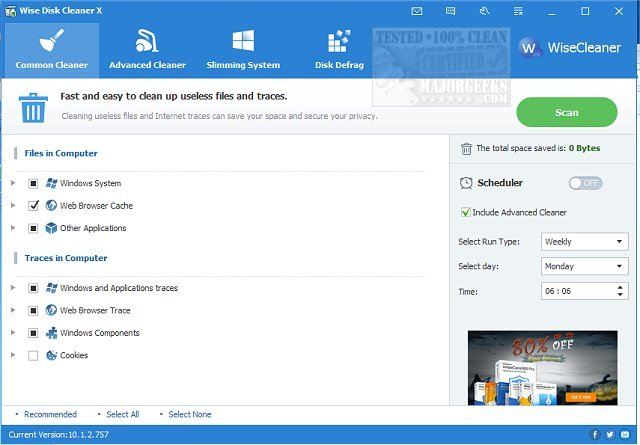
Wise Disk Cleaner has released version 11.3.6.856, a free and user-friendly application designed to help users reclaim disk space and enhance their PC's performance. This tool is particularly beneficial for those whose systems have accumulated unwanted files and clutter over time.
Key Features of Wise Disk Cleaner:
1. Deep Junk File Removal: Effectively eliminates temporary files, system logs, and unnecessary downloads to free up storage.
2. Privacy Protection: Safeguards user privacy by removing browsing history, cookies, and cached data from all major web browsers.
3. Disk Defragmentation & Optimization: Not only clears junk but also reorganizes the disk for improved speed.
4. Customizable Scans: Users can personalize their cleaning preferences while benefiting from quick scan speeds.
5. Scheduled Cleanups: Allows users to automate cleanups on a daily, weekly, or monthly basis, ensuring continuous optimization without manual effort.
Wise Disk Cleaner proves invaluable for various users, from gamers needing to clear cache for new installations to office workers managing large files. Its efficient performance can significantly enhance the user experience, keeping systems running smoothly.
In addition to its primary functions, the software includes a video tutorial to help users navigate its features effectively. The application is lightweight and straightforward, making it a must-have for anyone looking to maintain a fast and clutter-free computing environment.
Geek Verdict: Wise Disk Cleaner stands out as an essential tool for improving PC performance and managing digital clutter. With its powerful cleaning capabilities and privacy features, it’s a worthy addition to any user’s software arsenal. Users are encouraged to download it, perform a scan, and experience the immediate performance boost.
For those interested in comparing options, similar tools such as CCleaner and PrivaZer are also available, and users can explore Windows' built-in Storage Sense feature for automatic junk file deletion
Key Features of Wise Disk Cleaner:
1. Deep Junk File Removal: Effectively eliminates temporary files, system logs, and unnecessary downloads to free up storage.
2. Privacy Protection: Safeguards user privacy by removing browsing history, cookies, and cached data from all major web browsers.
3. Disk Defragmentation & Optimization: Not only clears junk but also reorganizes the disk for improved speed.
4. Customizable Scans: Users can personalize their cleaning preferences while benefiting from quick scan speeds.
5. Scheduled Cleanups: Allows users to automate cleanups on a daily, weekly, or monthly basis, ensuring continuous optimization without manual effort.
Wise Disk Cleaner proves invaluable for various users, from gamers needing to clear cache for new installations to office workers managing large files. Its efficient performance can significantly enhance the user experience, keeping systems running smoothly.
In addition to its primary functions, the software includes a video tutorial to help users navigate its features effectively. The application is lightweight and straightforward, making it a must-have for anyone looking to maintain a fast and clutter-free computing environment.
Geek Verdict: Wise Disk Cleaner stands out as an essential tool for improving PC performance and managing digital clutter. With its powerful cleaning capabilities and privacy features, it’s a worthy addition to any user’s software arsenal. Users are encouraged to download it, perform a scan, and experience the immediate performance boost.
For those interested in comparing options, similar tools such as CCleaner and PrivaZer are also available, and users can explore Windows' built-in Storage Sense feature for automatic junk file deletion
Wise Disk Cleaner 11.3.6.856 released
Wise Disk Cleaner is a free, user-friendly, fast, and easy-to-use application developed to free up disk space. Video tutorial available.