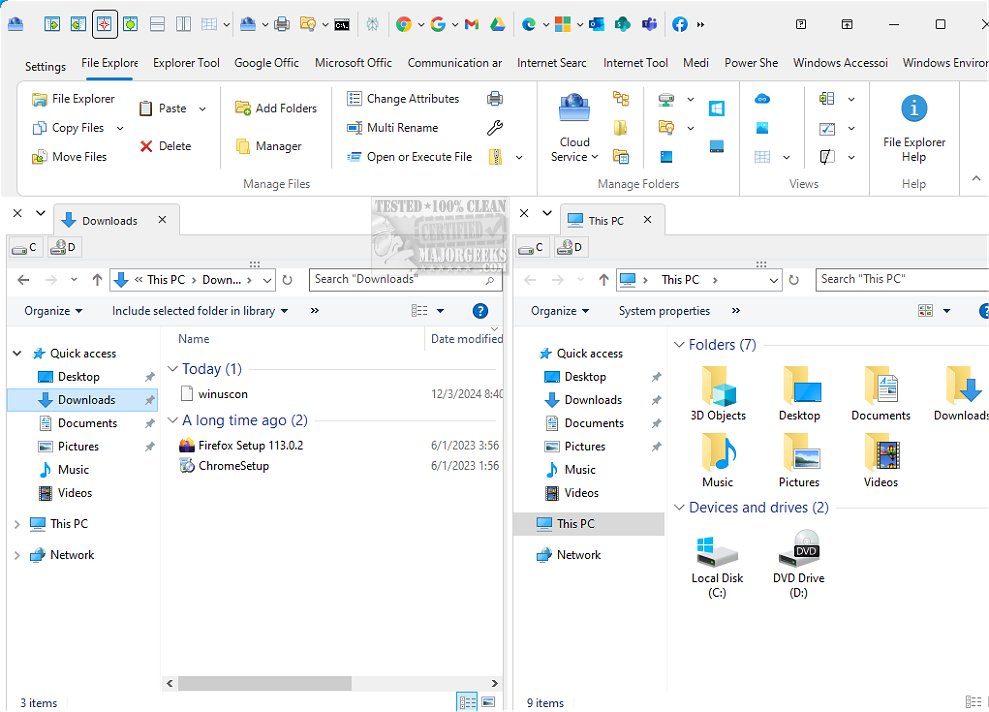
The newly launched Winuscon 13 is designed to significantly enhance your Windows experience by introducing a suite of features that promote efficiency, productivity, and overall optimization of your Windows PC. Initially conceived as a multi-tabbed dual file manager, Winuscon has evolved into a comprehensive tool that streamlines digital tasks for both casual users and professionals alike. Its user-friendly interface and intuitive navigation make file management effortless, positioning it as an essential resource for anyone looking to improve their digital workflow.
Core Features and Functionality
At its core, Winuscon remains a powerful dual file manager, equipped with advanced organizational features that allow users to categorize files based on parameters such as author names and subjects. This capability not only enhances productivity but also contributes to a more organized digital environment. Noteworthy features include:
1. Multi-Tab Functionality: Users can open multiple tabs, enabling them to handle various tasks concurrently while maintaining focus on their workflow.
2. Robust File Organization Tools: Customizable sorting options, batch file operations, and drag-and-drop functionality facilitate efficient file management.
3. Integrated Productivity Tools: Winuscon boasts capabilities for quick file searches, previews, and extensive support for various file formats, further enhancing user efficiency.
4. All-In-One Application: With quick access to Google and Microsoft Office applications, users can work on documents, spreadsheets, and presentations without needing to switch between programs, thereby streamlining their tasks.
5. Chrome-Based Browser: The advanced browser allows for multiple tabs and side-by-side webpage comparisons, making it easier to conduct research or review documents without losing context.
6. Advanced Research Capabilities: Winuscon facilitates online research by saving complex queries and links in a dedicated database for future reference, making it an invaluable tool for researchers and professionals.
7. AI-Powered Search Functionality: By utilizing artificial intelligence based on the Big Five model, Winuscon enhances search results, providing tailored information that maximizes research efficiency.
Additional Features
- Seamless Cloud Integration: Manage both local and cloud files effortlessly in a split-screen setup.
- Multi-Browser TV Wall: Monitor several websites simultaneously across eight browser screens.
- File Rename Tool: Easily rename multiple files based on various criteria.
- Comprehensive Reporting: Generate detailed reports and export them to Excel for organized record-keeping.
- PowerShell Scripting: Automate repetitive tasks with advanced scripting capabilities.
Conclusion
Winuscon 13 is more than a mere tool; it represents a revolutionary approach to managing your Windows experience. With its extensive range of features tailored to boost efficiency and productivity, Winuscon is poised to transform the way users engage with their digital lives. Whether you're a casual user or a professional, Winuscon offers a powerful solution that enhances workflow and simplifies file management. Experience the difference with Winuscon today and elevate your productivity to new heights
Core Features and Functionality
At its core, Winuscon remains a powerful dual file manager, equipped with advanced organizational features that allow users to categorize files based on parameters such as author names and subjects. This capability not only enhances productivity but also contributes to a more organized digital environment. Noteworthy features include:
1. Multi-Tab Functionality: Users can open multiple tabs, enabling them to handle various tasks concurrently while maintaining focus on their workflow.
2. Robust File Organization Tools: Customizable sorting options, batch file operations, and drag-and-drop functionality facilitate efficient file management.
3. Integrated Productivity Tools: Winuscon boasts capabilities for quick file searches, previews, and extensive support for various file formats, further enhancing user efficiency.
4. All-In-One Application: With quick access to Google and Microsoft Office applications, users can work on documents, spreadsheets, and presentations without needing to switch between programs, thereby streamlining their tasks.
5. Chrome-Based Browser: The advanced browser allows for multiple tabs and side-by-side webpage comparisons, making it easier to conduct research or review documents without losing context.
6. Advanced Research Capabilities: Winuscon facilitates online research by saving complex queries and links in a dedicated database for future reference, making it an invaluable tool for researchers and professionals.
7. AI-Powered Search Functionality: By utilizing artificial intelligence based on the Big Five model, Winuscon enhances search results, providing tailored information that maximizes research efficiency.
Additional Features
- Seamless Cloud Integration: Manage both local and cloud files effortlessly in a split-screen setup.
- Multi-Browser TV Wall: Monitor several websites simultaneously across eight browser screens.
- File Rename Tool: Easily rename multiple files based on various criteria.
- Comprehensive Reporting: Generate detailed reports and export them to Excel for organized record-keeping.
- PowerShell Scripting: Automate repetitive tasks with advanced scripting capabilities.
Conclusion
Winuscon 13 is more than a mere tool; it represents a revolutionary approach to managing your Windows experience. With its extensive range of features tailored to boost efficiency and productivity, Winuscon is poised to transform the way users engage with their digital lives. Whether you're a casual user or a professional, Winuscon offers a powerful solution that enhances workflow and simplifies file management. Experience the difference with Winuscon today and elevate your productivity to new heights
Winuscon 13 released
Winuscon improves your Windows experience with features that help you work more efficiently, boost your productivity, and make the most of your Windows PC.