WinTools.one version 26.5.1 has been released, enhancing its role as a comprehensive system maintenance and cleanup solution. The software includes various diagnostic tools that assess computer performance and pinpoint areas for improvement, ultimately optimizing system functionality for a smoother user experience.
Overview of WinTools.one
WinTools.one is crafted to assist users in managing critical components of their computer, such as files, folders, the system registry, and startup items. It effectively addresses common system issues and errors, freeing up storage space and contributing to a more responsive PC environment.
Editions
WinTools.one is available in two editions: Home and Professional. The Professional edition encompasses all features of the Home edition, with added tools like a duplicate file manager and enhanced options in the 'Tweaker' section.
Key Features
The suite includes an array of tools:
- Clean Uninstaller
- Scan Folders
- Scan Files
- Scan Shortcuts
- Scan Registry
- Objects Eraser
- Startup Manager
- Duplicate Files Manager
- File Encryptor
- File Shredder
- Extra Disks Management
- System Tweaker (which provides numerous additional settings and fixes)
User-Friendly Interface
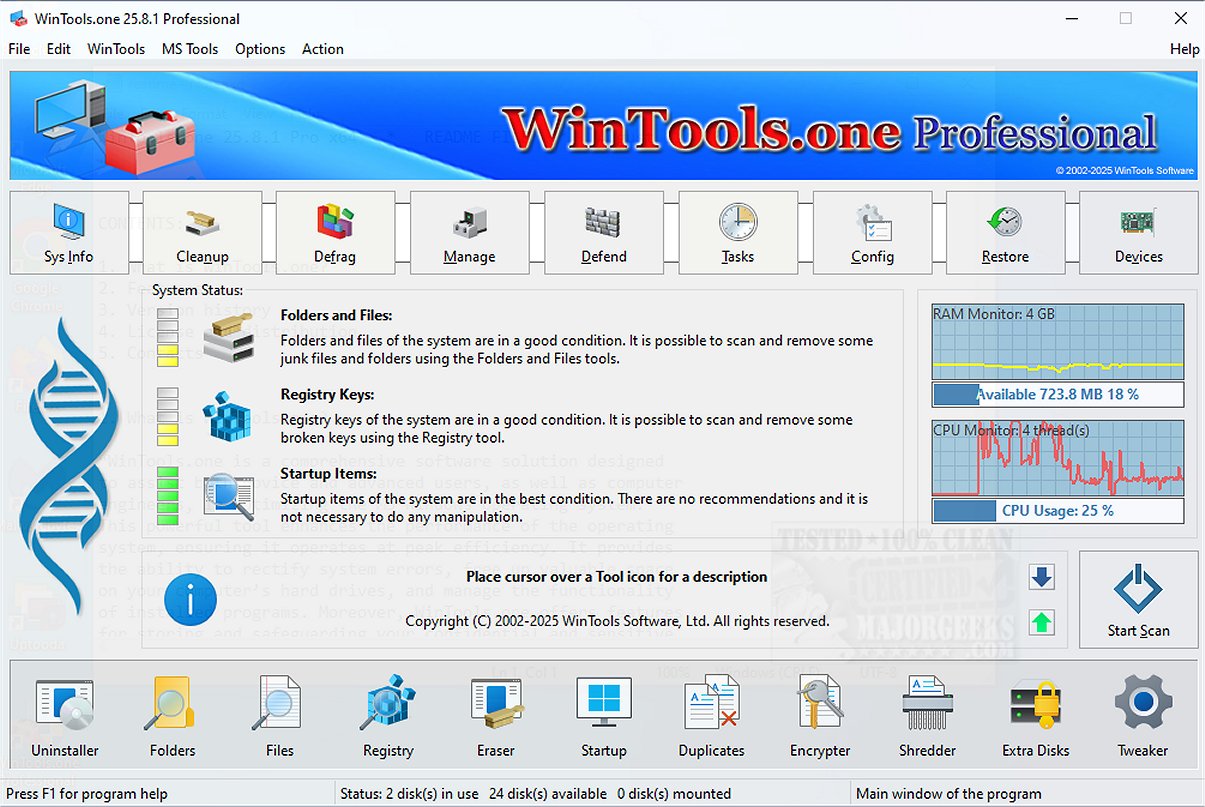
The main interface offers a straightforward system diagnostic that evaluates the status of files, folders, registry keys, and startup items, presenting actionable suggestions based on its findings. Users can initiate a comprehensive analysis with a single click, targeting temporary files, Windows logs, web caches, drivers, and more to identify unnecessary data.
Built-In Maintenance Tools
WinTools.one incorporates built-in maintenance tools, including a reliable uninstaller for safely removing unwanted applications, along with file and folder scanners that help eliminate unnecessary data and fix invalid shortcuts. The registry scanner enhances system performance by cleaning up the registry, while the startup manager optimizes boot and startup times. Additional features like a file eraser, shredder, and duplicate file manager further contribute to enhanced overall system performance.
Customization Options
One of the standout offerings of WinTools.one is its Tweaker section, which provides options for system customization, network fixing, driver management, and various other tools that empower users to take control of their Windows environment.
Conclusion
In summary, WinTools.one serves as an all-in-one toolbox for system cleanup, file management, startup optimization, and customization, making it an invaluable resource for both everyday users and advanced users alike. The Professional edition caters to those requiring more sophisticated tools, while the Home edition is well-equipped to address the needs of typical computer users.
Future Considerations
As technology continues to evolve, future updates of WinTools.one could potentially include features like cloud integration for file management, enhanced AI-driven diagnostics for smarter performance recommendations, and improved user interfaces that cater to accessibility needs. Such advancements would further solidify WinTools.one's position as a leading solution in system maintenance and optimization
Overview of WinTools.one
WinTools.one is crafted to assist users in managing critical components of their computer, such as files, folders, the system registry, and startup items. It effectively addresses common system issues and errors, freeing up storage space and contributing to a more responsive PC environment.
Editions
WinTools.one is available in two editions: Home and Professional. The Professional edition encompasses all features of the Home edition, with added tools like a duplicate file manager and enhanced options in the 'Tweaker' section.
Key Features
The suite includes an array of tools:
- Clean Uninstaller
- Scan Folders
- Scan Files
- Scan Shortcuts
- Scan Registry
- Objects Eraser
- Startup Manager
- Duplicate Files Manager
- File Encryptor
- File Shredder
- Extra Disks Management
- System Tweaker (which provides numerous additional settings and fixes)
User-Friendly Interface
The main interface offers a straightforward system diagnostic that evaluates the status of files, folders, registry keys, and startup items, presenting actionable suggestions based on its findings. Users can initiate a comprehensive analysis with a single click, targeting temporary files, Windows logs, web caches, drivers, and more to identify unnecessary data.
Built-In Maintenance Tools
WinTools.one incorporates built-in maintenance tools, including a reliable uninstaller for safely removing unwanted applications, along with file and folder scanners that help eliminate unnecessary data and fix invalid shortcuts. The registry scanner enhances system performance by cleaning up the registry, while the startup manager optimizes boot and startup times. Additional features like a file eraser, shredder, and duplicate file manager further contribute to enhanced overall system performance.
Customization Options
One of the standout offerings of WinTools.one is its Tweaker section, which provides options for system customization, network fixing, driver management, and various other tools that empower users to take control of their Windows environment.
Conclusion
In summary, WinTools.one serves as an all-in-one toolbox for system cleanup, file management, startup optimization, and customization, making it an invaluable resource for both everyday users and advanced users alike. The Professional edition caters to those requiring more sophisticated tools, while the Home edition is well-equipped to address the needs of typical computer users.
Future Considerations
As technology continues to evolve, future updates of WinTools.one could potentially include features like cloud integration for file management, enhanced AI-driven diagnostics for smarter performance recommendations, and improved user interfaces that cater to accessibility needs. Such advancements would further solidify WinTools.one's position as a leading solution in system maintenance and optimization
WinTools.one 26.5.1 released
WinTools.one is a comprehensive system maintenance and cleanup solution that includes a range of diagnostic tools that evaluate your computer's performance, identifying areas for improvement. Additionally, it offers effective solutions to optimize the functionality of your system, ensuring it runs smoothly.