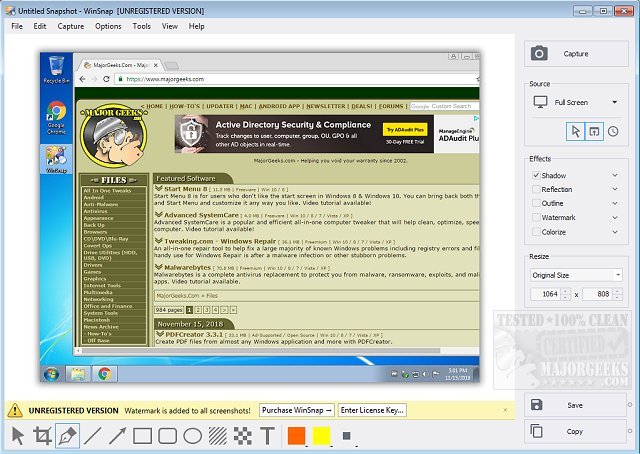
WinSnap 6.2.3 has been released, offering a versatile tool for capturing and editing screenshots. This utility simplifies the process of taking screenshots and editing them by automating tasks that traditionally required more complex software like Photoshop. Originally, WinSnap was tailored for capturing non-rectangular windows, including those with unique visual styles or skinned applications.
The latest version has been enhanced with professional features such as advanced shadow effects, color adjustments, and canvas transformations. Users can also save their images in various formats automatically, which streamlines the workflow significantly.
Key features of WinSnap include:
- Flexible screen capture options
- Professional shadow effects and robust image processing capabilities
- Basic transformations for the canvas
- Aero Glass capture that supports shadows and transparency
- Support for alpha-channel and PNG transparency
With these features, WinSnap caters to both casual users and professionals, making it an ideal choice for anyone needing to create high-quality screenshots efficiently. Future updates may further enhance functionality, including additional image editing tools and support for more file formats, broadening its appeal even more
The latest version has been enhanced with professional features such as advanced shadow effects, color adjustments, and canvas transformations. Users can also save their images in various formats automatically, which streamlines the workflow significantly.
Key features of WinSnap include:
- Flexible screen capture options
- Professional shadow effects and robust image processing capabilities
- Basic transformations for the canvas
- Aero Glass capture that supports shadows and transparency
- Support for alpha-channel and PNG transparency
With these features, WinSnap caters to both casual users and professionals, making it an ideal choice for anyone needing to create high-quality screenshots efficiently. Future updates may further enhance functionality, including additional image editing tools and support for more file formats, broadening its appeal even more
WinSnap 6.2.3 released
WinSnap is a small enhancement utility for taking and editing screenshots.