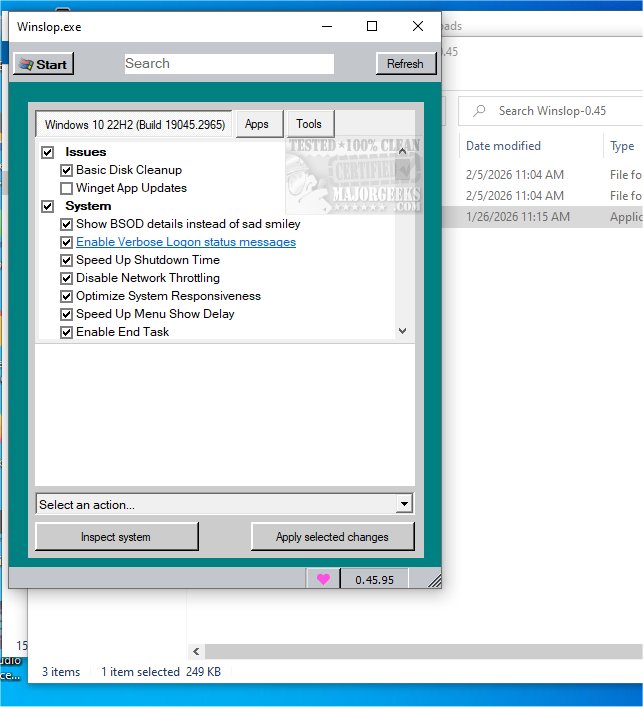
Winslopr is a cutting-edge, lightweight utility for Windows, developed by the creator of Flyoobe and Crapfixer. This tool is specifically designed to eliminate unnecessary system clutter, commonly referred to as "slop," which can hinder your operating system's performance and limit user control.
Understanding Slop
"Slop" encompasses low-value system components that are often pre-installed and add little functional value. These components consume system resources and can negatively impact user efficiency by restricting overall control.
Core Functionality
The primary objective of Winslopr is to streamline system functionality, minimize distractions, and provide users with clear, direct information. It operates entirely offline, avoiding reliance on cloud services, virtual assistants, or complex algorithms. This local approach allows users to easily reverse any changes if desired.
Winslopr simplifies routine system maintenance while optimizing performance by removing forced, opaque, and redundant features without compromising the Windows operating system's core integrity. It diverges from many maintenance tools by offering a focused, localized version of the previously popular CrapFixer, allowing users to review changes before finalization and revert actions when necessary.
Emphasis on Localization
Winslopr distinguishes itself through its emphasis on localization, a feature that was not fully realized in its predecessor. The tool's smaller codebase anticipates future localization enhancements, ensuring it caters better to diverse user needs while delivering essential functionalities without superfluous additions.
Offline Operation and User Privacy
A standout feature of Winslopr is its complete offline functionality, prioritizing user privacy and security. This makes it an excellent choice for those seeking a cleaner and straightforward Windows experience. Winslopr effectively:
- Removes slop
- Reduces slop
- Makes slop visible
- Restores control to the user
User-Friendly Interface
Winslopr is ideal for users looking for a streamlined, user-centric approach to system management, with an intuitive interface and robust capabilities that facilitate the maintenance of a clean and efficient computing environment.
Not Anti-AI or Windows
Winslopr takes a constructive approach to software usage, actively simplifying complexity without opposing Windows or AI technologies.
Transparency and Control Over Changes
Winslopr provides users with a detailed outline of the specific changes it plans to implement, requiring manual initiation for each action. This ensures complete user control over modifications, with an easy option to revert any changes if desired. This transparency fosters user confidence in managing their system effectively.
Conclusion: Geek Verdict
Winslopr empowers users to streamline their systems, eliminate bloatware, and manage default telemetry settings effortlessly. With just a few clicks, users can transform their computers into lean, responsive machines, discarding unnecessary features and applications for a more efficient computing experience.
Important Note: Unofficial Domain Alert
The creator, Belim, clarifies that he does not own or operate "winslop.com" and is not affiliated with the individual who registered it. Users are advised to exercise caution as third-party domains can change at any time, potentially leading to phishing or malware risks.
Additional Resources
- Comparison of Drive Cleaners: CCleaner vs. Wise Disk Cleaner vs. PrivaZer
- Instructions on using Storage Sense to automatically delete junk files in Windows 10 & 11
- Guidelines for securely deleting files in Windows using PowerShell and Cipher
- Steps for backing up or restoring the Windows Registry
In summary, Winslopr 26.06.01 is a significant utility that enhances Windows system performance by addressing the clutter that slows down productivity, while also prioritizing user control and privacy
Understanding Slop
"Slop" encompasses low-value system components that are often pre-installed and add little functional value. These components consume system resources and can negatively impact user efficiency by restricting overall control.
Core Functionality
The primary objective of Winslopr is to streamline system functionality, minimize distractions, and provide users with clear, direct information. It operates entirely offline, avoiding reliance on cloud services, virtual assistants, or complex algorithms. This local approach allows users to easily reverse any changes if desired.
Winslopr simplifies routine system maintenance while optimizing performance by removing forced, opaque, and redundant features without compromising the Windows operating system's core integrity. It diverges from many maintenance tools by offering a focused, localized version of the previously popular CrapFixer, allowing users to review changes before finalization and revert actions when necessary.
Emphasis on Localization
Winslopr distinguishes itself through its emphasis on localization, a feature that was not fully realized in its predecessor. The tool's smaller codebase anticipates future localization enhancements, ensuring it caters better to diverse user needs while delivering essential functionalities without superfluous additions.
Offline Operation and User Privacy
A standout feature of Winslopr is its complete offline functionality, prioritizing user privacy and security. This makes it an excellent choice for those seeking a cleaner and straightforward Windows experience. Winslopr effectively:
- Removes slop
- Reduces slop
- Makes slop visible
- Restores control to the user
User-Friendly Interface
Winslopr is ideal for users looking for a streamlined, user-centric approach to system management, with an intuitive interface and robust capabilities that facilitate the maintenance of a clean and efficient computing environment.
Not Anti-AI or Windows
Winslopr takes a constructive approach to software usage, actively simplifying complexity without opposing Windows or AI technologies.
Transparency and Control Over Changes
Winslopr provides users with a detailed outline of the specific changes it plans to implement, requiring manual initiation for each action. This ensures complete user control over modifications, with an easy option to revert any changes if desired. This transparency fosters user confidence in managing their system effectively.
Conclusion: Geek Verdict
Winslopr empowers users to streamline their systems, eliminate bloatware, and manage default telemetry settings effortlessly. With just a few clicks, users can transform their computers into lean, responsive machines, discarding unnecessary features and applications for a more efficient computing experience.
Important Note: Unofficial Domain Alert
The creator, Belim, clarifies that he does not own or operate "winslop.com" and is not affiliated with the individual who registered it. Users are advised to exercise caution as third-party domains can change at any time, potentially leading to phishing or malware risks.
Additional Resources
- Comparison of Drive Cleaners: CCleaner vs. Wise Disk Cleaner vs. PrivaZer
- Instructions on using Storage Sense to automatically delete junk files in Windows 10 & 11
- Guidelines for securely deleting files in Windows using PowerShell and Cipher
- Steps for backing up or restoring the Windows Registry
In summary, Winslopr 26.06.01 is a significant utility that enhances Windows system performance by addressing the clutter that slows down productivity, while also prioritizing user control and privacy
Winslopr 26.06.01 released
Winslopr is an innovative lightweight utility for Windows, developed by the creator of Flyoobe and Crapfixer. This tool is designed to eliminate unnecessary system clutter, often referred to as "slop," that can degrade your operating system's performance and reduce user control.