WinRAR 7.23 has recently been released, continuing its legacy as a top-tier program for managing ZIP and RAR files. With a history spanning several decades, WinRAR stands out not just as a file archiver, but as a reliable tool that efficiently compresses, extracts, and manages various archive formats, including ZIP, RAR, 7Z, TAR, and more.
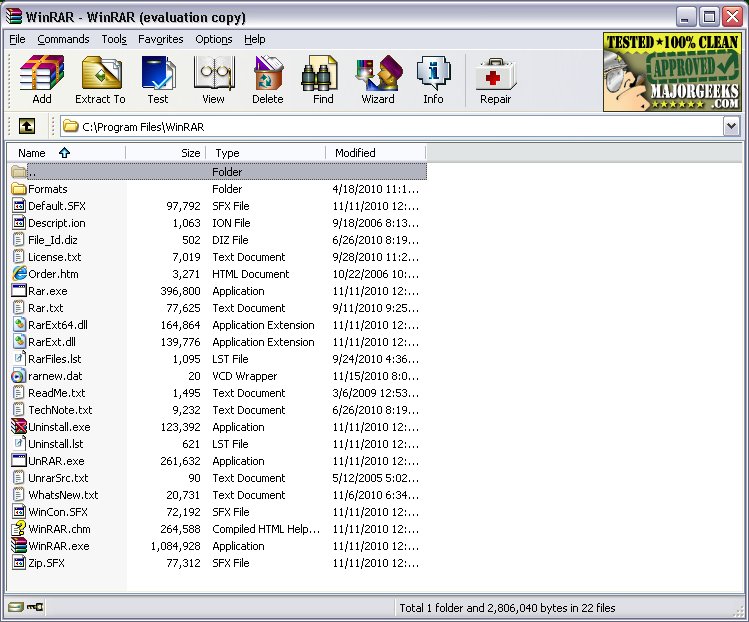
The interface of WinRAR remains largely unchanged, which many users find appealing. It provides straightforward access to essential features such as creating or extracting archives, splitting files, encrypting data with passwords, and scanning for viruses before unpacking. WinRAR's capabilities include:
- Extracting a multitude of archive formats like RAR, ZIP, ISO, and more.
- Compressing files into RAR or ZIP formats, which is useful for saving disk space or for email purposes.
- Splitting large files into smaller, manageable parts.
- Encrypting files with AES-256 for enhanced security.
- Adding recovery records to repair damaged archives, a crucial feature for those handling large backups or software distributions.
The latest updates to WinRAR enhance its file format support, fix bugs, and improve performance, making it even more versatile. While many users primarily work with RAR and ZIP formats, the tool's ability to handle newer compression methods and quicker unpacking processes adds to its utility. Notably, the trial version of WinRAR does not expire, allowing users to continue utilizing the software indefinitely, although purchasing a license is encouraged to support development.
Pros and Cons of WinRAR:
Pros:
- Fast and reliable compression and extraction
- Extensive support for various archive formats
- Built-in password protection and file repair features
- Ability to create self-extracting archives (SFX)
- Compatibility with all Windows versions, including Windows 11
Cons:
- The interface may feel outdated to some, although others appreciate its simplicity
- While not technically freeware, it can be used indefinitely
- Limited support for newer formats like Zstandard without additional plugins
Real-World Applications:
For instance, if you have a large collection of game mod files totaling 10GB, WinRAR allows you to compress them, split the archive into 1GB segments, and apply password protection—all in a few clicks. Similarly, for sensitive documents like tax records, you can encrypt them and keep everything organized in one secure file.
Final Thoughts:
Despite its lack of flashy features, WinRAR remains one of the best archive managers available for Windows, offering reliability for users needing to compress, encrypt, and organize files. Whether for work, gaming, or simply managing clutter on a drive, WinRAR proves its ongoing value as a practical tool. While users may also consider alternatives like 7-Zip, WinRAR's combination of performance and functionality keeps it at the forefront of file management solutions.
In summary, WinRAR continues to be a crucial tool for anyone dealing with file compression and extraction, and with each update, it enhances its capabilities to meet user needs effectively
The interface of WinRAR remains largely unchanged, which many users find appealing. It provides straightforward access to essential features such as creating or extracting archives, splitting files, encrypting data with passwords, and scanning for viruses before unpacking. WinRAR's capabilities include:
- Extracting a multitude of archive formats like RAR, ZIP, ISO, and more.
- Compressing files into RAR or ZIP formats, which is useful for saving disk space or for email purposes.
- Splitting large files into smaller, manageable parts.
- Encrypting files with AES-256 for enhanced security.
- Adding recovery records to repair damaged archives, a crucial feature for those handling large backups or software distributions.
The latest updates to WinRAR enhance its file format support, fix bugs, and improve performance, making it even more versatile. While many users primarily work with RAR and ZIP formats, the tool's ability to handle newer compression methods and quicker unpacking processes adds to its utility. Notably, the trial version of WinRAR does not expire, allowing users to continue utilizing the software indefinitely, although purchasing a license is encouraged to support development.
Pros and Cons of WinRAR:
Pros:
- Fast and reliable compression and extraction
- Extensive support for various archive formats
- Built-in password protection and file repair features
- Ability to create self-extracting archives (SFX)
- Compatibility with all Windows versions, including Windows 11
Cons:
- The interface may feel outdated to some, although others appreciate its simplicity
- While not technically freeware, it can be used indefinitely
- Limited support for newer formats like Zstandard without additional plugins
Real-World Applications:
For instance, if you have a large collection of game mod files totaling 10GB, WinRAR allows you to compress them, split the archive into 1GB segments, and apply password protection—all in a few clicks. Similarly, for sensitive documents like tax records, you can encrypt them and keep everything organized in one secure file.
Final Thoughts:
Despite its lack of flashy features, WinRAR remains one of the best archive managers available for Windows, offering reliability for users needing to compress, encrypt, and organize files. Whether for work, gaming, or simply managing clutter on a drive, WinRAR proves its ongoing value as a practical tool. While users may also consider alternatives like 7-Zip, WinRAR's combination of performance and functionality keeps it at the forefront of file management solutions.
In summary, WinRAR continues to be a crucial tool for anyone dealing with file compression and extraction, and with each update, it enhances its capabilities to meet user needs effectively
WinRAR 7.23 released
WinRAR is an excellent program for opening, creating, extracting, or adding files to your ZIP and RAR files.