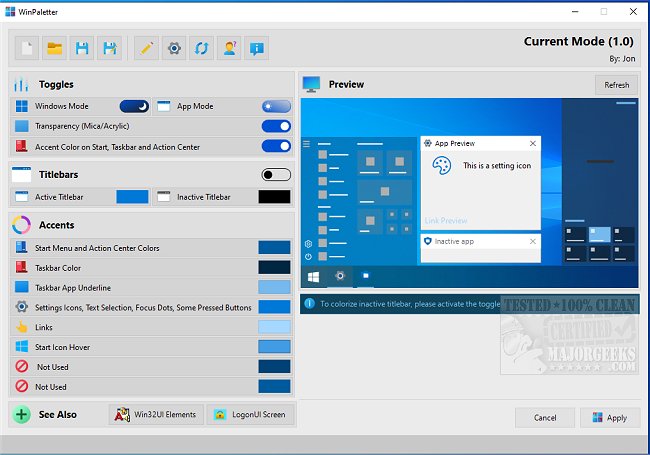
WinPaletter version 1.0.9.9 Beta / 1.0.9.7 has been released, offering users an intuitive tool for customizing the color accents of Windows 10 and 11. This software allows for a high degree of personalization, enabling users to change nearly every visual aspect of their desktop environment with ease. The modern interface displays various options for altering colors in title bars, accents, and additional elements, and users can preview changes before applying them to ensure cohesive color schemes.
Accent colors are managed within the Windows registry, with some stored as arrays and others as individual key values. WinPaletter simplifies the process of modifying these elements, allowing users to save their color combinations as theme files. This feature is particularly useful for those who may want to create multiple themes tailored for different tasks or preferences. Furthermore, the application aims to enhance accessibility by providing options for better contrast, catering to users with vision impairments.
Overall, WinPaletter serves as a valuable resource for anyone looking to enhance the aesthetics of their Windows system, making it user-friendly for all skill levels.
In addition to its core features, future updates could potentially introduce more advanced customization options, such as the ability to create animated themes or support for more extensive integration with third-party applications. Furthermore, expanding the library of pre-designed themes could inspire users and streamline the personalization process. As Windows continues to evolve, tools like WinPaletter will likely remain essential for those seeking to optimize their user experience
Accent colors are managed within the Windows registry, with some stored as arrays and others as individual key values. WinPaletter simplifies the process of modifying these elements, allowing users to save their color combinations as theme files. This feature is particularly useful for those who may want to create multiple themes tailored for different tasks or preferences. Furthermore, the application aims to enhance accessibility by providing options for better contrast, catering to users with vision impairments.
Overall, WinPaletter serves as a valuable resource for anyone looking to enhance the aesthetics of their Windows system, making it user-friendly for all skill levels.
In addition to its core features, future updates could potentially introduce more advanced customization options, such as the ability to create animated themes or support for more extensive integration with third-party applications. Furthermore, expanding the library of pre-designed themes could inspire users and streamline the personalization process. As Windows continues to evolve, tools like WinPaletter will likely remain essential for those seeking to optimize their user experience
WinPaletter 1.0.9.9 Beta / 1.0.9.7 released
WinPaletter enables you to colorize Windows 10 and 11 accents without restrictions from an easy-to-use interface.