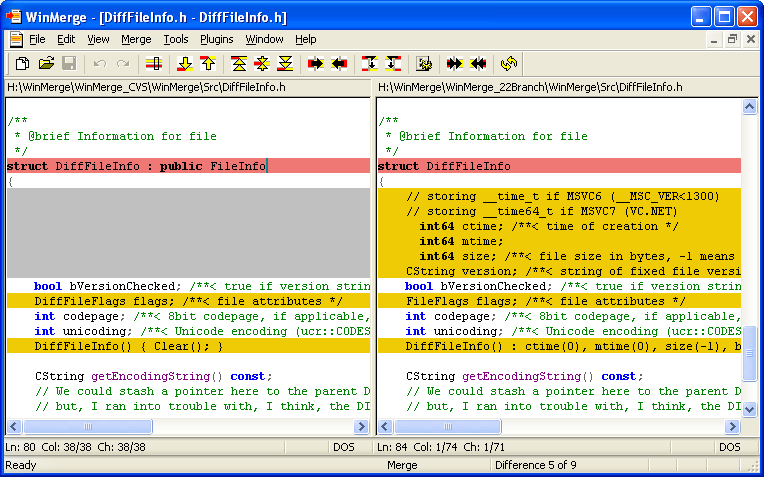
WinMerge has released a pre-release version 2.16.57 and a stable version 2.16.56.2 of its software. WinMerge is an open-source tool designed for visually comparing and merging text files on Windows systems. This software is particularly useful for identifying changes across different versions of projects and merging those changes effectively.
Some of the key features of WinMerge include:
- Visual comparison and merging of text files.
- A flexible editor that supports syntax highlighting.
- Compatibility with DOS, UNIX, and MAC text file formats.
- Unicode support for diverse text encoding.
- A dedicated difference pane that displays current discrepancies between files in a side-by-side format.
- A location pane that provides a map of the compared files.
- Highlighting of differences within lines of text.
- File filtering capabilities in directory comparisons.
- Detection of moved lines during file comparisons.
- Integration with the Windows shell for easy access.
- Basic integration with Visual SourceSafe and Rational ClearCase.
- Support for archive files using 7-Zip.
- Extensibility through plugins.
- A localizable interface that can be customized via resource DLLs.
- Comprehensive HTML-based manual for user guidance.
Additionally, users may find related topics such as how to add an 'Open With Notepad' context menu, how to install or uninstall Microsoft WordPad in Windows 10 & 11, and how to run, use, and reset WordPad in these operating systems helpful.
Overall, WinMerge serves as a powerful tool for developers and anyone needing to manage text file changes with efficiency and clarity. Its robust feature set makes it suitable for various programming and documentation tasks, enhancing productivity and collaboration among teams
Some of the key features of WinMerge include:
- Visual comparison and merging of text files.
- A flexible editor that supports syntax highlighting.
- Compatibility with DOS, UNIX, and MAC text file formats.
- Unicode support for diverse text encoding.
- A dedicated difference pane that displays current discrepancies between files in a side-by-side format.
- A location pane that provides a map of the compared files.
- Highlighting of differences within lines of text.
- File filtering capabilities in directory comparisons.
- Detection of moved lines during file comparisons.
- Integration with the Windows shell for easy access.
- Basic integration with Visual SourceSafe and Rational ClearCase.
- Support for archive files using 7-Zip.
- Extensibility through plugins.
- A localizable interface that can be customized via resource DLLs.
- Comprehensive HTML-based manual for user guidance.
Additionally, users may find related topics such as how to add an 'Open With Notepad' context menu, how to install or uninstall Microsoft WordPad in Windows 10 & 11, and how to run, use, and reset WordPad in these operating systems helpful.
Overall, WinMerge serves as a powerful tool for developers and anyone needing to manage text file changes with efficiency and clarity. Its robust feature set makes it suitable for various programming and documentation tasks, enhancing productivity and collaboration among teams
WinMerge 2.16.57 Pre-Release / 2.16.56.2 released
WinMerge is an Open Source visual text file differentiating and merging tool for Windows.
WinMerge 2.16.57 Pre-Release / 2.16.56.2 released @ MajorGeeks