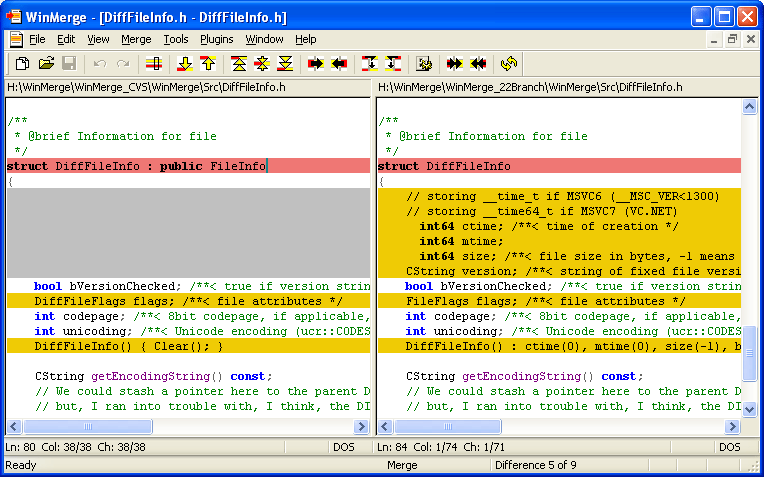
WinMerge has announced the release of version 2.16.56.2, enhancing its capabilities as an Open Source visual differentiation and merging tool tailored for Windows users. This software is particularly useful for developers and project managers who need to track changes across different versions of files, enabling efficient merging of those changes.
Key features of WinMerge include:
- Visual differentiation and merging of text files, allowing users to easily see variations.
- A flexible editor equipped with syntax highlighting for better readability.
- Compatibility with various text file formats including DOS, UNIX, and MAC.
- Unicode support to handle diverse character sets.
- A Difference pane that displays discrepancies between two files in a side-by-side format.
- A Location pane that acts as a map of the compared files.
- Enhanced line highlighting to pinpoint differences within the same line.
- Directory comparison with file filters.
- Detection of moved lines during file comparisons.
- Integration with the Windows shell for ease of access.
- Basic compatibility with Visual SourceSafe and Rational ClearCase for version control.
- Support for archive files through 7-Zip.
- An extensible plugin system for added functionality.
- A localizable interface through resource DLLs.
- Comprehensive documentation available in HTML format.
As WinMerge continues to evolve, it remains an essential tool for anyone involved in file management, version control, or collaborative projects. Its continual updates ensure users benefit from the latest features and improvements, making it a reliable choice in the realm of text file comparison and merging tools.
For users seeking related functionalities, tutorials on adding context menu options for Notepad, or guidance on installing and using Microsoft WordPad in Windows 10 and 11 are also available
Key features of WinMerge include:
- Visual differentiation and merging of text files, allowing users to easily see variations.
- A flexible editor equipped with syntax highlighting for better readability.
- Compatibility with various text file formats including DOS, UNIX, and MAC.
- Unicode support to handle diverse character sets.
- A Difference pane that displays discrepancies between two files in a side-by-side format.
- A Location pane that acts as a map of the compared files.
- Enhanced line highlighting to pinpoint differences within the same line.
- Directory comparison with file filters.
- Detection of moved lines during file comparisons.
- Integration with the Windows shell for ease of access.
- Basic compatibility with Visual SourceSafe and Rational ClearCase for version control.
- Support for archive files through 7-Zip.
- An extensible plugin system for added functionality.
- A localizable interface through resource DLLs.
- Comprehensive documentation available in HTML format.
As WinMerge continues to evolve, it remains an essential tool for anyone involved in file management, version control, or collaborative projects. Its continual updates ensure users benefit from the latest features and improvements, making it a reliable choice in the realm of text file comparison and merging tools.
For users seeking related functionalities, tutorials on adding context menu options for Notepad, or guidance on installing and using Microsoft WordPad in Windows 10 and 11 are also available
WinMerge 2.16.56.2 released
WinMerge is an Open Source visual text file differentiating and merging tool for Windows.