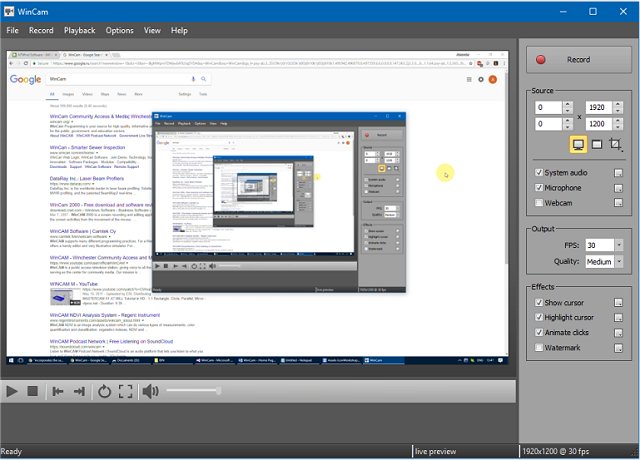
WinCam 4.1 has been released as an efficient and user-friendly screen recording software. It allows users to capture video from applications, the entire desktop, or specific sections of the screen, all while maintaining a high frame rate of up to 60 frames per second. This ensures that even the smallest details are captured accurately. The software leverages hardware acceleration to facilitate real-time video rendering and encoding, making the recording process seamless for users.
Designed to be straightforward, WinCam is packed with features such as recording video tutorials, saving Skype calls, real-time media capture, and creating visual content with ease. Users can select their desired video source and apply effects before simply clicking the Record button to start capturing.
In addition to its recording capabilities, WinCam includes basic video editing tools that allow users to manage their recordings effectively. By double-clicking the timeline or using the toolbar buttons, users can easily set start and end times for their videos.
Beyond its core functionalities, WinCam 4.1 could offer additional features in future updates, such as enhanced editing options, integration with popular streaming platforms, or advanced sharing capabilities to further streamline the content creation process. As screen recording becomes increasingly essential for online learning, gaming, and business communication, WinCam positions itself as a valuable tool for users looking to create high-quality video content effortlessly.
Similar resources for users looking to enhance their experience with Windows include guides on taking screenshots, restoring the Windows Photo Viewer, and editing videos with the Microsoft Photo App, as well as tips on managing the thumbnail cache in Windows 10
Designed to be straightforward, WinCam is packed with features such as recording video tutorials, saving Skype calls, real-time media capture, and creating visual content with ease. Users can select their desired video source and apply effects before simply clicking the Record button to start capturing.
In addition to its recording capabilities, WinCam includes basic video editing tools that allow users to manage their recordings effectively. By double-clicking the timeline or using the toolbar buttons, users can easily set start and end times for their videos.
Beyond its core functionalities, WinCam 4.1 could offer additional features in future updates, such as enhanced editing options, integration with popular streaming platforms, or advanced sharing capabilities to further streamline the content creation process. As screen recording becomes increasingly essential for online learning, gaming, and business communication, WinCam positions itself as a valuable tool for users looking to create high-quality video content effortlessly.
Similar resources for users looking to enhance their experience with Windows include guides on taking screenshots, restoring the Windows Photo Viewer, and editing videos with the Microsoft Photo App, as well as tips on managing the thumbnail cache in Windows 10
WinCam 4.1 released
WinCam is designed to be a simple but powerful screen recorder.