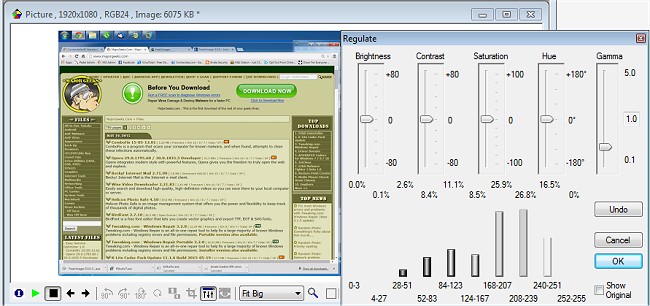
FreeVimager has announced the release of version 9.9.28, continuing its reputation as a versatile and user-friendly free image viewer and editor for Windows operating systems. Key features of FreeVimager include support for touch screen gestures, allowing users to easily zoom in/out or navigate between images. Users can also visualize image locations on Google Maps, edit various graphic file types (such as jpeg, bmp, gif, tiff, png, pcx, and emf), and utilize a "Save As PDF" function.
The software is compatible with all Windows versions from 95 onwards and offers full-screen support for multi-monitor setups, enabling easy switching between screens via the context menu or TAB key. Additionally, FreeVimager maintains user preferences in an INI file, located in the same directory as the executable version.
Other noteworthy features include a preview display with transparency for better multitasking, comprehensive Unicode support for file naming in multiple languages, and preservation of all metadata during image editing. The application also facilitates batch processing capabilities, including EXIF date adjustments and IPTC/XMP editing, ensuring lossless editing of images.
Users can create slideshows, print previews with customizable image positioning, and send optimized images via email. Standard editing tools such as rotation, cropping, resizing, and brightness adjustments are also included, alongside a live Redeye removal tool and an Ansel Adams Zone System Histogram for precise visual adjustments. Furthermore, the software supports Twain scanning for multiple pages, zip extraction via context menus, and allows direct emailing of scanned documents in TIFF and PDF formats.
As the digital landscape continues to evolve, FreeVimager remains a valuable tool for users seeking a comprehensive yet straightforward solution for image management and editing. Its continuous updates and feature enhancements reflect a commitment to meeting user needs in an accessible way.
For those interested in exploring similar functionalities, users may also check out guides on viewing pictures as slideshows in Windows 10 and 11, or on restoring the classic Windows Photo Viewer in these operating systems
The software is compatible with all Windows versions from 95 onwards and offers full-screen support for multi-monitor setups, enabling easy switching between screens via the context menu or TAB key. Additionally, FreeVimager maintains user preferences in an INI file, located in the same directory as the executable version.
Other noteworthy features include a preview display with transparency for better multitasking, comprehensive Unicode support for file naming in multiple languages, and preservation of all metadata during image editing. The application also facilitates batch processing capabilities, including EXIF date adjustments and IPTC/XMP editing, ensuring lossless editing of images.
Users can create slideshows, print previews with customizable image positioning, and send optimized images via email. Standard editing tools such as rotation, cropping, resizing, and brightness adjustments are also included, alongside a live Redeye removal tool and an Ansel Adams Zone System Histogram for precise visual adjustments. Furthermore, the software supports Twain scanning for multiple pages, zip extraction via context menus, and allows direct emailing of scanned documents in TIFF and PDF formats.
As the digital landscape continues to evolve, FreeVimager remains a valuable tool for users seeking a comprehensive yet straightforward solution for image management and editing. Its continuous updates and feature enhancements reflect a commitment to meeting user needs in an accessible way.
For those interested in exploring similar functionalities, users may also check out guides on viewing pictures as slideshows in Windows 10 and 11, or on restoring the classic Windows Photo Viewer in these operating systems
FreeVimager 9.9.28 released
FreeVimager is a free image viewer & editor for Windows.