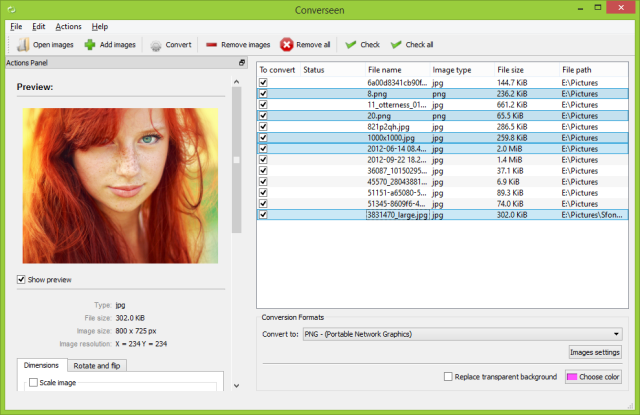
Converseen version 0.15.2.8-1 has been released, enhancing its capabilities as a robust and free cross-platform batch image processing tool. This software enables users to manage and manipulate multiple images simultaneously with ease, making it ideal for individuals who regularly handle large collections of images. One of its notable features is the ability to convert entire PDF files into a variety of image formats, accommodating diverse personal and professional needs.
Supporting over 100 different image formats, including popular ones like GIF, JPEG, PNG, and TIFF, Converseen allows users to tailor and optimize images according to specific requirements. The user interface is designed to be intuitive, ensuring that even those with limited technical skills can navigate the software without trouble. Its rapid processing speeds make it suitable for both professionals and casual users seeking efficient solutions for image conversions.
Converseen stands out for maintaining high-quality output while preserving the integrity of original images. It offers a wide range of features, including resizing, rotating, flipping, and renaming files, making it a comprehensive tool for various image processing tasks. Best of all, it is completely free, providing an invaluable resource for anyone looking to streamline their image management and editing processes.
In summary, Converseen is an exceptional tool for batch image processing that simplifies the editing workflow. Its versatile features, compatibility with numerous image formats, and user-friendly design make it an essential application for anyone interested in enhancing their image processing experience. With the addition of the latest version, users can expect improved functionality and performance, further solidifying Converseen's position as a go-to resource for image manipulation needs
Supporting over 100 different image formats, including popular ones like GIF, JPEG, PNG, and TIFF, Converseen allows users to tailor and optimize images according to specific requirements. The user interface is designed to be intuitive, ensuring that even those with limited technical skills can navigate the software without trouble. Its rapid processing speeds make it suitable for both professionals and casual users seeking efficient solutions for image conversions.
Converseen stands out for maintaining high-quality output while preserving the integrity of original images. It offers a wide range of features, including resizing, rotating, flipping, and renaming files, making it a comprehensive tool for various image processing tasks. Best of all, it is completely free, providing an invaluable resource for anyone looking to streamline their image management and editing processes.
In summary, Converseen is an exceptional tool for batch image processing that simplifies the editing workflow. Its versatile features, compatibility with numerous image formats, and user-friendly design make it an essential application for anyone interested in enhancing their image processing experience. With the addition of the latest version, users can expect improved functionality and performance, further solidifying Converseen's position as a go-to resource for image manipulation needs
Converseen 0.15.2.8-1 released
Converseen is a powerful and free, cross-platform batch image processing tool that allows users to efficiently manage and manipulate multiple images simultaneously with just a single click. 32-bit is also available.