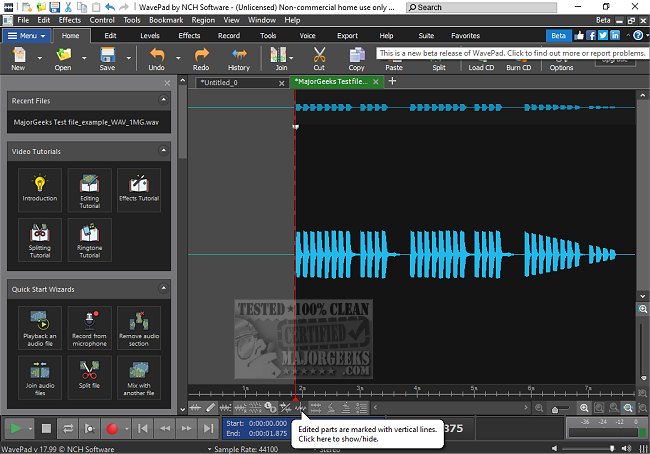
WavePad, developed by NCH Software, has launched its latest version, WavePad 24.38 Beta, enhancing its reputation as a versatile audio editing software tailored for both professionals and audio enthusiasts. This advanced tool is designed to cater to a variety of audio editing needs, whether for music production, podcasting, or simply refining recordings.
Why Choose WavePad?
WavePad stands out in the crowded audio editing market due to its comprehensive toolkit that allows users to perform everything from basic edits to intricate sound restoration. Users can effortlessly remove background noise, apply reverb effects, and process large batches of files efficiently. Its compatibility with numerous file formats and advanced editing capabilities ensures quick and effective audio manipulation.
Key Features of WavePad
WavePad boasts a robust array of features, including essential editing functions like cut, copy, paste, delete, and insert. Users can utilize effects such as amplification, normalization, equalization, and more, along with the support for VST plugins that enhance customization. The software supports a wide range of audio formats including MP3, WAV, FLAC, and more, making it versatile for any project. Batch processing capabilities are particularly beneficial for podcasters and musicians dealing with multiple files.
Advanced tools such as spectral analysis, voice changers, and speech synthesis provide in-depth audio manipulation options. Additionally, audio restoration features like noise reduction and click/pop removal ensure high-quality sound output. For those working with video, WavePad allows users to extract or edit audio tracks seamlessly and provides visualizations for a better editing experience. It also includes a library of royalty-free sounds and music clips, making it a comprehensive resource for audio creators.
Pros and Cons of WavePad
Pros:
- User-friendly interface with powerful tools
- Extensive support for various file formats
- Advanced features for professional audio work
- Availability across multiple platforms including Windows, macOS, iOS, Android, and Kindle
Cons:
- The free version has limited advanced features
- The interface may appear slightly outdated compared to newer audio editors, though it remains functional
- Some advanced tools require an upgrade to the Master's Edition
Conclusion: The Geek Verdict
WavePad is an exceptional audio editing software that caters to a wide spectrum of users, from casual hobbyists to audio professionals. While the free version has certain limitations, upgrading to the Master's Edition unlocks a plethora of professional-grade features, making it a worthwhile investment for serious audio work. For anyone seeking a reliable, feature-rich audio editor that is intuitive to use, WavePad is highly recommended.
Extended Insights
As audio editing continues to evolve, the capabilities of tools like WavePad will likely expand even further. Future updates might focus on enhancing collaboration features, cloud integration, and AI-driven editing tools to streamline the editing process. Additionally, as remote work becomes commonplace, having a robust audio editing solution available on multiple platforms allows users to create high-quality audio content from virtually anywhere. With ongoing enhancements, WavePad is well-positioned to remain a key player in the audio editing landscape
Why Choose WavePad?
WavePad stands out in the crowded audio editing market due to its comprehensive toolkit that allows users to perform everything from basic edits to intricate sound restoration. Users can effortlessly remove background noise, apply reverb effects, and process large batches of files efficiently. Its compatibility with numerous file formats and advanced editing capabilities ensures quick and effective audio manipulation.
Key Features of WavePad
WavePad boasts a robust array of features, including essential editing functions like cut, copy, paste, delete, and insert. Users can utilize effects such as amplification, normalization, equalization, and more, along with the support for VST plugins that enhance customization. The software supports a wide range of audio formats including MP3, WAV, FLAC, and more, making it versatile for any project. Batch processing capabilities are particularly beneficial for podcasters and musicians dealing with multiple files.
Advanced tools such as spectral analysis, voice changers, and speech synthesis provide in-depth audio manipulation options. Additionally, audio restoration features like noise reduction and click/pop removal ensure high-quality sound output. For those working with video, WavePad allows users to extract or edit audio tracks seamlessly and provides visualizations for a better editing experience. It also includes a library of royalty-free sounds and music clips, making it a comprehensive resource for audio creators.
Pros and Cons of WavePad
Pros:
- User-friendly interface with powerful tools
- Extensive support for various file formats
- Advanced features for professional audio work
- Availability across multiple platforms including Windows, macOS, iOS, Android, and Kindle
Cons:
- The free version has limited advanced features
- The interface may appear slightly outdated compared to newer audio editors, though it remains functional
- Some advanced tools require an upgrade to the Master's Edition
Conclusion: The Geek Verdict
WavePad is an exceptional audio editing software that caters to a wide spectrum of users, from casual hobbyists to audio professionals. While the free version has certain limitations, upgrading to the Master's Edition unlocks a plethora of professional-grade features, making it a worthwhile investment for serious audio work. For anyone seeking a reliable, feature-rich audio editor that is intuitive to use, WavePad is highly recommended.
Extended Insights
As audio editing continues to evolve, the capabilities of tools like WavePad will likely expand even further. Future updates might focus on enhancing collaboration features, cloud integration, and AI-driven editing tools to streamline the editing process. Additionally, as remote work becomes commonplace, having a robust audio editing solution available on multiple platforms allows users to create high-quality audio content from virtually anywhere. With ongoing enhancements, WavePad is well-positioned to remain a key player in the audio editing landscape
Wavepad 24.38 Beta released
WavePad is an advanced audio editing software that offers a wide range of features for professionals and enthusiasts alike.